04/10/21 HT-X1H(H)E4.fm
E-39
ENGLISH
TINSZA030SJZZ
HT-X1H
Super Video CD/Video CD Operation
Playing a super video CD or video CD
The following playback functions are the same as DVD or CD oper-
ations.
Page
Playing a disc . . . . . . . . . . . . . . . . . . . . . . . . . . . . . . . . . . . 23 - 25
To locate the beginning of a chapter/track (skip) . . . . . . . . . . 26
Fast forward/Fast reverse (search) . . . . . . . . . . . . . . . . . . . . . 26
To change the audio language (audio output) . . . . . . . . . . . . 29
To brighten an image . . . . . . . . . . . . . . . . . . . . . . . . . . . . . . . . . 29
To improve the image quality . . . . . . . . . . . . . . . . . . . . . . . . . . 30
Still picture/Frame advance . . . . . . . . . . . . . . . . . . . . . . . . . . . 31
Slow-motion play . . . . . . . . . . . . . . . . . . . . . . . . . . . . . . . . . . . . 31
To zoom in on an image (zoom) . . . . . . . . . . . . . . . . . . . . . . . . 32
To play in the desired order (programmed playback) . . . . . . 33
To play repeatedly (repeat play) . . . . . . . . . . . . . . . . . . . . . . . . 34
To play the contents between the specified points repeatedly
(A-B repeat) . . . . . . . . . . . . . . . . . . . . . . . . . . . . . . . . . . . . . . . . . 35
To change the display on the main unit . . . . . . . . . . . . . . . . . . 35
To change the display on TV screen . . . . . . . . . . . . . . . . . . . . 36
To play in random order (random play) . . . . . . . . . . . . . . . . . . 37
To start playback from the desired point (direct play) . . . . . . 38
! Playing a super video CD or video CD with P. B.
C. (playback control)
To scroll the menu screen (menu screen with more than 1
page):
Press the or button.
To stop playback:
Press the button.
To play without activating the playback control function:
You can play a super video CD/video CD with P.B.C. without acti-
vating the playback control function.
In this case, the menu screen will not appear, and the disc will play
in the same way as a super video CD/video CD without P.B.C.
Notes:
"
Some super video CDs/video CDs with P.B.C. cannot be played
back when the P.B.C. mode is off.
"
If the P.B.C. mode is cancelled with the menu on the TV, play-
back starts automatically.
1
Insert a super video CD/video
CD with P.B.C. The menu will ap-
pear on the TV and playback will
be paused.
Example
2
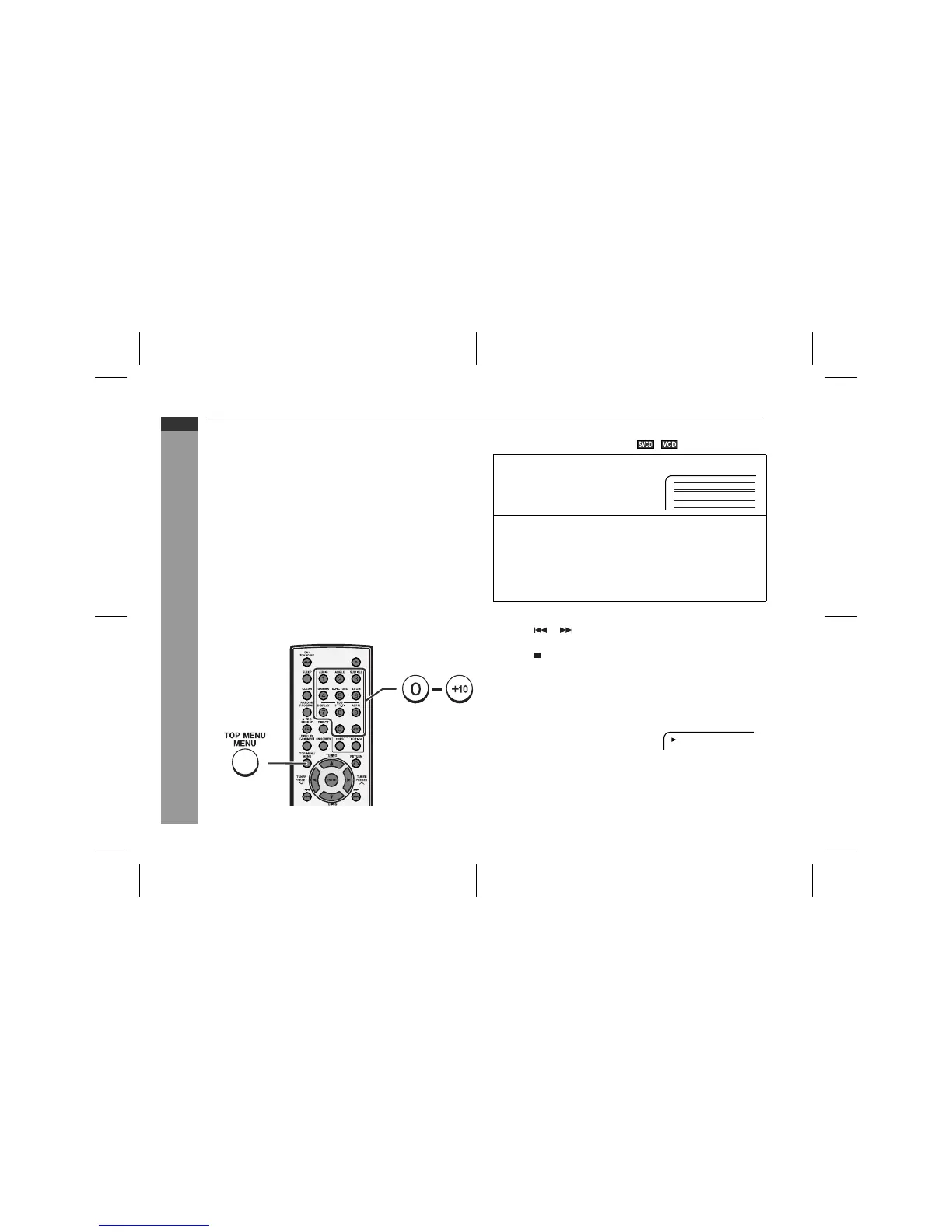
Select the desired menu number by using the direct num-
ber buttons (0 - +10).
Example:
To select track 14, press "+10" and "4".
"
Playback starts.
"
After playback stops, the menu will reappear, then select the
menu number you want to play.
Press the TOP MENU/MENU button to
cancel the P.B.C. mode.
Each time you press the button, the setting switches on and off.
1
2
3
PBC offPlay


 To Next Page