04/10/16 HT-X1H(H)E6.fm
E-55
ENGLISH
TINSZA030SJZZ
HT-X1H
Advanced Features
Changing the default setting of the amplifier (continued)
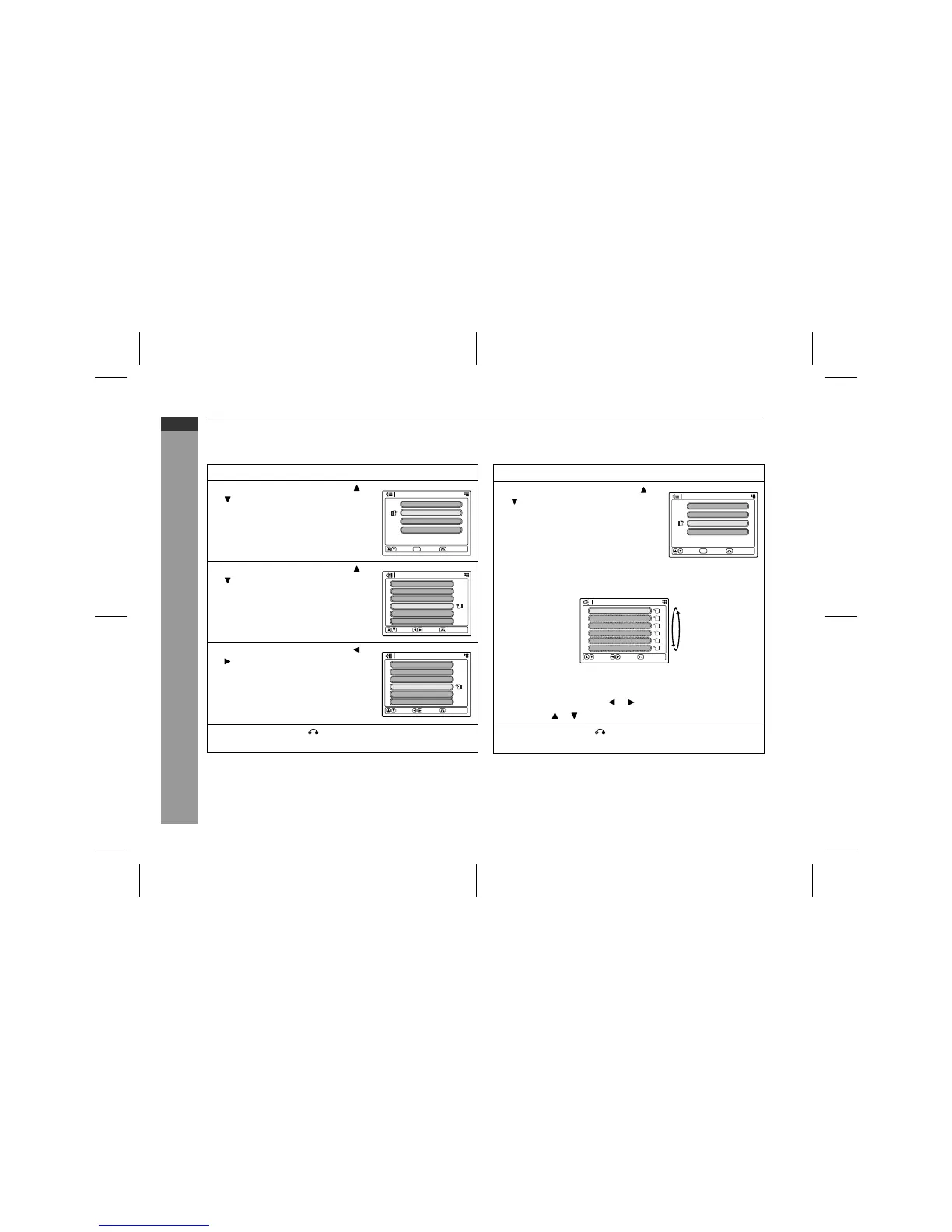
! Speaker level setting
If sounds from the speakers are uneven, you can equalise them by
adjusting the speaker levels.
Notes:
" The speaker level setting is only available for the front speakers
and subwoofer/amplifier unit when the surround is "STEREO" or
"VIRTUAL (SURROUND)".
" If subwoofer/amplifier unit sound is distorted, lower the sub-
woofer/amplifier unit level.
! Test tone
You can check each speaker sound by a test tone. Readjust the vol-
ume set in "Speaker level setting".
Note:
The test tone is produced only from the front speakers and sub-
woofer/amplifier unit when the surround is "STEREO" or "VIRTUAL
(SURROUND)".
1
Press the SET UP AMP button.
2
Within 10 seconds, press the or
button to select "SP LEVEL",
and then press the ENTER button.
3
Within 10 seconds, press the or
button to select the desired
speaker.
The indicator of the selected speaker
flashes.
4
Within 10 seconds, press the or
button to adjust the level.
"
You can adjust the level at 1 dB in-
tervals.
"
To set the distance of other speak-
ers, repeat the operation from step
3.
5
Press the RETURN button twice.
The setting is complete.
Speaker Delay
Amplifier Setup
Speaker Level
Test Tone
Select Enter Return
ENTER
Crossover
Front
Speaker Level
Select
Change
Return
L
0 dB
Center
0 dB
Front
R
0 dB
Surround
R
0 dB
Surround
L
0 dB
Sub Woofer
0 dB
Front
Speaker Level
Select
Change
Return
L
0 dB
Center
0 dB
Front
R
0 dB
Surround
R
+3 dB
Surround
L
0 dB
Sub Woofer
0 dB
1
Press the SET UP AMP button.
2
Within 10 seconds, press the or
button to select "TONE", and
press the ENTER button.
The test tone will be heard from each speaker, in order, at about
2-second intervals.
To adjust speaker levels
Whilst the test tone is heard:
Adjust the level with the or button.
Press the or to select a speaker.
3
Press the RETURN button twice.
The setting is complete.
Speaker Delay
Amplifier Setup
Speaker Level
Test Tone
Select Enter Return
ENTER
Crossover
Front
Test Tone
Select
Change
Return
L
0 dB
Center
0 dB
Front
R
0 dB
Surround
R
+3 dB
Surround
L
0 dB
Sub Woofer
0 dB


 To Next Page