04/10/21 HT-X1H(H)E4.fm
E-40
ENGLISH
TINSZA030SJZZ
HT-X1H
8
MP3, WMA and JPEG Disc Operation
Playing an MP3, WMA or JPEG disc
The following playback functions are the same as DVD or CD oper-
ations.
Page
Playing a disc . . . . . . . . . . . . . . . . . . . . . . . . . . . . . . . . . . . .23 - 25
To locate the beginning of a chapter/track (skip) . . . . . . . . . . 26
Fast forward/Fast reverse (search) . . . . . . . . . . . . . . . . . . . . . 26
To change the audio language (audio output) . . . . . . . . . . . . 29
To play in the desired order (programmed playback) . . . . . . 33
To play repeatedly (repeat play) . . . . . . . . . . . . . . . . . . . . . . . . 34
To play in random order (random play) . . . . . . . . . . . . . . . . . . 37
To start playback from the desired point (direct play) . . . . . . 38
You can play CD-R/RW recorded in the MP3, WMA and JPEG for-
mats.
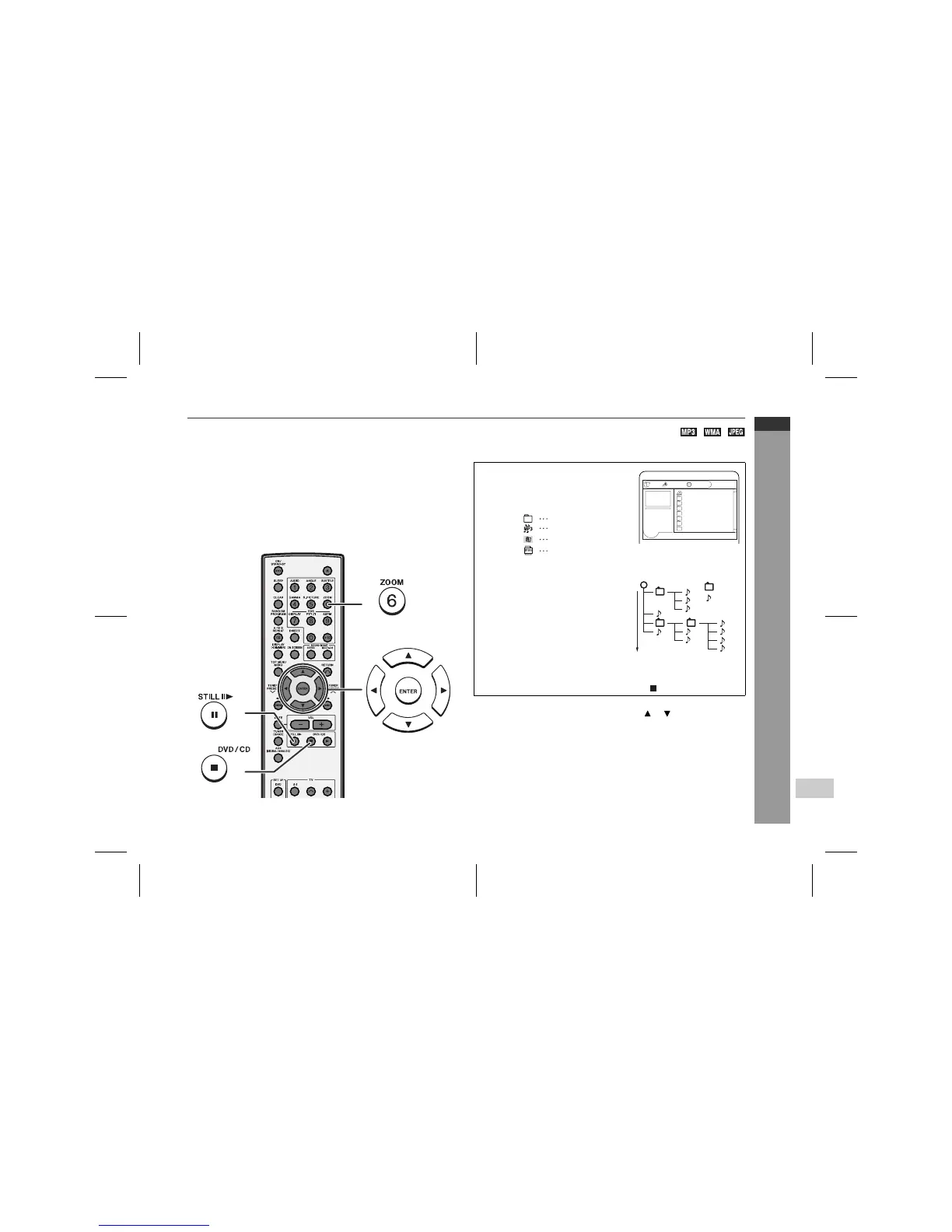
Selecting a folder/file on the menu screen:
Whilst in the stop mode, press the cursor ( or ) button to select a
folder/file and press the ENTER button.
Caution:
If you convert MP3 data to "audio CD" data when recording on a
CD-R/RW, play it as an audio CD. The MP3 operation cannot be
performed.
Notes:
"
Up to 20 characters can be displayed for a folder name and a file
name. Underlines, asterisks, and spaces may not be displayed.
"
Due to the structure of its disc information, it takes longer to read
an MP3, WMA or JPEG disc than a normal CD.
Insert a disc containing MP3, WMA
and JPEG files.
A menu screen appears and playback
starts automatically.
Example of playback sequence
"
Playback is performed in the
order of 1 to 11 in this exam-
ple.
"
Files on some discs cannot
be played in order.
When playing JPEG files
"
Playback skips to the next file approx. every 5 seconds.
"
To return to the menu screen, press the button.
1/19 00:00:00Stereo
ROOT
ALBUM01
ALBUM02
ALBUM03
ALBUM04
ALBUM05
ALBUM06
ALBUM07
Folder
MP3 file
WMA file
JPEG file
Folder
ROOT
File
3
4
5
8
9
11
6
7
1
2
10
Playback
sequence


 To Next Page