04/10/16 HT-X1H(H)E6.fm
E-51
ENGLISH
TINSZA030SJZZ
HT-X1H
Advanced Features
Enjoying surround sound (sound mode) (continued)
You can enjoy spacious sound recorded in Dolby Digital or DTS.
Also, Dolby Pro Logic allows you to enjoy spacious 2 channel ste-
reo sound.
! Listening to 2 channel stereo sounds
Notes:
"
When the surround mode is set to "STEREO" or "VIRTUAL
(SURROUND)", the same monaural sound is reproduced in the
both of the right and left channels.
"
Some discs are recorded at 96 kHz (sampling frequency). When
this type of disc is played on a compatible player and signals are
digitally [AUX (DIGITAL) IN] sent to this unit, the sound mode is
changed to "STEREO" automatically. The sound mode cannot be
changed during playback.
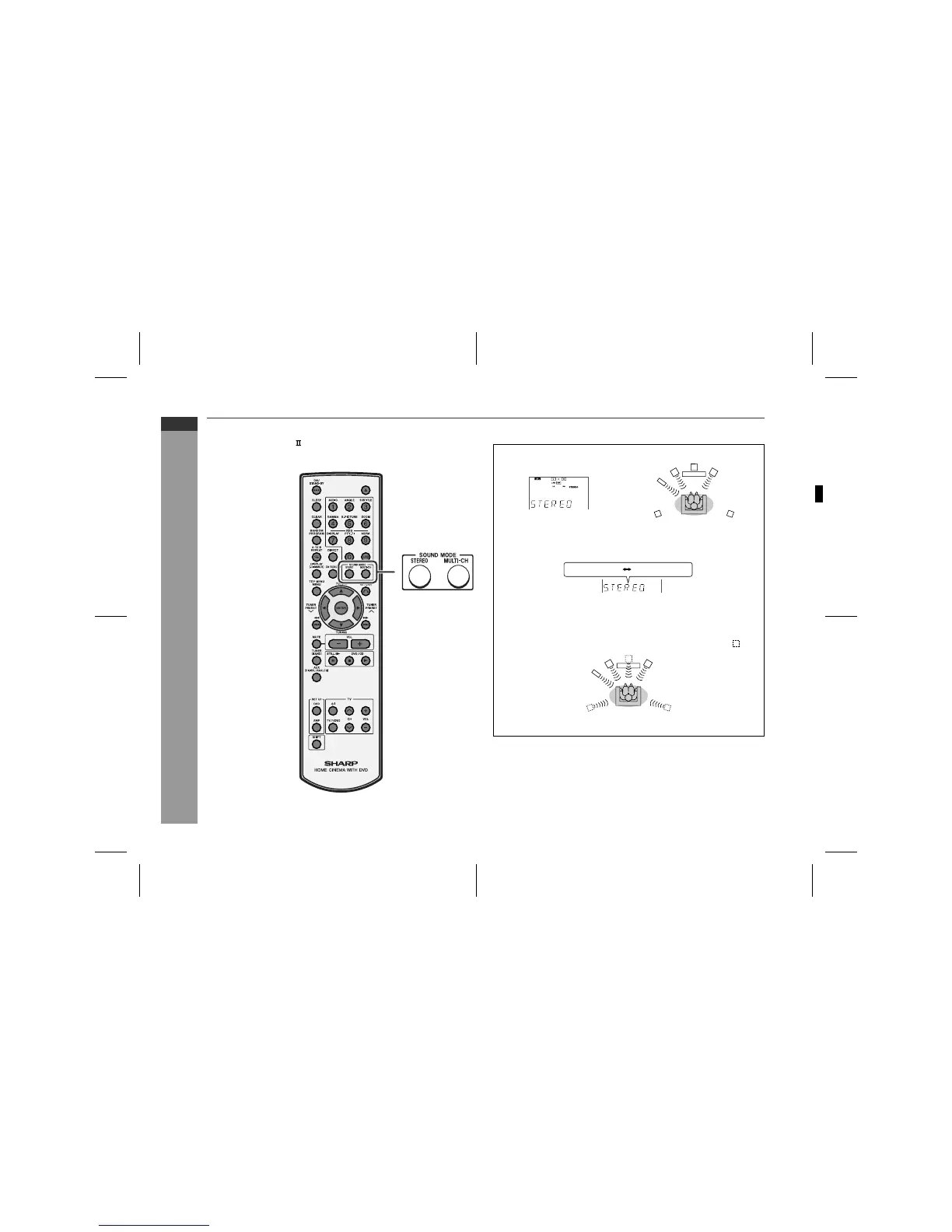
Whilst the disc is playing, press the STEREO button.
Example: DTS format
You can enjoy 2 channel ste-
reo sound.
When you press once, the last used setting appears. To change it,
press the button repeatedly within 3 seconds.
STEREO: You can enjoy the great acoustic effects of the
front speakers and subwoofer/amplifier unit.
VIRTUAL (*): Although the surround speaker does not work, you
can enjoy spacious surround effects.
It sounds as if speakers are also placed in .
(*) For CD playback, "SURROUND" appears instead of "VIRTU-
AL" (effects are the same).
STEREO VIRTUAL (*)
34
SHARP TINSZA030SJZZ (H)


 To Next Page