MX-5001N SIMULATION 6 – 63
44
44-1
Purpose
Setting
Function (Purpose)
Used to set each correction operation func-
tion in the image forming (process) section.
Section
Image process (Photoconductor/Develop-
ing/Transfer/Cleaning)
Operation/Procedure
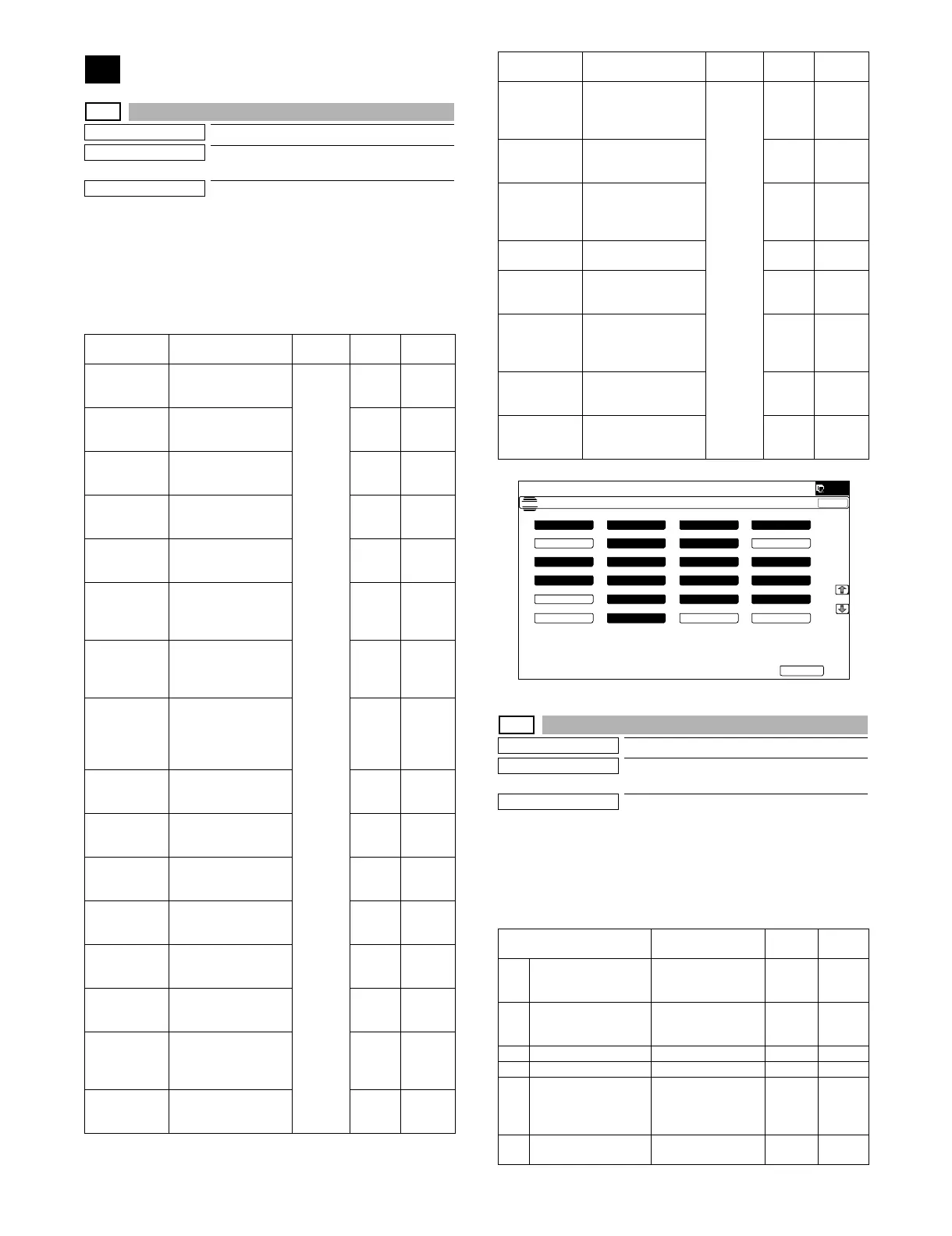
1) Select an item to be set with the touch panel.
(The selected item is highlighted.)
2) Press [EXECUTE] key. (The set value is saved.)
NOTE: Set the items to the default values unless a change is spe-
cially required.
44-2
Purpose
Adjustment/Setup
Function (Purpose)
Used to adjust the sensitivity of the image
density sensor (registration sensor).
Section
Process
Operation/Procedure
When [EXECUTE] key is pressed, the adjustment is executed auto-
matically.
After completion of the adjustment, the adjustment result is dis-
played.
If the adjustment is not executed normally, "ERROR" is displayed.
Item/Display Content
Setting
range
Default
value
NOTE
HV Normal operation high
density process control
Enable/Disable setting
Normal
(Disable
: 1 : NO)
Reverse
(Enable :
0 : YES)
Enable
HT Normal operation half
tone process control
Enable/Disable setting
Enable
TC Transfer output
correction
Enable/Disable setting
Enable
MD VG Membrane decrease
grid voltage correction
Enable/Disable setting
Enable
MD LD Membrane laser power
voltage correction
Enable/Disable setting
Disable
MD EV Membrane decrease
environment grid
voltage correction
Enable/Disable setting
Enable
MD DL Membrane decrease
discharge light quantity
correction
Enable/Disable setting
Enable
MD DL EV Membrane decrease
environment discharge
light quantity
correction
Enable/Disable setting
Disable
TN_HUM Toner density humidity
correction
Enable/Disable setting
Enable
TN_AREA Toner density area
correction
Enable/Disable setting
Enable
TN_LIFE Toner density life
correction
Enable/Disable setting
Enable
TN_COV Toner density print
ratio correction
Enable/Disable setting
Enable
TN_PROCON Toner density process
control correction
Enable/Disable setting
Enable
TN_ENV Toner density
environment correction
Enable/Disable setting
Enable
TN_DRIP Toner density
correction
unconditional supply
Enable/Disable setting
Enable
TN_SPEND Toner forcible
consumption mode
Enable/Disable setting
Disable
PHT 1pixel half tone
process control
correction
Enable/Disable setting
Normal
(Disable
: 1 : NO)
Reverse
(Enable :
0 : YES)
Disable
AR_AUTO Auto registration
adjustment
Enable/Disable setting
Enable
AR_ERROR Auto registration
adjustment execution
error check
Enable/Disable setting
Enable
DM_PHASE Drum phase fitting
Enable/Disable setting
Enable
SENSITIVITY Toner density
correction
Enable/Disable setting
Disable
PRT_HT Half tone process
control printer
correction feedback
Enable/Disable setting
Enable
PTC_ENV PTC environment
correction
Enable/Disable setting
Enable Enable:
Correc-
tion ON
PTC_LIFE PTC life correction
Enable/Disable setting
Enable Enable:
Correc-
tion ON
Item/Display Content
Setting
range
Default
value
A PCS_CL LED ADJ Color sensor light
emitting quantity
adjustment value
1 - 255 21
B PCS_K LED ADJ Black sensor light
emitting quantity
adjustment value
1 - 255 21
C PCS_CL DARK Dark voltage of color 0 - 255 0
D PCS_K DARK Dark voltage of black 0 - 255 0
E PCS_K GRND Belt substrate when
the item B
adjustment is
completed.
0 - 255 0
F PCS_K BELT MAX Belt substrate input
max. value
0 - 255 0
Item/Display Content
Setting
range
Default
value
NOTE
ǂǂǂ6,08/$7,21ǂǂ12
&/26(
7(67
02'(6(77,1*
(;(&87(
+9 +7 0'ǂ9*7&
0'/' 0'(9 0''/(90''/
71B+80 71B$5($ 71B&2971B/,)(
71B352&21 71B(19 71B63(1'71B'5,3
3+7 $5B$872 '0B3+$6($5B(5525
6(16,7,9,7< 357B+7 37&B(1937&B(19



 To Next Page