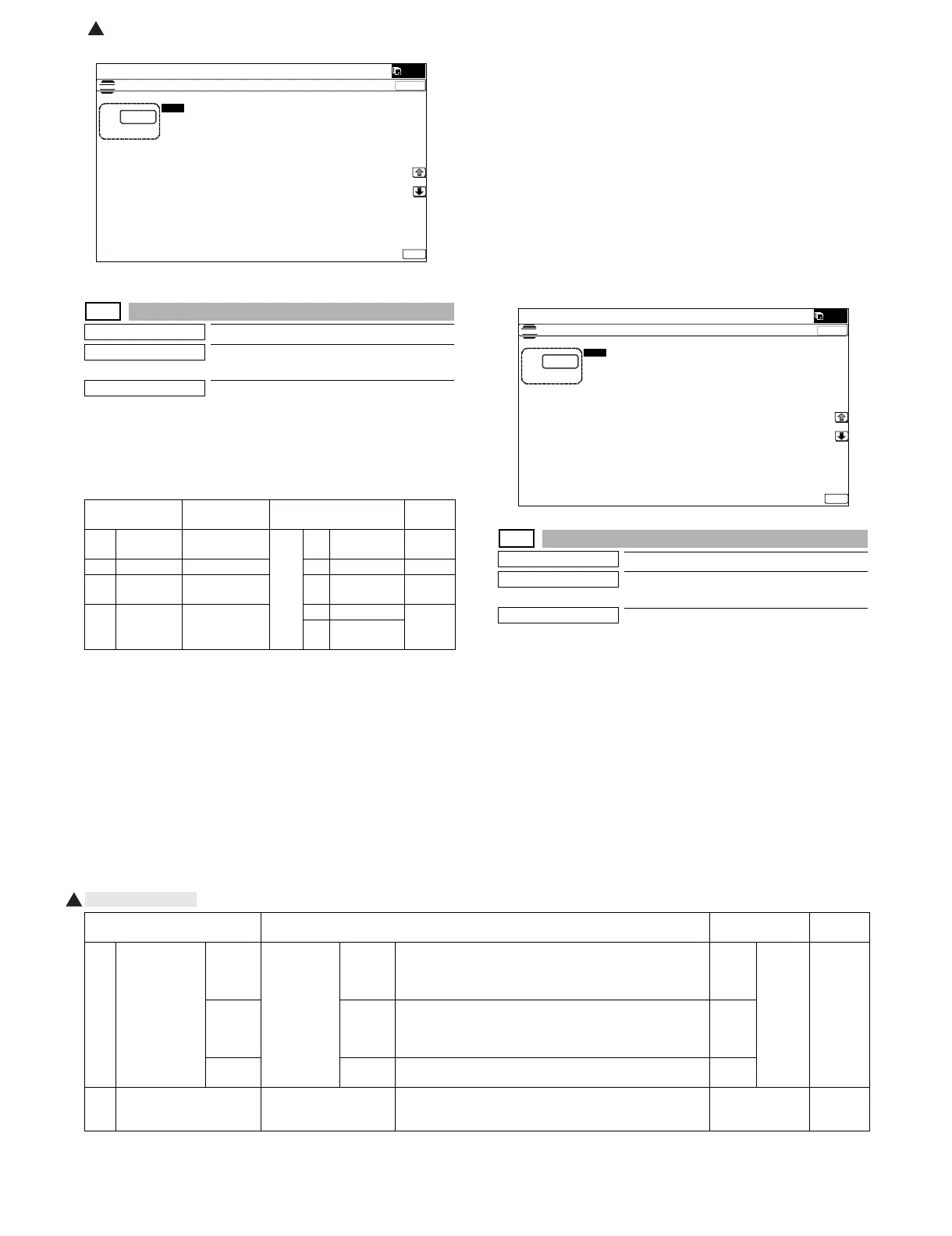
MX-5001N SIMULATION 6 – 73
44-29
Purpose
Setting
Function (Purpose)
Used to set the operating conditions of the
process control during a job.
Section
Process
Operation/Procedure
1) Select a target item of setting with [↑] [↓] key on the touch
panel.
2) Enter the set value with 10-key.
3) Press [OK] key.
HV: High density process control
HT: Half tone process control
PHT: Not operate
44-31
Purpose
Adjustment/Setup
Function (Purpose)
Used to adjust the OPC drum phase. (Man-
ual adjustment)
Section
Process
Operation/Procedure
NOTE: For the OPC drum phase adjustment, do not use this simu-
lation, but use SIM50-22 (auto adjustment).
1) Select item A with [↑] [↓] key.
2) Enter the value corresponding to the adjustment pattern with
10 key.
3) Press [EXCUTE] key. (The adjustment pattern is printed out.)
4) Select an adjustment pattern whose deflection is within two
scale lines on the adjustment pattern of C,M, Y colors.
5) Select item B with [↑] [↓] key.
6) Enter the adjustment pattern sheet number selected in proce-
dure 4).
7) Press [EXECUTE] key.
8) The adjusted adjustment pattern is printed.
[41-sheet machine]
ǂǂǂ6,08/$7,21ǂǂ12
&/26(
7(67
352&217,0,1*$'-8670(17
$˖
˷ ˹
˖,1,7,$/<(6
$˖
˖6:21
%˖
˖7,0(
&˖
˖+80B/,0,7
'˖
˖5(9<(6
)˖
˖+80
(˖
˖5(9B%.<(6
*˖
˖5(9B&/<(6
+˖
˖5()5(6+02'(12
,˖
˖'$<
-˖
˖3,;B5$7,2B%.
.˖
˖3,;B5$7,2B&/
/˖
2.
Item/Display Content Setting range
Default
value
A COPY During copy
job
0 - 4 0 No
execution
4
B PRINTER During print job 1 HV only 4
C FAX During FAX
print job
2HV → PHT 4
D SELF
PRINT
During self
print
3HV → HT 4
4HV → PHT
→ HT
ǂǂǂ6,08/$7,21ǂǂ12
&/26(
7(67
+$/)721(6(77,1*
$˖
˷˹
˖&23<+9ė3+7ė+7
$˖
˖35,17(5+9ė3+7ė+7
%˖
˖)$;+9ė3+7ė+7
&˖
˖6(/)35,17+9ė3+7ė+7
'˖
2.
1
Item/Display Content Setting range
Default
value
A PRINT MODE 45deg Print mode 45
degrees
Deflection check pattern print for every 45 degrees (8-sheet
print)
(1)0° (2)45° (3)90°(4)135° (5)180° (6)225° (7)270° (8)315°
* The number in () is printed on the output pattern.
11 - 3 3
(SET
VALUE)
90deg 90
degrees
Deflection check pattern print for every 90 degrees (4-sheet
print)
(1)0° (2)90° (3)180° (4)270°
* The number in () is printed on the output pattern.
2
SET
VALUE
SET
VALUE
Deflection check pattern print at the set value (1-sheet print) 3
B COLOR Phase adjustment value
BK→CL
Angle step 0° (1) → 45° (2) → 90° (3) → 135° (4) → 180° (5) →
225° (6) → 270° (7) → 315° (8)
1 - 8 1
: Oct. 24 2008
1



 To Next Page