PN-K321/K322B FIRMWARE UPDATA PROCEDURES 5-4
■
CHECK METHOD BY THE FIRMWARE
UPDATER
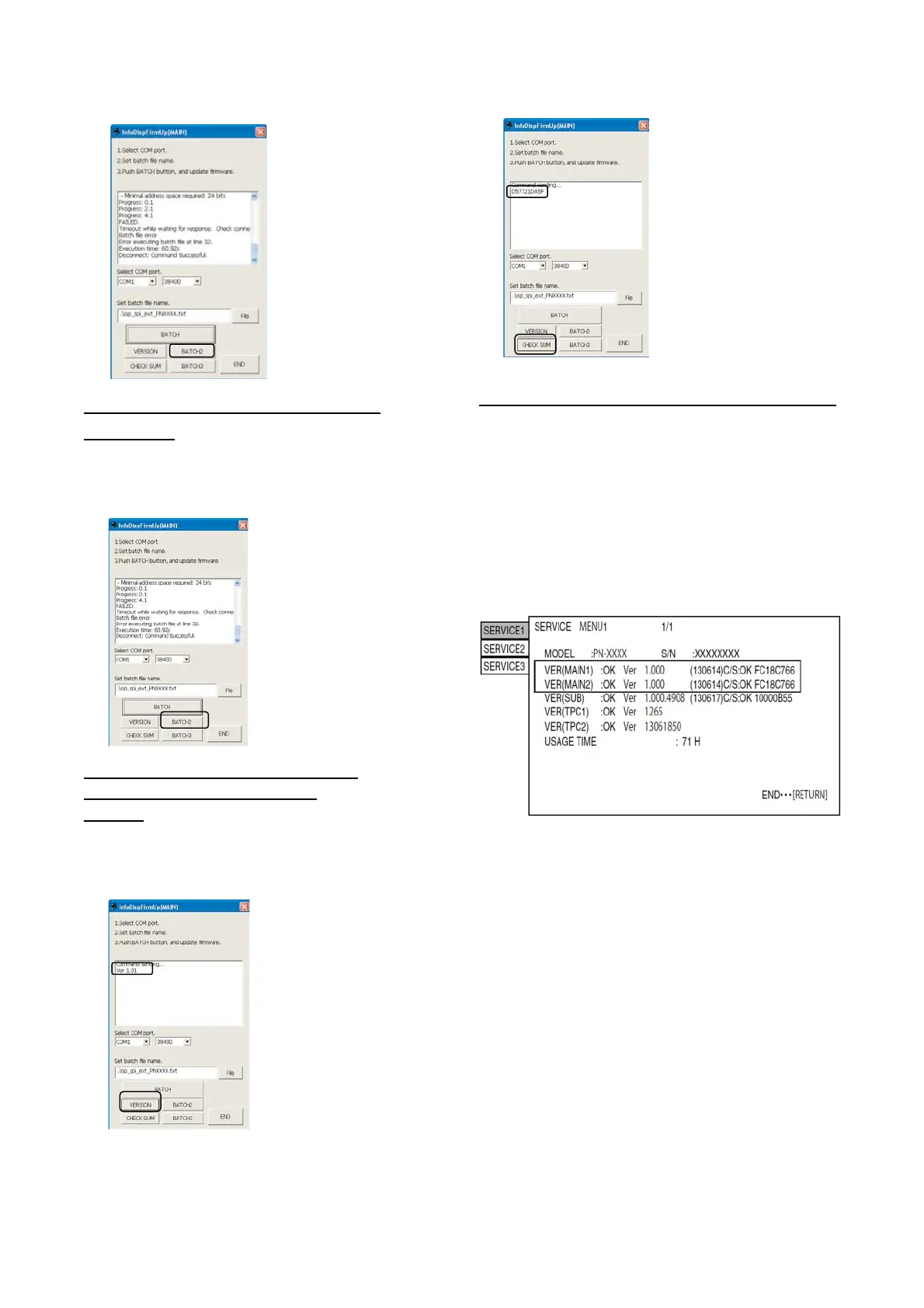
The current firmware version can be checked by pressing
[VERSION] button when the monitor power lamp is lighted in
green
2-3. VERSION CHECK PROCEDURES
■ CHECK METHOD BY THE FIRMWARE
UPDATER
The current firmware version can be checked by pressing
[VERSION] button when the monitor power lamp is lighted in
green.
The check sum can be also checked by pressing [CHECK SUM]
button similarly.
■
Check method by the service menu
With an image displayed on the screen, display the SERVICE
MENU1 screen and check the firmware version..
Press the [MENU/ENTER] and the [INPUT/RETURN] button for
about 5 seconds (the LED blinks, or the "F" mark is displayed in
the upper left corner of screen.), or, press the [BRIGHT- ()],
[BRIGHT+ ()], [BRIGHT- ()] and [BRIGHT+ ()] buttons in
sequence with pointing the cursor to the [Other] menu.
After confirming the version, press the [INPUT/RETURN] button to
close the SERVICE MENU1 window.



 To Next Page