12 English
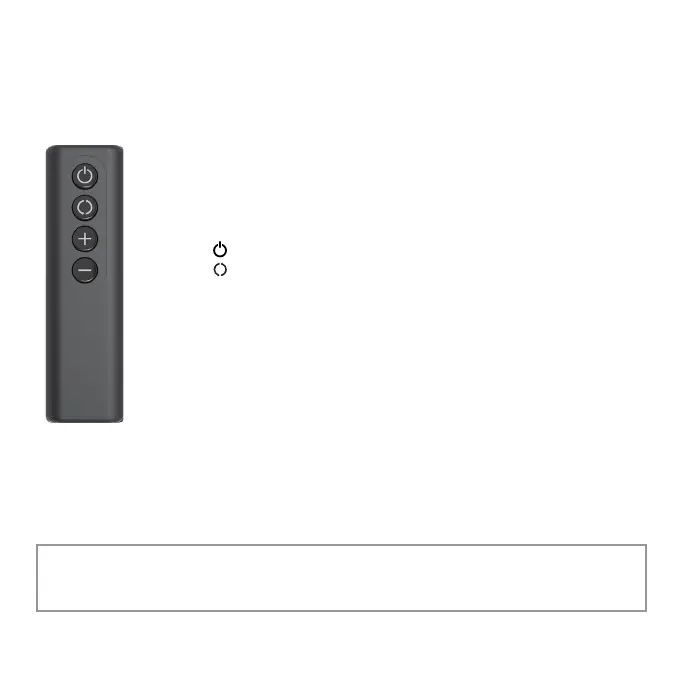
REMOTE FUNCTIONS
The remote requires a line-of-sight path to allow for the signal
to be received by the circulator. Point the remote control at the
control panel for best reception.
1. Press ( ) to power unit ON or OFF.
2. Press ( ) to turn Oscillation ON or OFF.
3. Press (
+
) to increase speed.
. Press (
-
) to decrease speed.
BATTERY REPLACEMENT
The remote control requires 2 AAA batteries (included but not
installed). To install the batteries, remove the cover located on the
underside of the remote control. If necessary, clean the battery
contacts and also those of the device prior to battery installation.
Remove any plastic protection from the batteries. On the inside of the battery
cover there is a + and a – sign indicating which direction you should insert your
batteries. Ensure the batteries are installed correctly with
regard to polarity. Then replace the cover onto the bottom of the remote.
For battery replacement, always use the correct size and grade of battery for this
product.
REMOTE CONTROL
Model SPIN 12 only.
Note: Remove batteries from the remote control when not in use for an
extended period of time and always remove dead batteries immediately and
replace with fresh. Do not store dead batteries in remote.


 To Next Page