4
NAVIGATING THE ONSCREEN MENUS
The following keys will allow you to navigate through the menus on your Shaw Direct HD receiver:
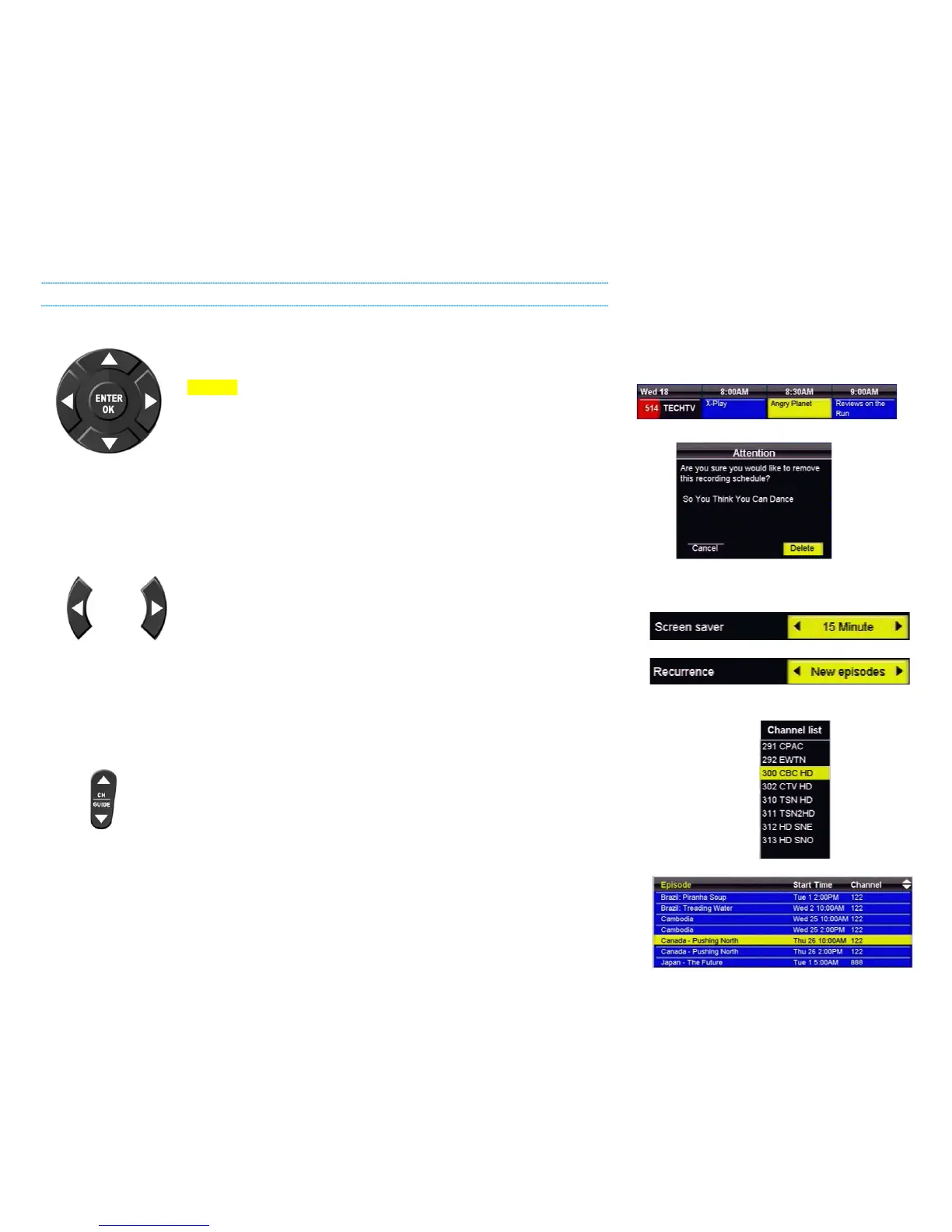
The DIRECTIONAL ARROW keys allow you to move up, down, left, and
right through the onscreen menus. Your current selection is always shown
in YELLOW.
The ENTER or OK button will “select” the item in yellow and display
available options or confirm the current selection. For example:
1. Pressing ENTER will display the Program Options menu for Angry Planet.
2. Pressing ENTER will confirm deletion of the recording schedule.
The LEFT and RIGHT arrow keys also allow you to change options for the
selected item in applicable menus, as indicated by the “a d” symbols on
screen. For example:
3. Pressing the LEFT arrow key will change the Screen Saver delay to 14 Minute, pressing the
RIGHT arrow key will change the Screen Saver delay to 16 Minute.
4. Pressing the LEFT or RIGHT arrow keys will toggle between New episodes and All episodes.
The CHw and CHs keys (or CH+ and CH-, depending on your remote) allow you
to move through lists one page at a time. For example:
5. Pressing CH
w will page up and show channels 283-290, pressing CHs
will page down and show channels 314-321.
6. Pressing CH
w will page up and show episodes starting with A, pressing CHs will page down
and show episodes from K onwards.
1
2
3
4
5
6



 To Next Page