Cyan
Magenta
Yellow
Black
17
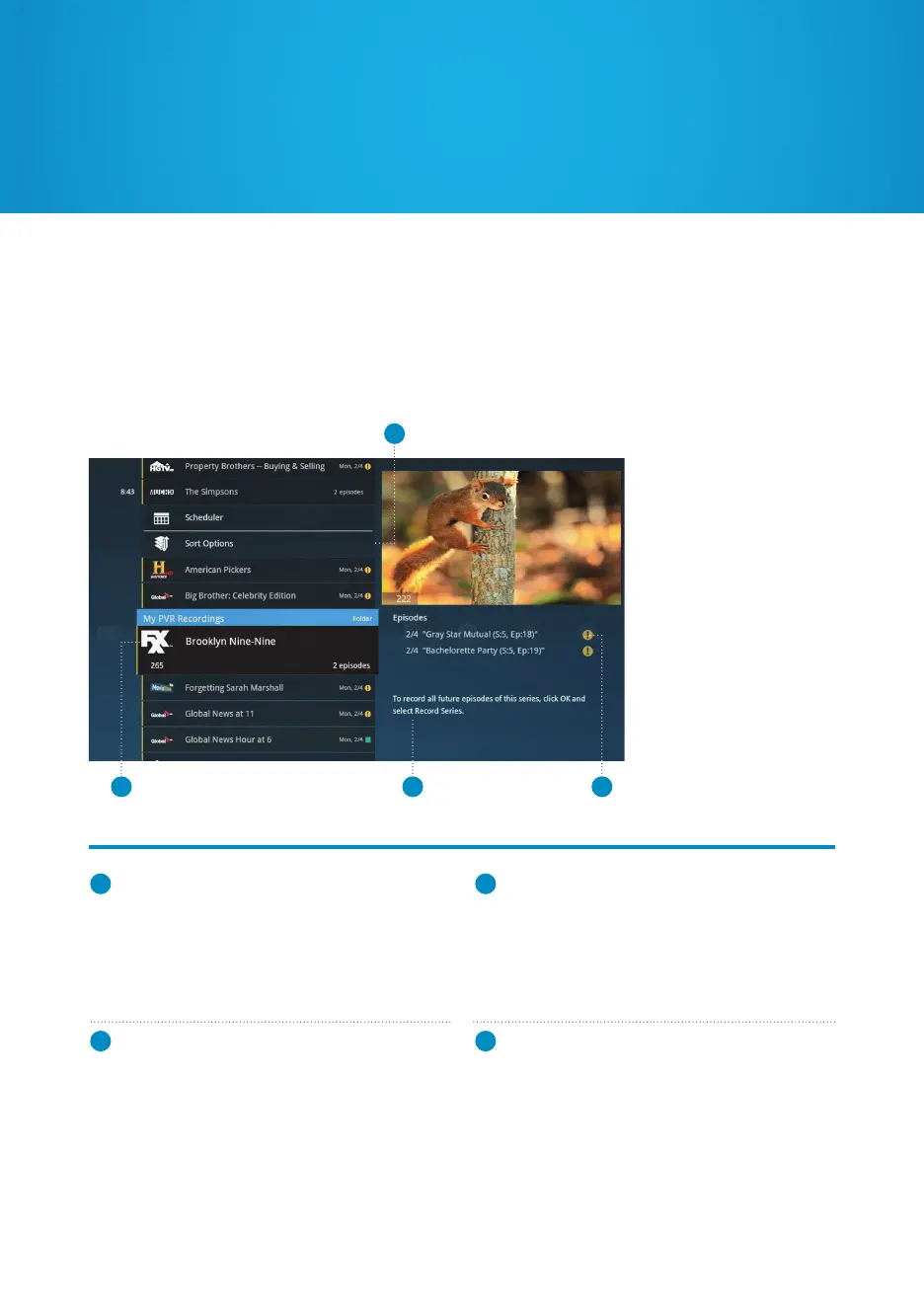
My PVR Recordings
1
RECORDING ICON
Indicates the status of your recordings (see
recording icons, page 19). The recording date or
number of episodes recorded will also display here.
2
HIGHLIGHTED RECORDING
Displays the channel number, logo and a series
folder indicator. A single recording displays
episode length and the status of a recording.
A series folder will display the number of
episodes recorded.
3
INFORMATION
See a description of a selected episode. If a
series folder is selected, recording options will
be displayed.
4
SERIES
Individual episodes in a series are displayed in
the preview panel. Press the RIGHT arrow to
review recorded episodes. Press OK to see
episode options.
1
2 43
To access My PVR Recordings, press PVR at the top of your remote. All of your recorded
shows will be listed, by channel and program name. To watch a show, select it and press
OK. If you’ve already watched part of a show, you can resume where you left off or start
from the beginning.


 To Next Page