7
English
Connections
•
Before making any connections to the audio/
video receiver, ensure that the AVR’s AC cord
is unplugged from the AVR and the AC outlet.
Making connections with the AVR plugged in and
turned on could damage the speakers.
Caution
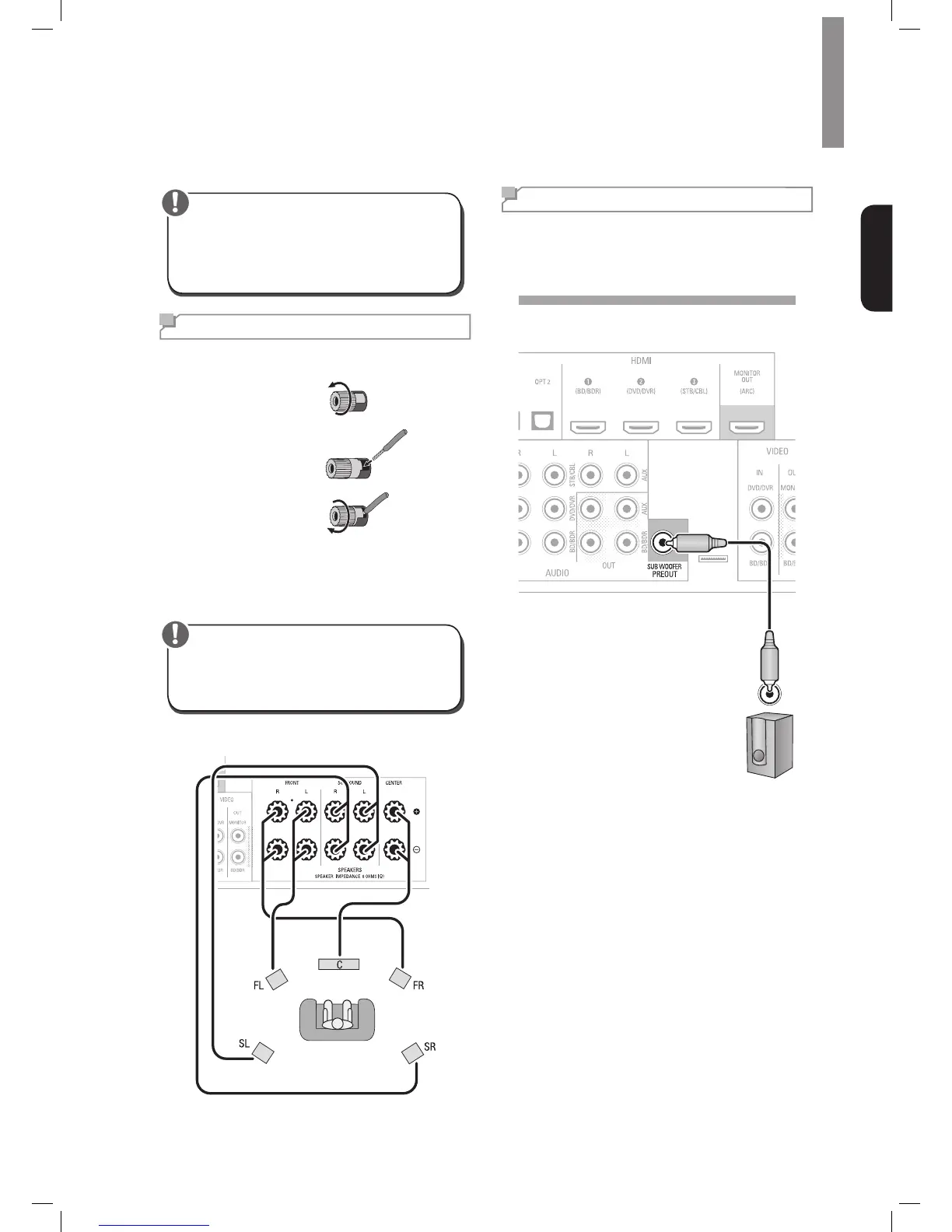
Connect Your Speakers
HowtousetheAVR’sspeakerterminals
1
Unscrew Cap
2
Insert Bare Wire
3
Tighten Cap
Always connect the colored (+) terminal on the AVR to
the (+) terminal on the speaker (usually red), and the
black (–) terminal on the AVR to the (–) terminal on the
speaker (usually black).
•
Make sure the (+) and (–) bare wires do not touch
each other or the other terminal. Touching wires
can cause a short circuit that can damage your
AVR.
Caution
Connect the speakers as shown in the illustration.
Connect Your Subwoofer
Use a single RCA audio cable to connect the AVR’s
Subwoofer Pre-Out connector to your subwoofer.
Consult your subwoofer’s user manual for specic
information about making connections to it.
Subwoofer
Rear Panel







 To Next Page