Shure Incorporated
11/29
1.
2.
3.
4.
Antenna Configuration
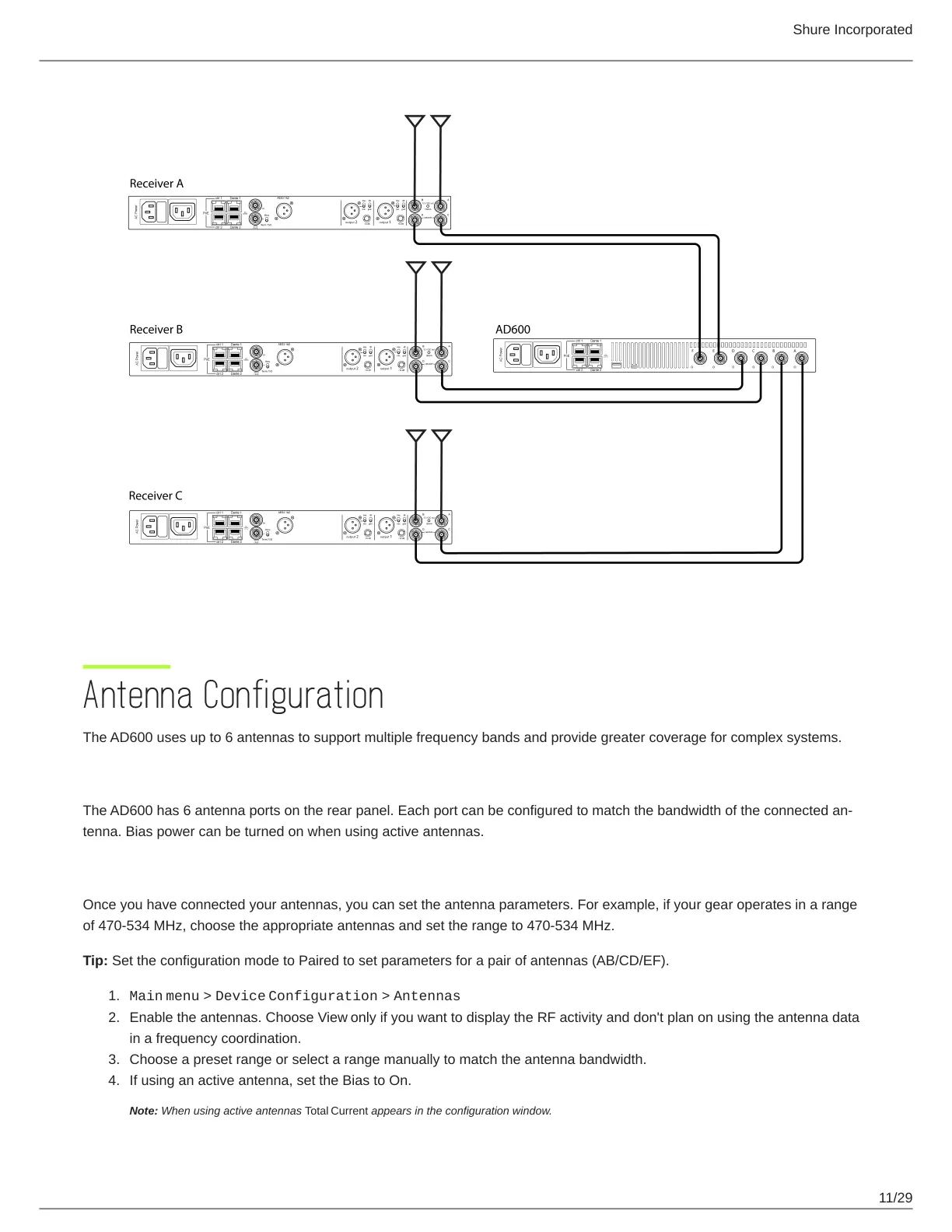
The AD600 uses up to 6 antennas to support multiple frequency bands and provide greater coverage for complex systems.
Antenna Ports
TheAD600has6antennaportsontherearpanel.Eachportcanbeconfiguredtomatchthebandwidthoftheconnectedan
tenna. Bias power can be turned on when using active antennas.
Setting Antenna Parameters
Once you have connected your antennas, you can set the antenna parameters. For example, if your gear operates in a range
of 470-534 MHz, choose the appropriate antennas and set the range to 470-534 MHz.
Tip: Set the configuration mode to Paired to set parameters for a pair of antennas (AB/CD/EF).
Main menu > Device Configuration > Antennas
Enable the antennas. Choose View only if you want to display the RF activity and don't plan on using the antenna data
in a frequency coordination.
Choose a preset range or select a range manually to match the antenna bandwidth.
If using an active antenna, set the Bias to On.
Note: When using active antennas Total Current appears in the configuration window.


 To Next Page