Shure Incorporated
15/29
1.
2.
3.
1.
2.
3.
4.
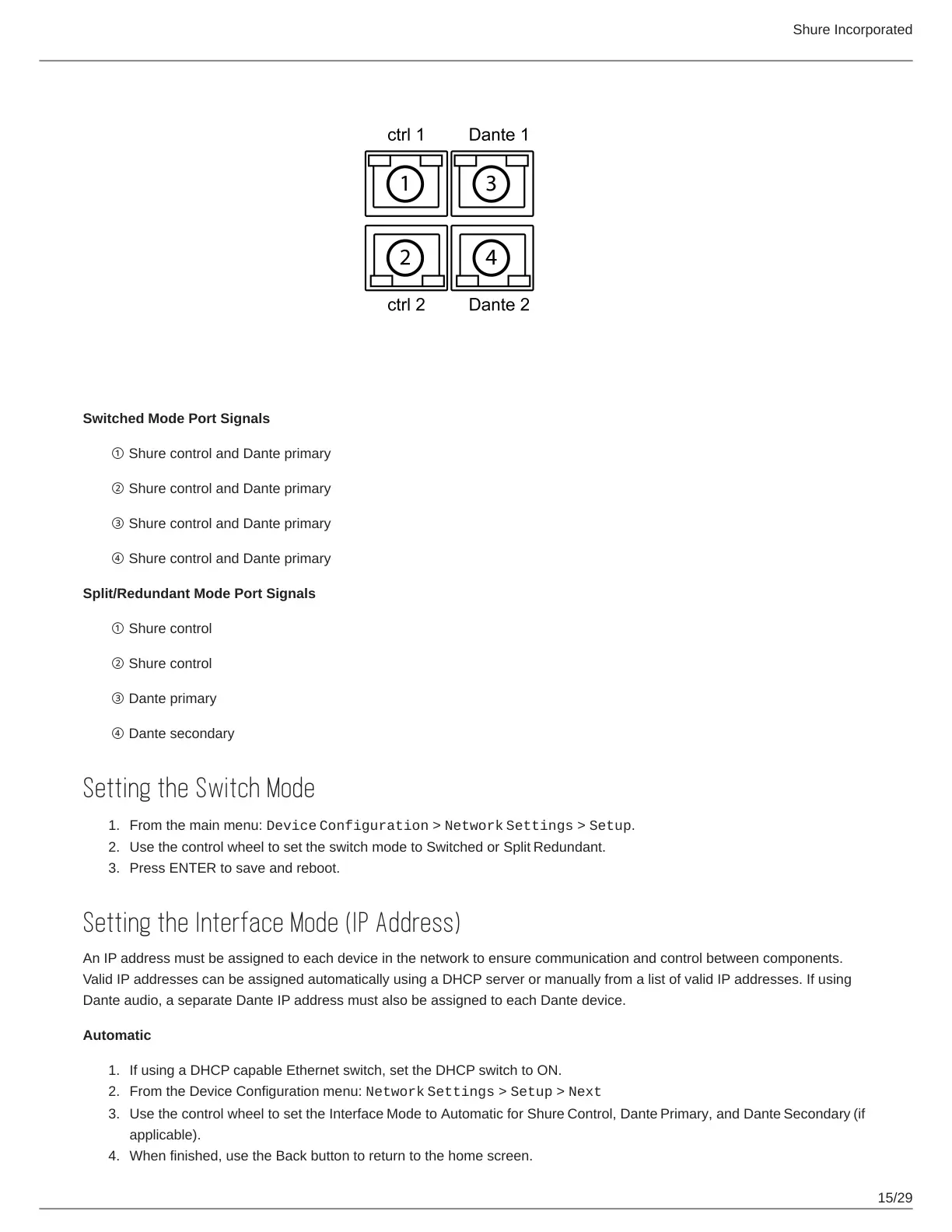
Switched Mode Port Signals
① Shure control and Dante primary
② Shure control and Dante primary
③ Shure control and Dante primary
④ Shure control and Dante primary
Split/Redundant Mode Port Signals
① Shure control
② Shure control
③ Dante primary
④ Dante secondary
Setting the Switch Mode
From the main menu: Device Configuration > Network Settings > Setup.
Use the control wheel to set the switch mode to Switched or Split Redundant.
Press ENTER to save and reboot.
Setting the Interface Mode (IP Address)
An IP address must be assigned to each device in the network to ensure communication and control between components.
Valid IP addresses can be assigned automatically using a DHCP server or manually from a list of valid IP addresses. If using
Dante audio, a separate Dante IP address must also be assigned to each Dante device.
Automatic
If using a DHCP capable Ethernet switch, set the DHCP switch to ON.
From the Device Configuration menu: Network Settings > Setup > Next
Use the control wheel to set the Interface Mode to Automatic for Shure Control, Dante Primary, and Dante Secondary (if
applicable).
When finished, use the Back button to return to the home screen.


 To Next Page