EasyManua.ls Logo

Shure GLXD4 - User Manual

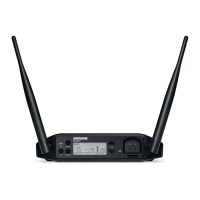
Shure GLXD4
34 pages
Print Icon
To Next Page IconTo Next Page
Loading...
GLXD4
Wireless Receivers
The Shure GLXD4 Wireless Receiver online user guide.
Version: 6 (2020-E)

Other manuals for Shure GLXD4

Questions and Answers

  • J
    Joyce JohnsonAug 30, 2025
    What to do if I hear audio artifacts or dropouts on my Shure Receiver?
    • C
      Christian ShafferAug 30, 2025
      If you are experiencing audio artifacts or dropouts with your Shure Receiver, try the following: * Change the receiver and transmitter to a different group and/or channel. * Identify and remove any nearby sources of interference, such as cell phones, Wi-Fi access points, or signal processors. * Charge or change the transmitter battery. * Make sure the receiver and transmitter are within the recommended system parameters. * Ensure the system is set up within the recommended range and the receiver is kept away from metallic surfaces. * Position the transmitter within line of sight of the receiver for optimal sound.
  • T
    Timothy DavisAug 29, 2025
    What to do if I can't adjust the gain control on my Shure Receiver?
    • T
      Thomas SnyderAug 29, 2025
      If the receiver gain control cannot be adjusted, check the transmitter. The transmitter must be on to enable gain changes.
  • G
    Gabriela RichardsonAug 28, 2025
    What to do if sound level varies when switching sources on my Shure GLXD4?
    • R
      Raymond KennedyAug 28, 2025
      If you experience sound level variations when switching to different sources, adjust the transmitter gain as necessary (see Gain Adjustment).
  • H
    henry55Aug 27, 2025
    How to fix distortion on Shure Receiver?
    • M
      Michael SwansonAug 27, 2025
      To fix distortion, reduce transmitter gain (see Gain Adjustment).
  • S
    Shannon MccarthyAug 26, 2025
    What to do if there is no sound or faint sound from my Shure Receiver?
    • B
      bryanttammyAug 27, 2025
      If you experience no sound or faint sound, here are some things to check: * If the Receiver RF LED is on, verify all sound system connections or adjust gain as needed. Also, verify that the receiver is connected to mixer/amplifier. * If the Receiver RF LED is off, turn on the transmitter. Make sure the batteries are installed correctly. Link transmitter and receiver. Charge or change transmitter battery. * If the Receiver LCD screen is off, make sure the AC adapter is securely plugged into the electrical outlet and the receiver is powered on. * If the Transmitter indicator LED is flashing red, charge or change the transmitter battery. * If the Transmitter is plugged into the charger, disconnect it.
  • N
    ngonzalezAug 25, 2025
    Why is the sound level inconsistent on my Shure device?
    • F
      floresjesusAug 26, 2025
      If you are experiencing sound level variations when switching to different sources on your Shure device, adjust the transmitter gain as necessary.
  • I
    Isaac ChenAug 25, 2025
    Why does my Shure Receiver have audio dropouts?
    • J
      Jessica HaleAug 25, 2025
      If you are experiencing audio artifacts or dropouts with your Shure Receiver, try changing the receiver and transmitter to a different group or channel. Identify and shut down or remove any nearby sources of interference, such as cell phones or Wi-Fi access points. Ensure the receiver and transmitter are within system parameters, set up within the recommended range, and kept away from metallic surfaces. For optimal sound, the transmitter must be used in the line of sight from the receiver. Charge or change transmitter battery.

Summary

Important Safety Instructions

System Overview

GLXD4 Receiver Controls and Connectors

Receiver Controls and Interface

Details on receiver antennas, status LEDs, buttons, and LCD screen elements.

Transmitters

Wearing the Bodypack Transmitter

Correct Microphone Placement

Batteries and Charging

Information on battery types, charging options, and procedures.

Multiple Receiver Systems

Setting Up Receivers and Transmitters

Step-by-step instructions for pairing receivers and transmitters.

Manually Linking a Transmitter to a Receiver

Challenging Wireless Environments

Improving Wireless System Performance

Strategies to reduce interference and optimize wireless system reliability.

Firmware

Operation

Details on system operation and adjustments.

Locking and Unlocking Controls

Manually Selecting Group and Channel

Troubleshooting

Guidance for resolving common system issues and errors.

Resetting Components

Resetting the Receiver

Restores receiver to factory settings, including gain and unlocked controls.

Resetting the Transmitter

Restores transmitter to factory settings, unlocking controls.

Specifications

GLXD1 Transmitter Specifications

Handheld Transmitter Specifications

Receiver Specifications

Receiver Specifications (Continued)

Connectivity and Compliance

Regulatory Certifications

Compliance statements for FCC, ISED, and European directives.

Shure GLXD4 Specifications

General IconGeneral
Input voltage14 - 18 V
Power supply typeAC
Battery life (max)16 h
Current consumption550 mA
Battery low indicationYes
Impedance50 Ω
Antenna typeFixed
Display typeLCD
Mounting type-
Product colorBlack
Scan featuresChannel scan, Group scan
Housing materialABS
Antennas quantity2
Channels quantity8 channels
High density modeNo
Operating frequency typeUltra High Frequency (UHF)
Radio Frequency (RF) range2404 - 2478 MHz
Operating temperature (T-T)-18 - 57 °C
Microphone frequency response20 - 20000 Hz
Total Harmonic Distortion (THD)0.2 %
XLR out1
Weight and Dimensions IconWeight and Dimensions
Depth117 mm
Width183 mm
Height40 mm
Weight286 g

Related product manuals