Shure Incorporated
17/76
③ ANI4OUT (digital-to-analog conversion)
Each ANI4OUT receives 4 channels of Dante audio, and converts them to 4 analog signals, delivered through XLR
outputs or block connectors.
Input: Connect the ANI4OUT to the network switch with a network cable
Ouput: Connect the analog output to the audio input on the video codec
④ Video codec connection to far end
Connect the codec to the appropriate network to connect with the far end.
⑤ Audio from far end to amplifier
Route the far end audio through the video codec audio output to an amplifier.
⑥ Amplified audio signal to loudspeakers
Connect the loudspeakers to the amplifier to deliver the audio from the far end.
Hardware and Installation
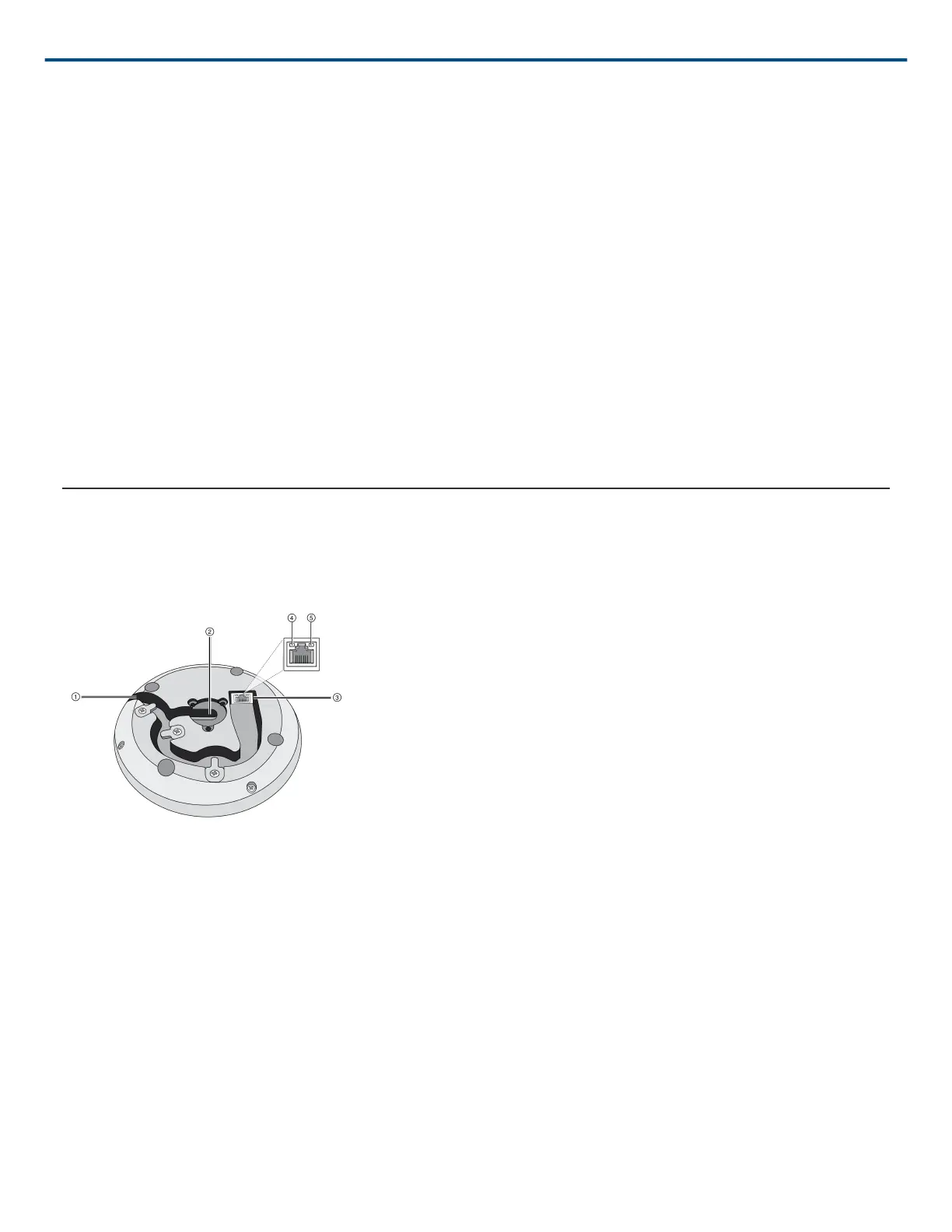
Hardware
① Cable Exit
Guide the cable under the tabs and through the routing to exit from the side.
② Bottom Cable Exit
Guide the cable under the tabs and through the bottom exit for permanent table installations.
Note: Use the cable plug accessory when the cable is routed through the bottom.
③ Network Port
RJ-45 jack for network connection.
④ Network Status LED (Green)
Off = no network link












 To Next Page