Shure Incorporated
13/38
2.
3.
4.
1.
2.
3.
4.
Talk in all parts of the coverage area at a normal speech volume and have someone on the far end listen to your signal.
Adjust levels as needed. The coverage area gain fader is post-gate.
Adjust EQ settings as needed. You can use EQ to improve speech intelligibility and control problematic frequencies in a
room (such as a low-frequency rumble caused by HVAC systems). You can also make changes to IntelliMix DSP blocks
here.
If needed, listen to the microphone signal directly using a Dante headphone amp or with Dante Virtual Soundcard.
Loudspeaker Levels
To adjust, go to Loudspeaker and use the Speaker output fader.
Make a test call with your videoconferencing software and adjust the loudspeaker level as needed. If you set a higher loud
speaker level, you may need to use a higher NLP setting on the AEC block to remove echo.
If needed, use the signal generator to help with EQ adjustments. The signal generator is pre-EQ.
Mute the MXA902
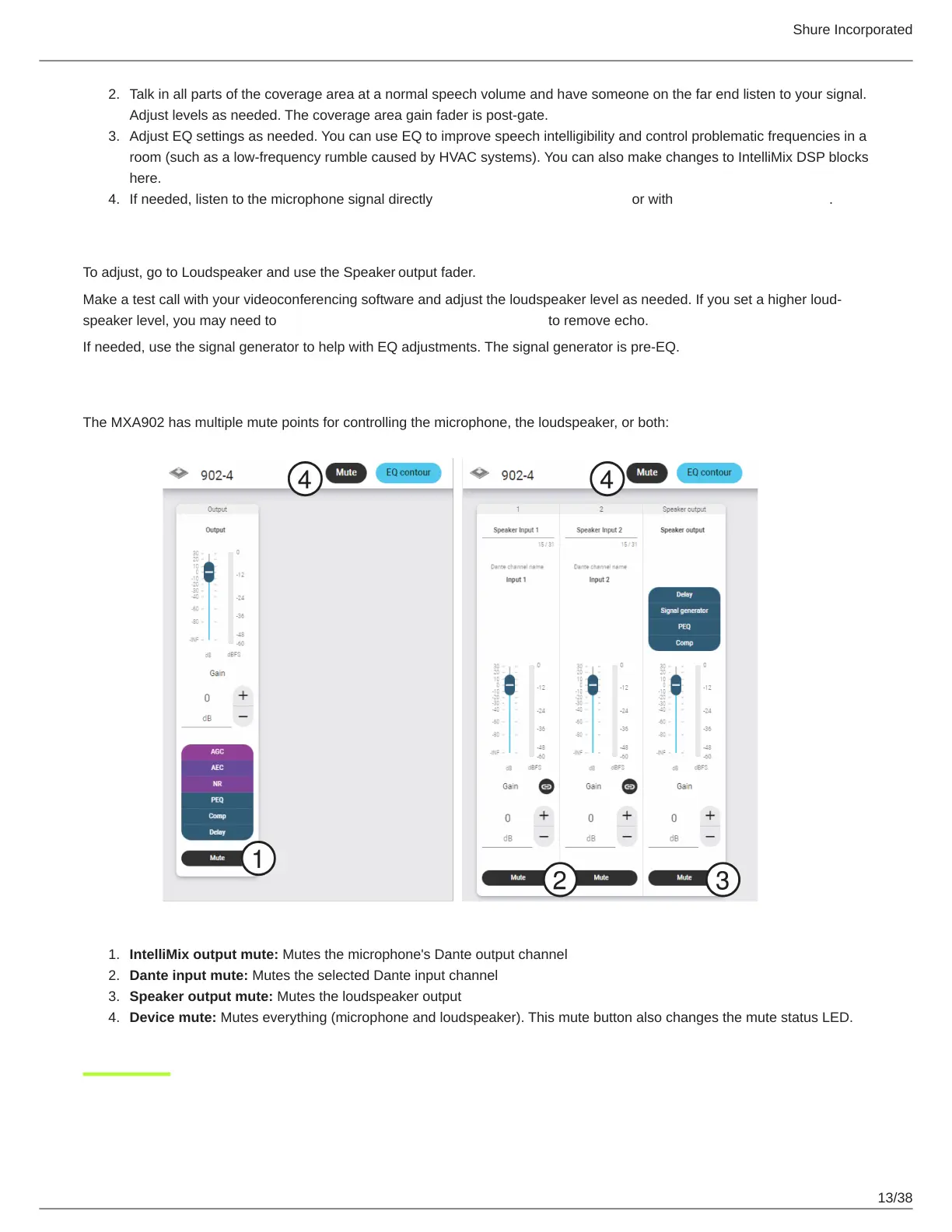
The MXA902 has multiple mute points for controlling the microphone, the loudspeaker, or both:
IntelliMix output mute: Mutes the microphone's Dante output channel
Dante input mute: Mutes the selected Dante input channel
Speaker output mute: Mutes the loudspeaker output
Device mute: Mutes everything (microphone and loudspeaker). This mute button also changes the mute status LED.



 To Next Page