Shure Incorporated
5/38
2.
3.
1.
2.
3.
4.
◦
◦
5.
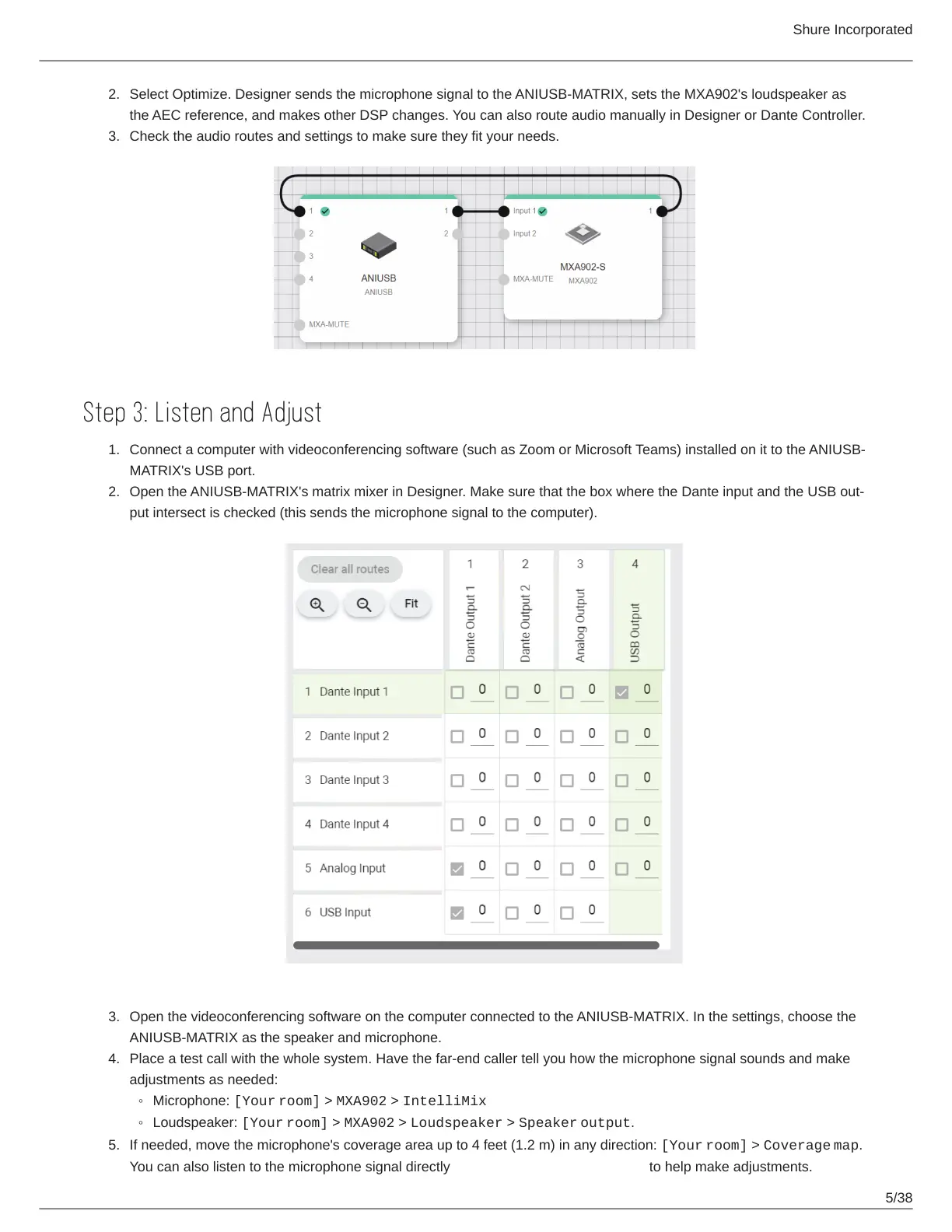
Select Optimize. Designer sends the microphone signal to the ANIUSB-MATRIX, sets the MXA902's loudspeaker as
the AEC reference, and makes other DSP changes. You can also route audio manually in Designer or Dante Controller.
Check the audio routes and settings to make sure they fit your needs.
Step 3: Listen and Adjust
Connect a computer with videoconferencing software (such as Zoom or Microsoft Teams) installed on it to the ANIUSB-
MATRIX's USB port.
Open the ANIUSBMATRIX's matrix mixer in Designer. Make sure that the box where the Dante input and the USB out
put intersect is checked (this sends the microphone signal to the computer).
Open the videoconferencing software on the computer connected to the ANIUSB-MATRIX. In the settings, choose the
ANIUSB-MATRIX as the speaker and microphone.
Place a test call with the whole system. Have the far-end caller tell you how the microphone signal sounds and make
adjustments as needed:
Microphone: [Your room] > MXA902 > IntelliMix
Loudspeaker: [Your room] > MXA902 > Loudspeaker > Speaker output.
If needed, move the microphone's coverage area up to 4 feet (1.2 m) in any direction: [Your room] > Coverage map.
You can also listen to the microphone signal directly using a Dante headphone amp to help make adjustments.



 To Next Page