14
8015675/1EEU/2021-12| SICKO P E R A T I N G I N S T R U C T I O N S | Flow-X
Subject to change without notice
3 PRODUCT DESCRIPTION
3.8.4 Flow-X web interface
All Flow-X flow computers have an integrated web server that allows external operation via
common web browsers (Windows Internet Explorer, Mozilla Firefox, Google Chrome, Opera,
etc.). The web browser offers the same features as the main user interface, plus an
Explorer Tree for easy navigation. It also serves to download reports and historical data.
3.8.5 Touchscreen user interface layout
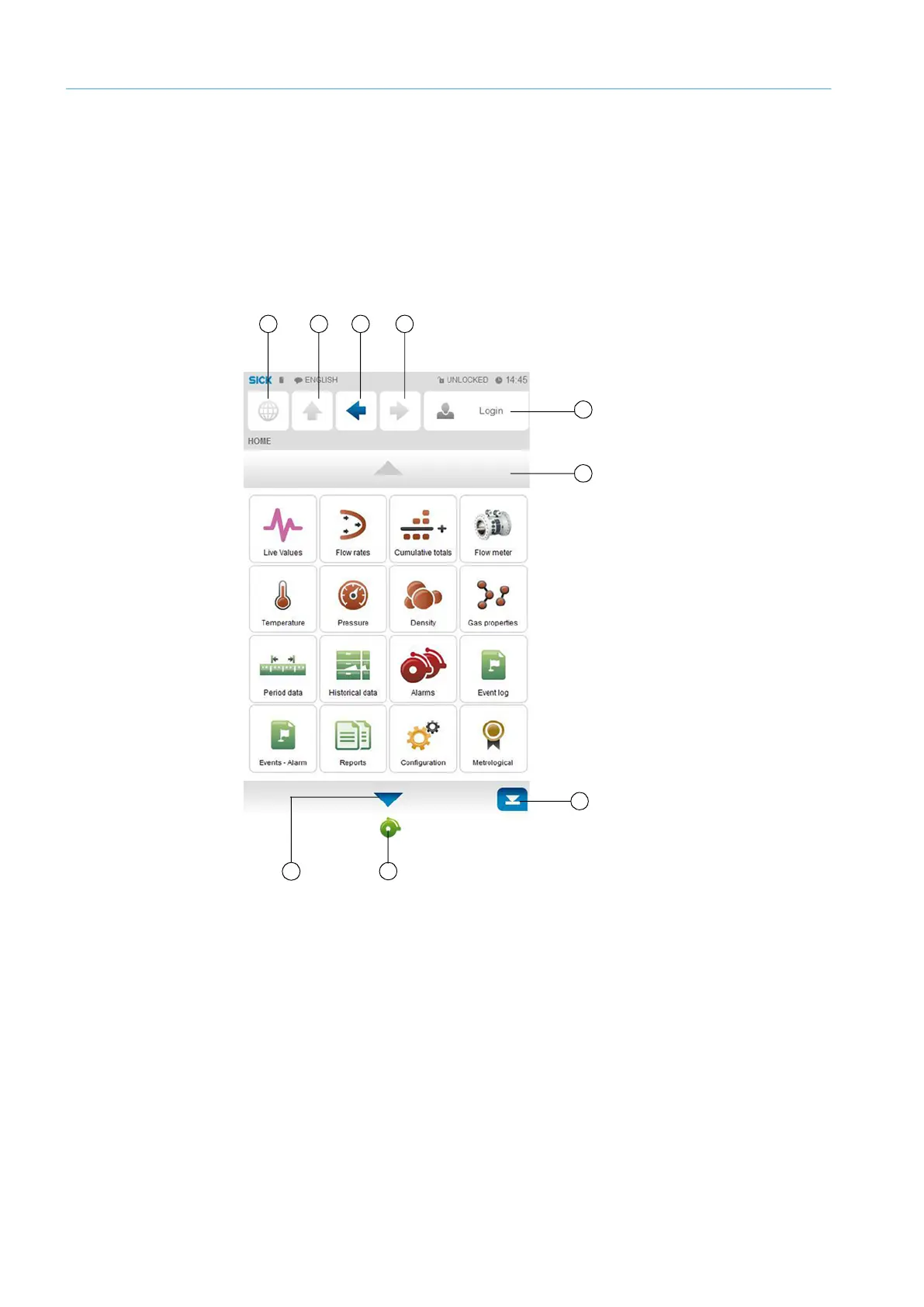
Flow-X flow computer user interfaces have the following layout and buttons:
Fig. 9: Main menu of the Flow-X flow computers
1 Go to “Main menu”
2 Up one menu level
3 One step backward
4 One step forward
5 Go to “Login” menu
6 One page up
7 To end of page
8 Go to “Alarms” menu
9 One page down
1 2 3
4
5
6
7
8
9


 To Next Page