35
8015675/1EEU/2021-12| SICK O P E R A T I N G I N S T R U C TI O N S | Flow-X
Subject to change without notice
COMMISSIONING 5
5.4.4 Deleting log files and reports
After commissioning all devices, it is recommended to delete the event logs and reports
generated in the Flow-X flow computer during commissioning.
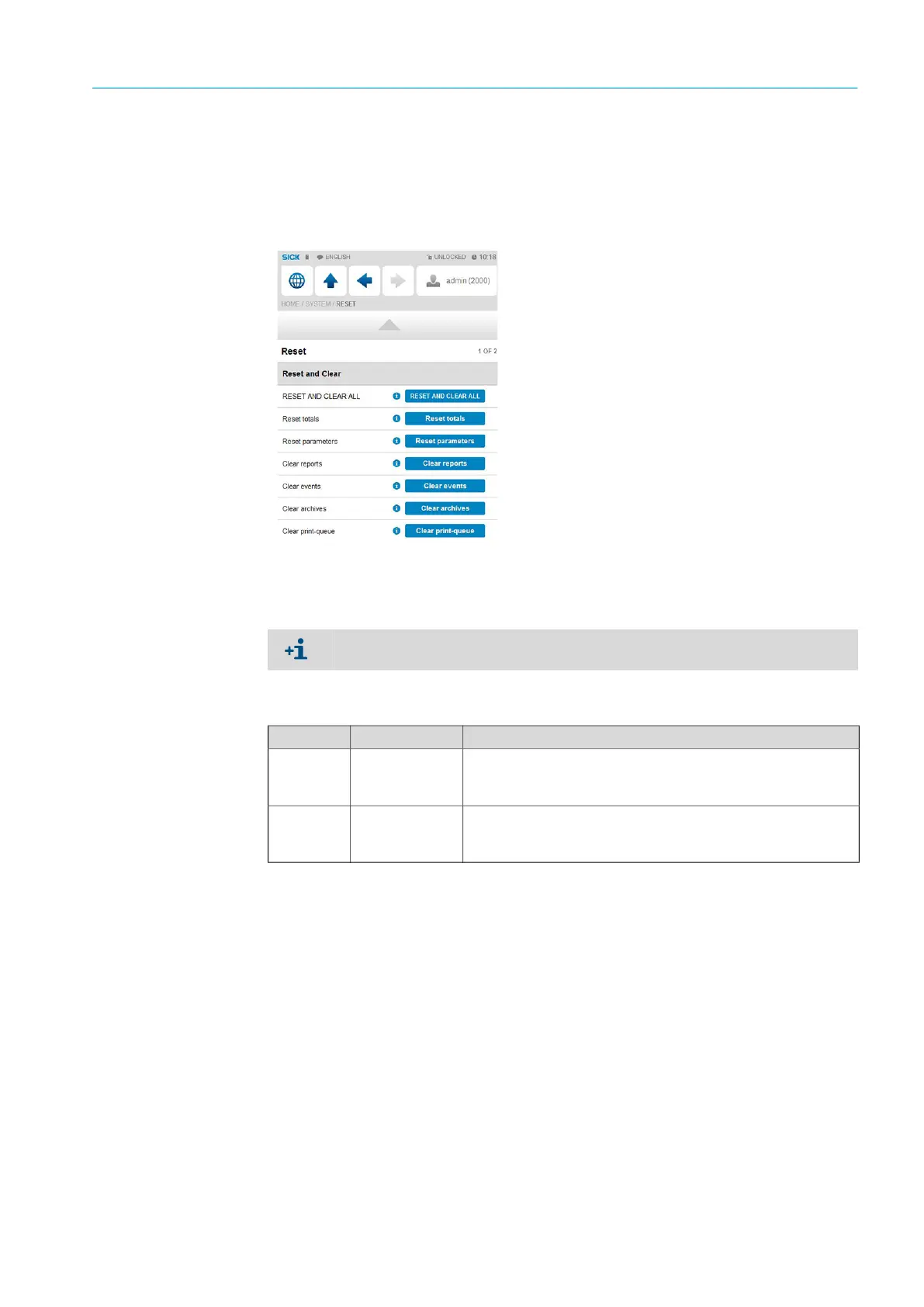
6 To do this, select each of “Reset totals”, “Clear reports”, “Clear archives” and “Clear
print-queue” and confirm.
Fig. 35: Menu item “System/Reset”
5.5 Metrological settings
The following settings are required by the MID (Measuring Instruments Directive)!
Go to menu item “Display/Metrological, Accountable alarm”.
This display is only visible when “MID compliance” (Configuration, Overall setup, Overall
setup) is activated.
Setting Security level Description
Q
min
1000
Low range value (lowest permissible flow rate) of the gas flow
meter. The corresponding alarm is triggered when the gas flow
meter is below this value.
Q
max
1000
High range value (highest permissible flow rate) of the gas flow
meter. The corresponding alarm is triggered when the gas flow
meter is above this value.
Table 10: Metrological settings


 To Next Page