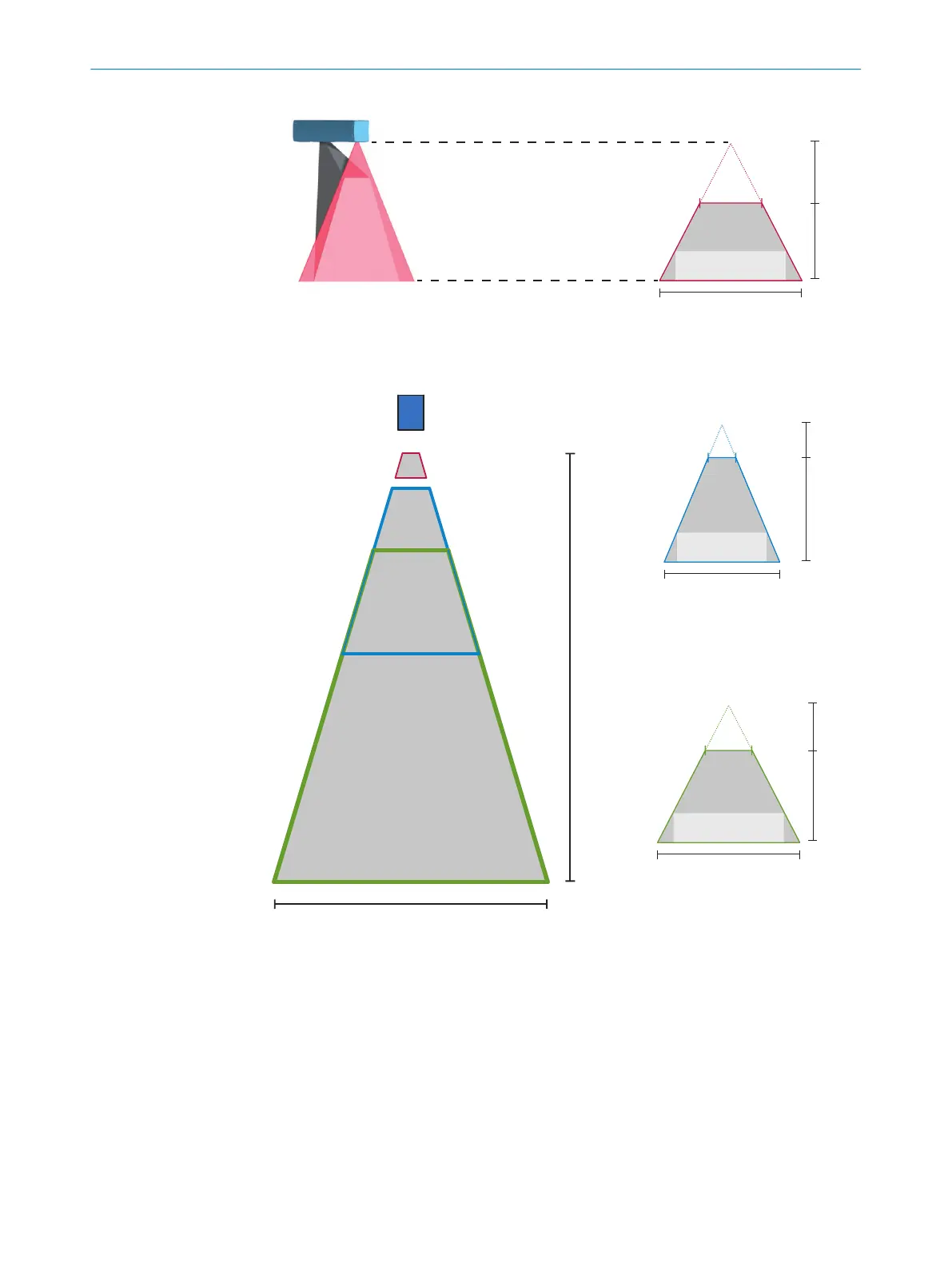
56
(2.20)
60
(2.36)
75
(2.95)
H
W
65 x 15
(2.56 x 0.59)
40
(1.57)
TriSpectorP1008
291
(11.46)
800
(31.50)
660
(25.98)
H
W
540 x 200
(21.26 x 7.87)
180
(7.09)
TriSpectorP1060
141
(5.55)
400
(15.75)
330
(12.99)
H
W
270 x 100
(10.63 x 3.94)
90
(3.54)
TriSpectorP1030
Y
X
TriSpectorP1000
Y = Max. height range 2
X = Width at max.
working distance 3
Typical field of view 1
TriSpectorP1008
TriSpectorP1030
TriSpectorP1060
Figure 6: Field of view diagrams
1
Typical field of view
2
Maximum height range
3
Width at maximum working distance
5.4 Replacing the windows
The laser window and the camera window on the device are replaceable and available
as spare parts. Each spare part contains one window (in glass or PMMA) and four
screws.
MOUNTING 5
8022395/19OK/2020-12 | SICK O P E R A T I N G I N S T R U C T I O N S | TriSpectorP1000
23
Subject to change without notice








 To Next Page