02.202010/28 H47.ELEKS014EN-00
GENIUS 2.2 PANIC, Electromechanical mul-point lock
5
8 s
or
f
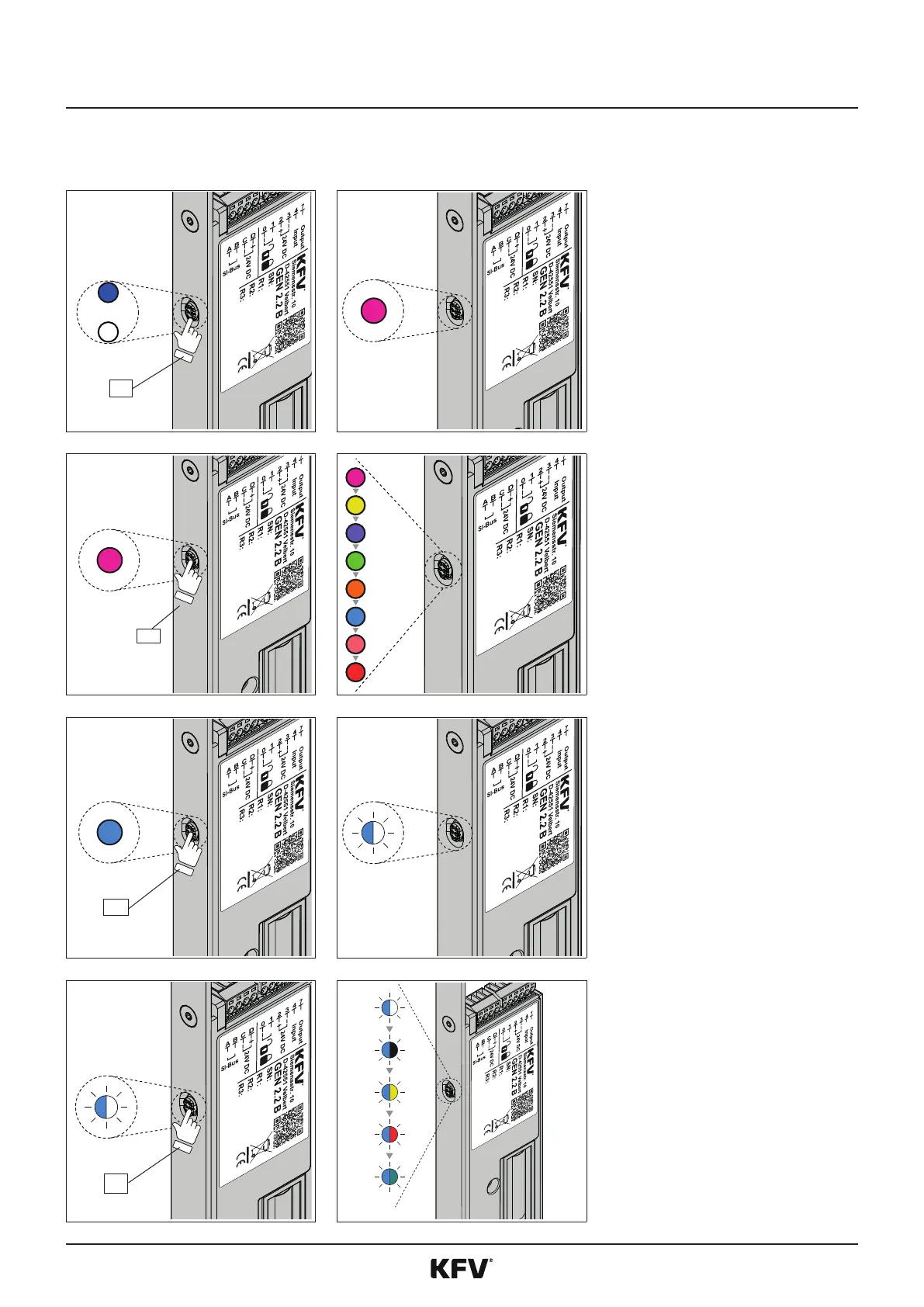
To proceed to the menu, press
the buon on the GENIUS 2.2
PANIC for 8 seconds unl the
menu LED magenta lights up.
The LED lights up blue or white
during these 8 seconds.
f
An acousc signal sounds as
acknowledgement.
1 s
f
Press the menu buon for 1
second to change to level 1 (see
11) in the menu items.
f
Every press of a buon is
acknowledged by an acousc
signal.
3 s
f
To select a level 1 menu, hold
down the menu buon on the
relevant main menu for 3 sec-
onds.
f
An acousc signal sounds as
acknowledgement.
f
The selected funcon in level 2
is indicated by colour alternang
ashing (gure shows level 1
menu "light blue").
1 s
f
Press the menu buon for 1
second to change the funcons
in level 2 (see page 11).
f
Every press of a buon is
acknowledged by an acousc
signal.



 To Next Page