BC8001A Installation and Operating Instruction
Page 41/49
12.9 How to set LCD switch off time
Function: If no key is pressed within a certain time, LCD turns off automatically. LCD can be lighted up by pressing any key. But
if fire or faults happen, the LCD turns on immediately.
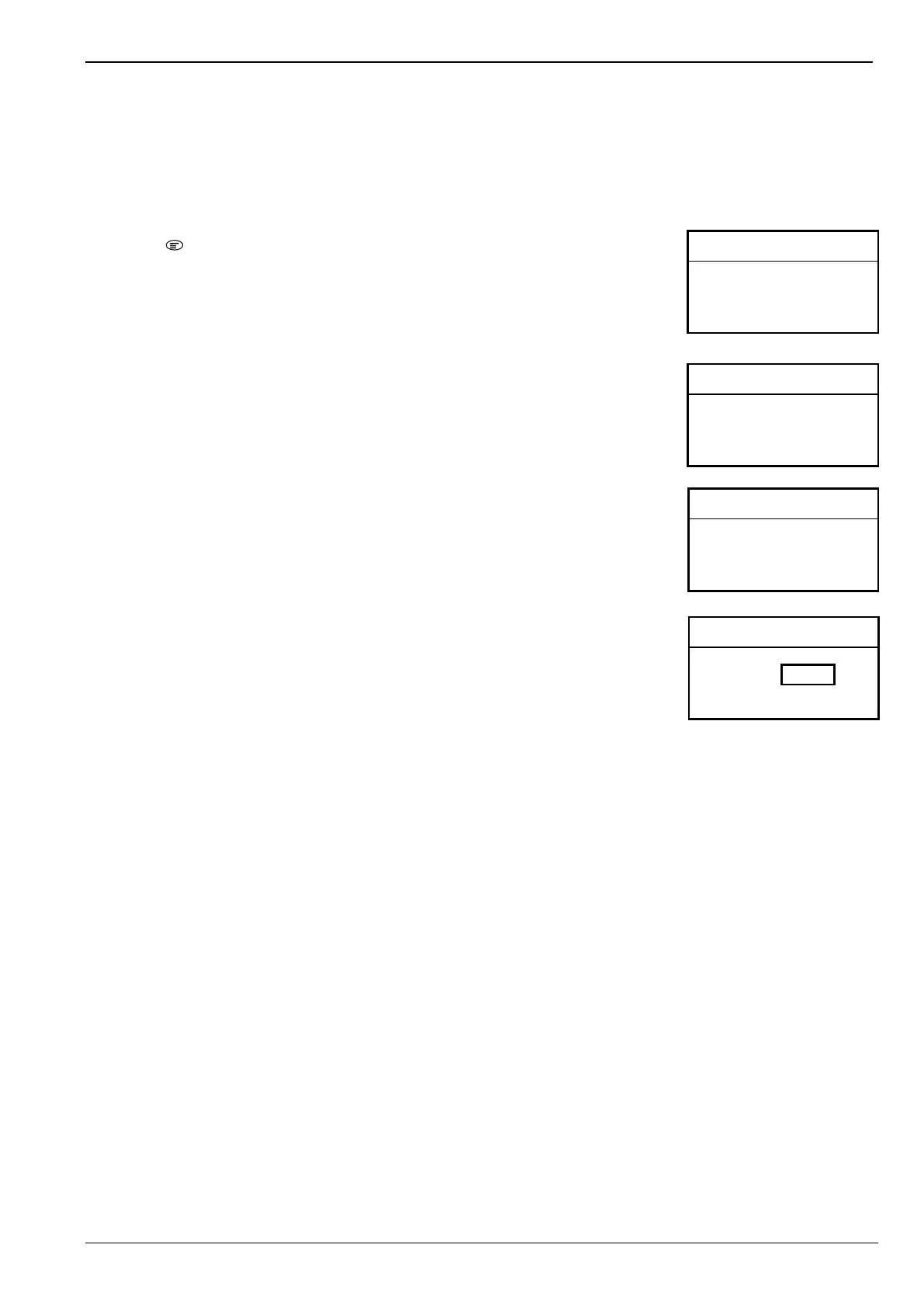
1. Press “ ” to enter main menu.
The main menu is displayed.
2. Press “↓” to choose “4.Configure” and press “OK” key.
Configure window is displayed.
3. Press “↓” to choose “5.Set LCD Switch Off Time” and press “OK” key.
Current LCD switch off time is displayed.
6. Press “←” to delete time, and enter new time.
The valid range is from 0 to 60 minutes. “0” represents LCD is on forever.
4. Press “OK” key to save modification and return to previous window.
<Main Menu> L 3 A
1. RT Information
2. History Record
3. Operation
4. Configure
< Configure> L 3 A
1. Configure
2. Set Time and Date
3. Set LCD Contrast
4. Set Buzzer Volume
< Configure> L 3 A
5.
6. Set Language
7. AutoMap
8. Save Configuration
<Set LCD Time> L 3 A
Valid(0~60) (min)



 To Next Page