BRAVO MAXIMA II Operating manual - English
24 Copyright Silca 2011
7.7 Access to bottom compartment
1) Turn the machine off and unplug it.
2) Remove the swarf tray.
3)
Turn the machine onto its left-hand side
.
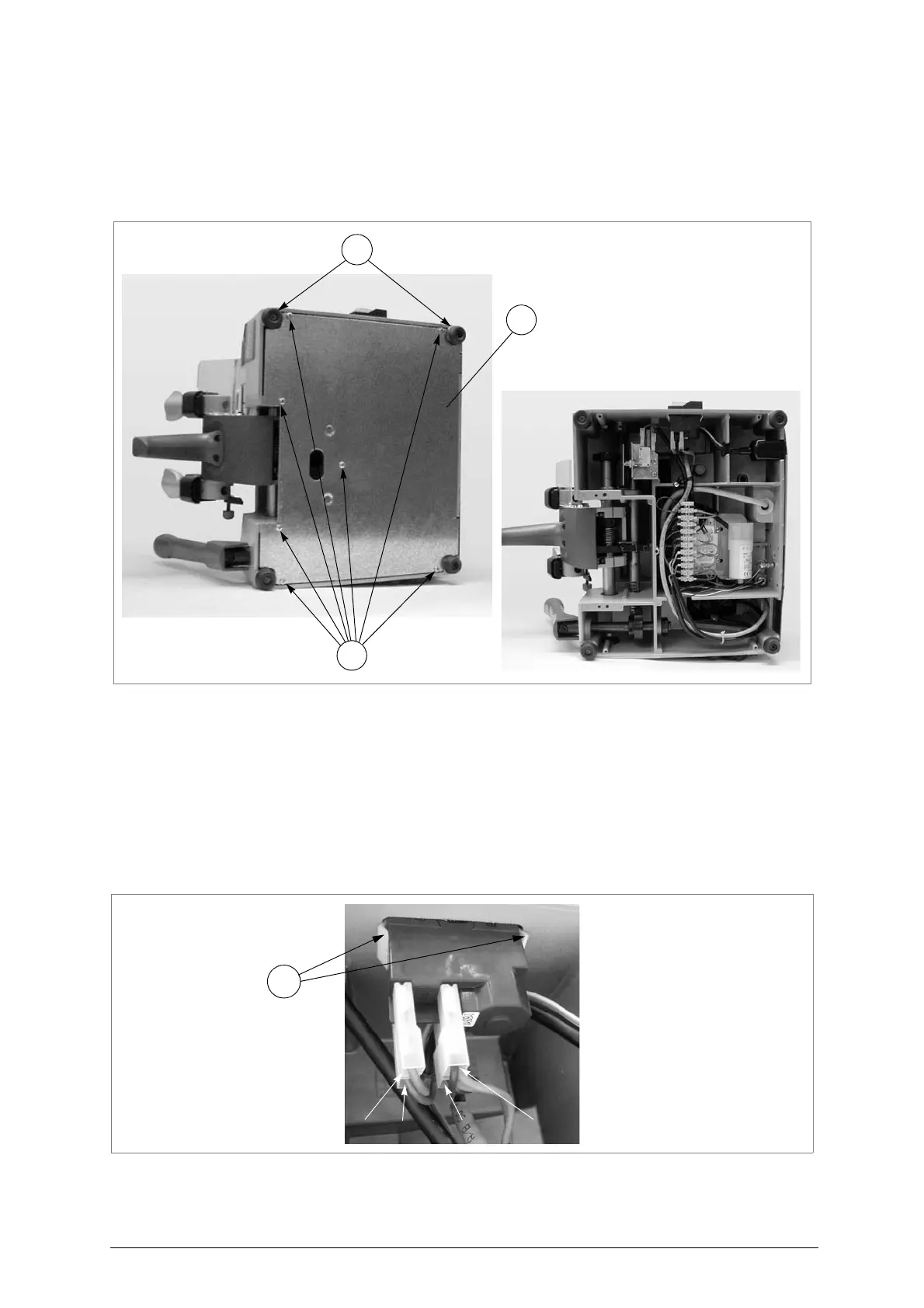
4) Loosen the 7 screws (W) and 2 feet (W1) and remove the bottom safety plate (W2) (fig.31).
Fig. 31
7.8 Replacing the master switch
1) Turn the machine off and unplug it.
2) Remove the bottom panel (see ch. 7.7).
3) Detach the various connectors (1, 2, 3, 4) paying careful attention to their positions (fig.32).
4) Press on the 2 tabs (W4) on the switch and pull it out.
5) Fit the new switch properly, taking care to secure it well (tabs).
6) Reconnect the various connectors (1, 2, 3, 4).
7) Replace the bottom safety plate and fix with the 7 screws (W) and 2 feet. Fit the swarf tray.
Fig. 32



 To Next Page