UM_FULL_75SL_REV_A 19
GROUP 3 (Three Flash of Parking Light) for Manual transmission vehicle.
Chirps Shutdown Mode Solution
1
Manual transmission mode is enable
and not initialized
Follow the manual transmission setup steps
(page 17 of the user manual)
2
Door Open
• Close the Door.
• Check 24-pin Green or Violet wire connection.
3
(-) Parking Brake / E-Brake In Shutdown
• Set the Parking Brake / E-brake Brake.
• Check 24-pin White/Blue wire connection.
4
No RPM or The vehicle’s clutch bypasses fail.
• Check 24-pin Gray/Black wire connection
• The vehicle’s clutch must be temporarily bypassed
• Re-learning the RPM
5
Accelerometer trigger
• Move the gearshift lever to the neutral gear
Note: The Accelerometer monitors sudden movement forward or backward during the remote start process.
It will Stop Remote Start after detect forward or backward movement
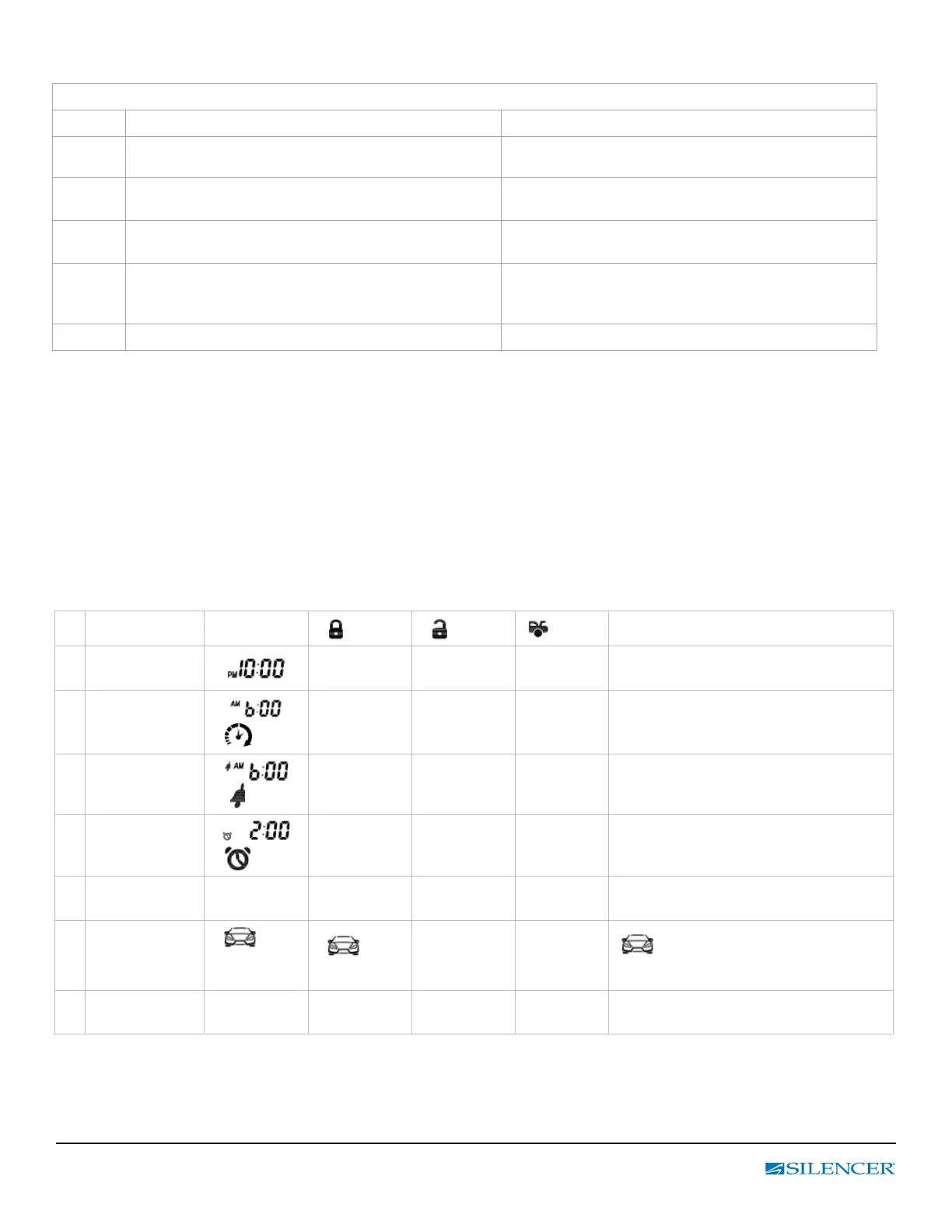
M. LCD Remote Control Program Setting
Enter:
1. Press and hold the F button for 3 seconds until the Display text and a tone play to conrm is heard and then release.
2. Press F button conrm the selection and move to the next setting, and the “Display” text and a tone play to conrm.
Exit:
Press and hold the F button for 3 seconds until 2 beeps are heard and then release.
Feature Display
button button
button
Function / Description
1 Time
Adjusts
Hour
Adjusts
Minute
Sets the time on your remote
2
Daily timer start
ash
Adjusts
Hour
Adjusts
Minute
Sets the time at which you want your
vehicle to start every day.
3
Alarm Clock
Time
ash
Adjusts
Hour
Adjusts
Minute
On/Off
Sets the time which you would like the
remote alarm clock to alert you.
4
Parking
Meter Timer
ash
Adjusts
Hour
Adjusts
Minute
On/Off
Sets the time which you would like the
parking meter timer to alert you.
5
Backlight delay
or turn off
5 / 10 / OFF 5 sec 10 sec
Backlight
Turn off
Sets the Backlight of LCD
6
Car Icon
Illumination
icon
displayed or
not
icon
Displayed
Not
icon displayed when required by
the 2-way information system.
7
Temperature
F or C F C
Change the temperature readout from
Fahrenheit or Celsius



 To Next Page