11
1.2 Preliminary checks
a
WARNING
– Should it be necessary to access the areas in the
bottom part of the appliance, make sure that the
system components and pipes are not hot (risk of
burning).
– Before replenishing the heating system, put on
protective gloves.
The initial start-up of
Edea
must be carried out by profession-
ally qualified personnel, after which the appliance can func-
tion automatically. It may be necessary for the user to restart
the appliance automatically, without contacting the techni-
cian; for example, after a holiday.
First of all check that the gas isolation and water system
valves are open.
1.3 Ignition
After completing the preliminary checks, start up
Edea
:
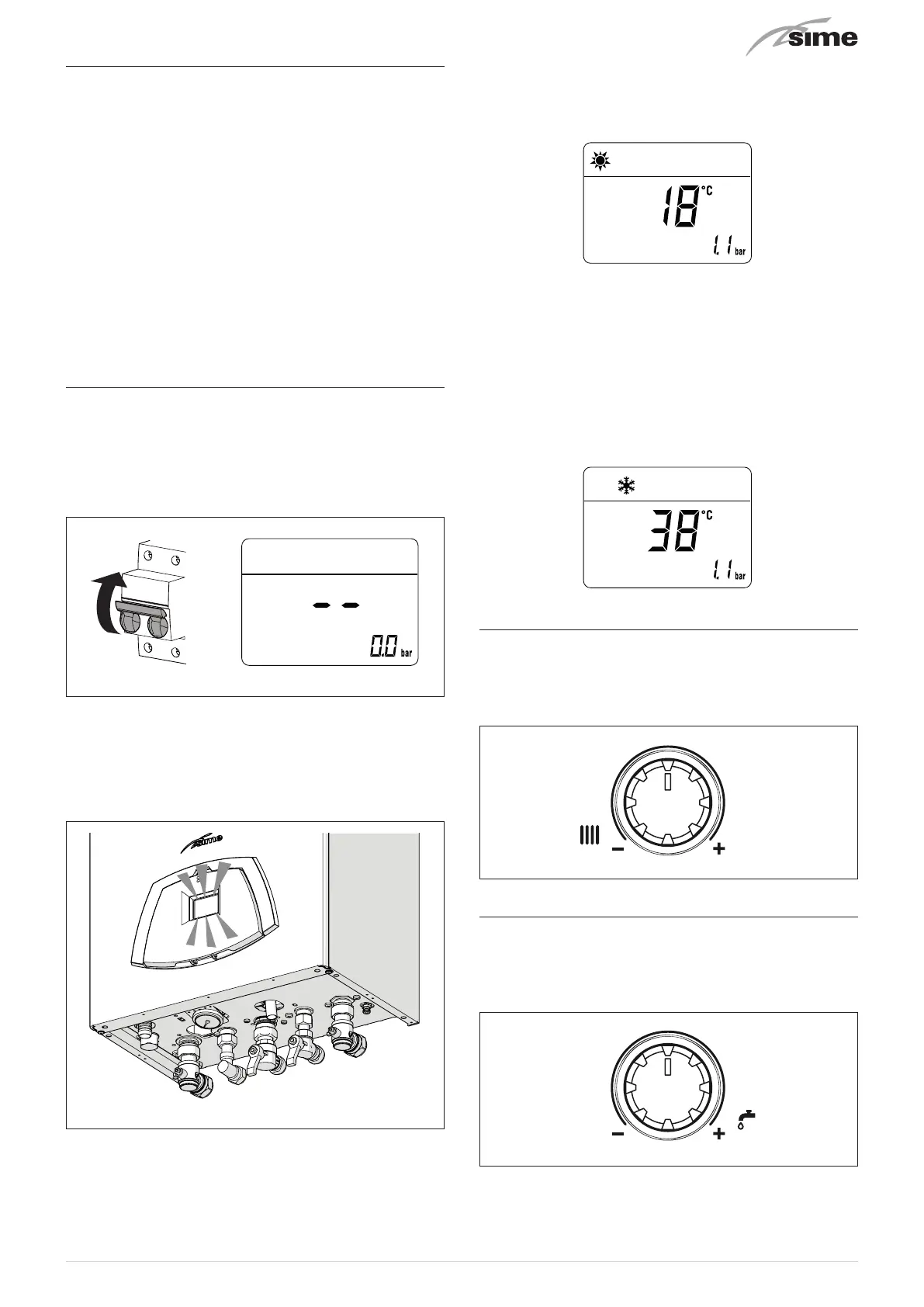
– set the main system switch to "ON" in order for the display
to show the pressure level in the system during refilling
–
make sure that the operating mode is set to "Stand-by";
if this
is not the case, press the button
y
until "Stand-by" mode
has been selected
ON
Fig. 2
– check that the pressure in the heating system, when cold, is
1-1.2 bar
. If the pressure is less than this, use the external
filling device to repressurise the system to
1-1.2 bar
– ensure that the filling device is turned off after use
– press and hold the button
y
for more than 3 seconds and
check whether normal operating conditions are restored.
Fig. 3
– select the "SUMMER"
l
operating mode by pressing and
holding the
y
button for at least 1 second. the value of
the delivery sensor detected at that moment will appear on
the display
– open one or more hot water taps.
Edea
will work at its max-
imum power until the tap or taps are closed.
Once
Edea
is commissioned in “SUMMER mode”
l
, with
the
y
button, pressed for at least 1 second, it is possible to
choose the “WINTER mode”
n
. The display will show the val-
ue of the delivery water temperature measured at that time.
In this case it is necessary to adjust the room thermostat(s) at
the desired temperature or, if the system is equipped with a
timer-controlled thermostat, verify that it is “active” and ad-
justed.
1.4 Adjusting the heating temperature
To increase or decrease the delivery temperature of
Edea
, in-
stead of modifying the specific parameter, it is possible to turn
knob
t
on the control panel. The temperature can be set to
between 20 and 80°C.
Fig. 4
1.5 Adjusting the domestic hot water tem-
perature
If the domestic hot water temperature is to be increased or
decreased, act on the
r
knob on the control panel. The tem-
perature can be set to between 10 and 60°C.
Fig. 5



 To Next Page