22
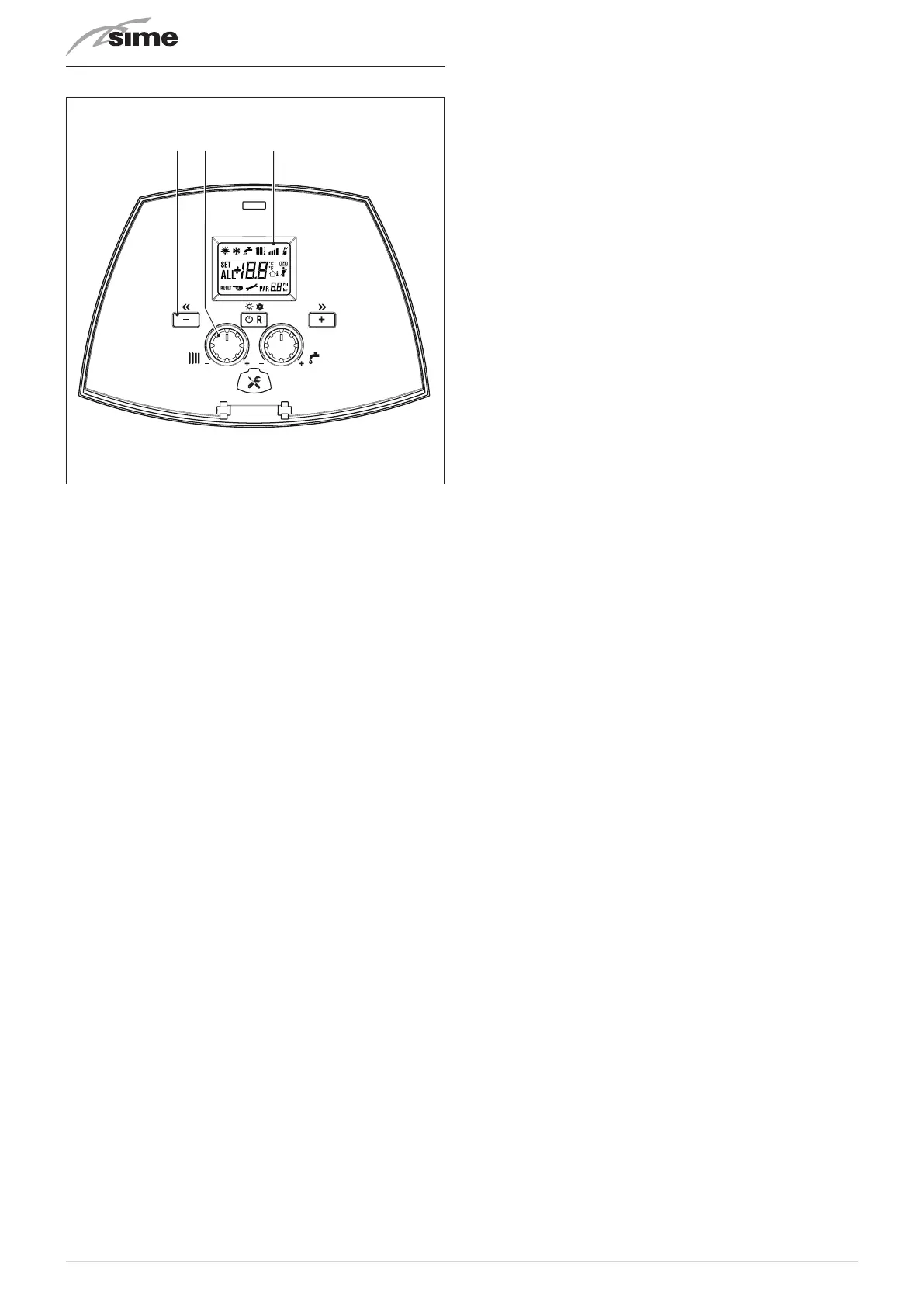
5.9 Control panel
Fig. 15
1
FUNCTIONAL BUTTONS
y
If pressed once or more times for at least 1 second
during normal operation, this button allows the user
to change the appliance’s operating mode in a cyclical
sequence (Stand-by – Summer – Winter). If the appli-
ance is experiencing a resettable fault, it can be used
to unlock it.
<
This allows the user to scroll through the parameters
or decrease the values.
>
This allows the user to scroll through the parameters
or increase the values.
C
Programming connector cover plug.
2
KNOBS
t
The heating knob allows the user to set the heating
temperature to between 20 and 80°C during normal
operation.
r
The domestic hot water knob allows the user to set the
domestic hot water temperature to between 10 and
60°C during normal operation.
NOTE:
pressing any button for more than 30 seconds causes a
fault to appear on the display (ALL 42) without preventing the
appliance’s operation. The warning disappears when normal
conditions are restored.
3
DISPLAY
l
“SUMMER”
. This symbol appears when the boiler is op-
erating in "Summer" mode or if only the domestic hot
water mode is enabled via the remote control.
n
“WINTER”
. The symbol is present in the “Winter” oper-
ating mode, or with the remote control if both the do-
mestic hot water and heating modes are enabled. The
flashing
l
and
n
symbols signal that the “chimney
sweep” function is active.
d
“RESET REQUEST”
. The wording indicates that, once the
fault has been repaired, the appliance’s normal opera-
tion can be reset by pressing the
y
button.
r
“DOMESTIC HOT WATER”
. This symbol is present during
a DHW request or during the "chimney sweep func-
tion" It flashes during the selection of the domestic hot
water set point.
t
“HEATING”
. This symbol lights up during heating oper-
ation or during the "chimney sweep function It flashes
during the selection of the heating set point.
f
“BLOCK” DUE TO NO FLAME
.
F
“FLAME PRESENCE"
.
v
“POWER LEVEL”
. Indicates the power level at which the
appliance is operating.
p
“PARAMETER"
. This indicates that the user may be in
parameter setting/display, or "info" or "counter", or in
"activated alarms" (history).
A
“ALARM"
. This indicates that a fault has occurred.
The number specifies the cause which generated the
alarm.
z
“CHIMNEY SWEEP"
. This indicates that the "chimney
sweep function" has been activated.
e
“EXTERNAL TEMPERATURE SENSOR”
. Indicates that the
external temperature sensor has been installed and
that the appliance is working at a sliding temperature.
a
“HEATING SYSTEM PRESSURE"
. Display of heating sys-
tem pressure.
E
"ECO", ALTERNATIVE ENERGY SOURCES
. Where active, it
indicates that there is a solar system available.
c
“MAINTENANCE REQUEST”
. If active, it indicates that it is
time to perform maintenance on the appliance.



 To Next Page