42
7.5 Display of operating data and counters
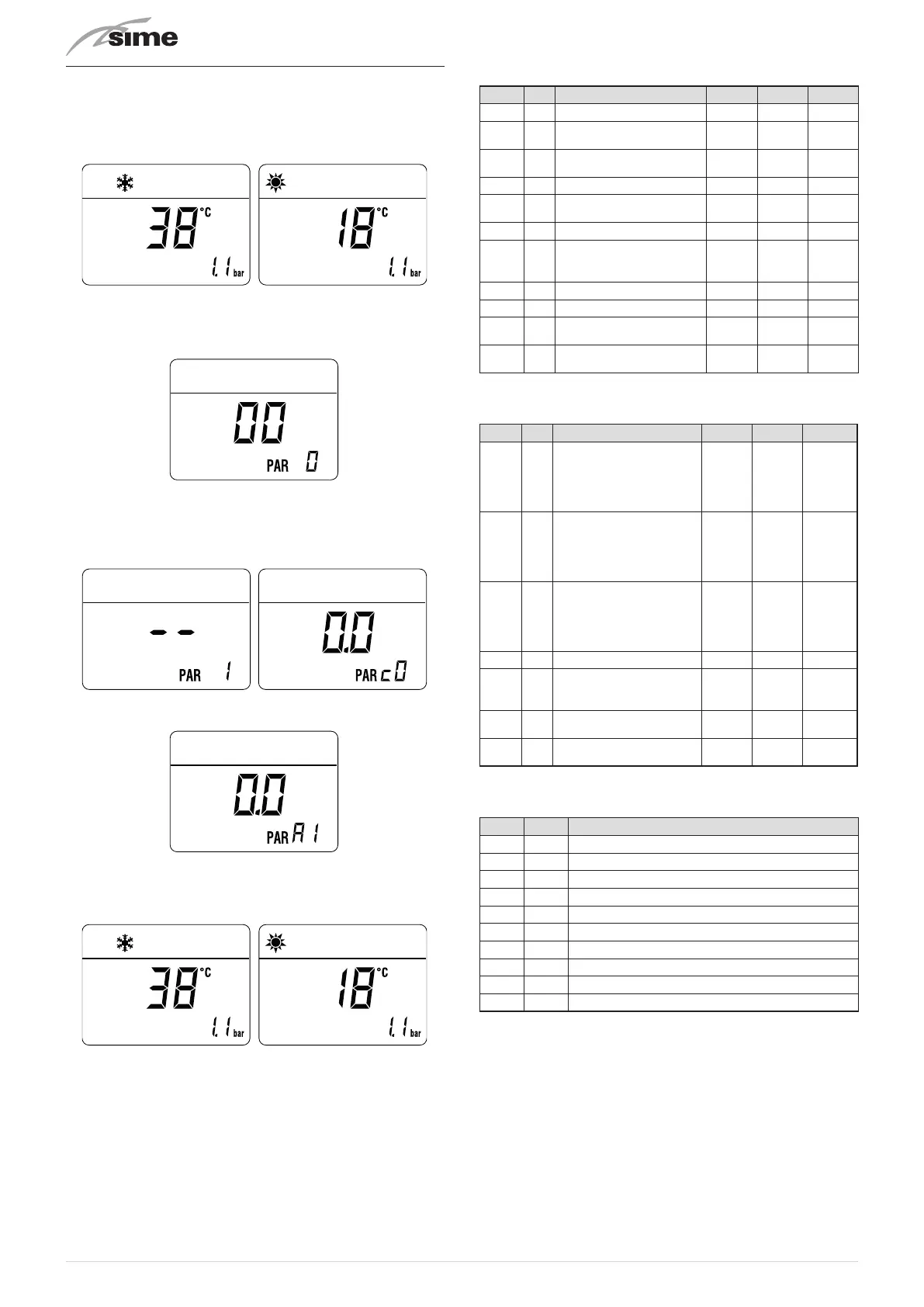
Once the boiler is operating a qualified technician can view the
operating data and the counters as follows:.
From the operating screen in the mode enabled at that mo-
ment (WINTER
n
or SUMMER
l
):
– turn the heating
t
and hot water
r
knobs to the minimum
– simultaneously
press
, for more than 3 s, the
>
and
<
but-
tons.
From this point, the technician has 2 options:
– pressing the
>
button will scroll the list of
“information
(PAR)”
and of the
“counters (PARc)”
. The scrolling sequence
is as follows
– pressing the
<
button will show the
“alarms occurred” (PARa)
– move within the displayed items using the
<
or
>
buttons
– once the desired values have been displayed, to exit the
menu press the
y
button until the home page appears.
TABLE OF INFORMATION DISPLAYED
Type
No.
Description Range U/M Step
PAR 00 SW version
PAR 01
External temperature
sensor
- 9 .. 99 °C 1
PAR 02
Delivery sensor
temperature
- 9 .. 99 °C 1
PAR 03 Smoke probe - 9 .. 99 °C 1
PAR 04
Domestic hot water
sensor temperature
- 9 .. 99 °C 1
PAR 05 AUX auxiliary sensor - 9 .. 99 °C 1
PAR 06
Actual heating SET
temperature
Par. 13
… Par.
14
°C 1
PAR 07 Power level 0 .. 99 % 1
PAR 08 Flow meter rate 0 .. 99 l/min 0.1
PAR 09
Water pressure
transducer reading
0 .. 99 bar 0.1
PAR 10
Display of current fan
revolutions
0 .. 99
RPM x
100
1
TABLE OF COUNTER DISPLAYED
Type
No.
Description Range U/M Step
PAR c0
total no. of boiler
operating hours
0 .. 99
h x
1000
0.1;
from 0.0
to 9.9;
1; from
10 to 99
PAR c1
total no. of burner
operating hours
0 .. 99
h x
1000
0.1;
from 0.0
to 9.9;
1; from
10 to 99
PAR c2
total no. of burner
ignitions
0 .. 99
h x
1000
0.1;
from 0.0
to 9.9;
1; from
10 to 99
PAR c3 total no. faults 0 .. 99 x 1 1
PAR c4
total no. of times
installer parameters
"ALL"accessed
0 .. 99 x 1 1
PAR c5
total no. of times OEM
parameters accessed
0 .. 99 x 1 1
PAR c6
time until next
maintenance intervention
1 .. 199 months 1
TABLE OF ACTIVATED ALARMS/FAULTS
Type No. Description
PAR A0 Last activated alarm/fault
PAR A1 Last but one activated alarm/fault
PAR A2 Third from last activated alarm/fault
PAR A3 Previous activated alarm/fault
PAR A4 Previous activated alarm/fault
PAR A5 Previous activated alarm/fault
PAR A6 Previous activated alarm/fault
PAR A7 Previous activated alarm/fault
PAR A8 Previous activated alarm/fault
PAR A9 Previous activated alarm/fault



 To Next Page