16 — Setup
5 SETUP
e Saturn load bank
oers a number of
conguration options
through its setup screens.
You can access the setup
screens by pressing “F4 -
Setup” or the F4 function
key.
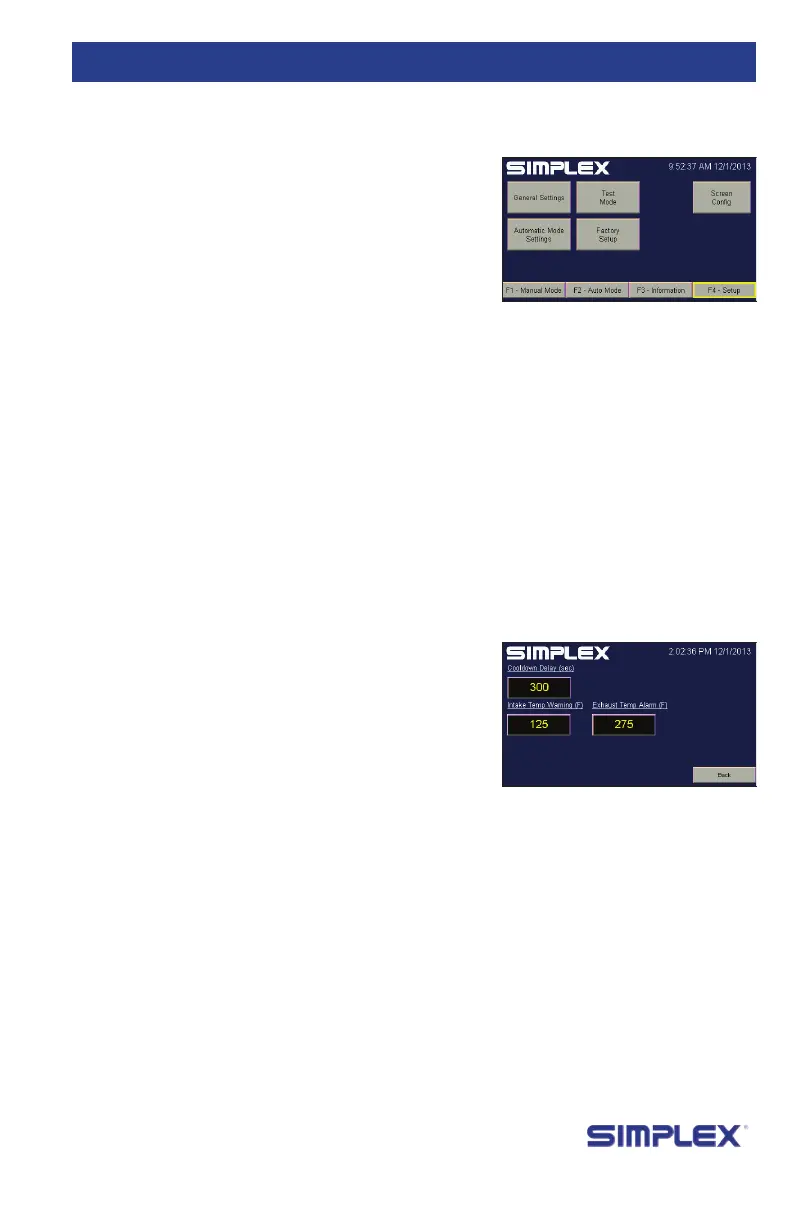
At the main setup screen,
you are presented with four options:
1. General Settings
2. Automatic Mode Settings
3. Test Mode (Intended only for Simplex engineers)
4. Factory Setup (Intended only for Simplex engineers)
You can access General Settings and Automatic Mode
Settings by pressing their respective buttons.
General Settings presents
three elds:
1. Cooldown Delay (sec)
2. Intake Temp Warning (F)
3. Exhaust Temp Alarm (F)
Cooldown Delay
determines how long the
load bank fans will continue
running aer an operation has been concluded. Intake Temp
Warning determines at what temperature the load bank will
present a warning that the air being used for the forced air
cooling system is too hot.
Exhaust Temp Alarm determines how hot the exhaust must
be before the load bank will trigger an Exhaust Temp High alarm
and remove the load. is and Intake Temp Warning may need
to be changed at installation, depending on the climate.
Automatic Mode Settings specify the operation of Automatic/
Regenerative Mode. For information about how to set them up,
see “Setting Up Automatic Mode” on page 20.
Saturn load
banks feature
a power
outlet in the
control panel
for your use.
This outlet is
limited to 2
amps.
general
S
ettingS
Cooldown
Delay should
not normally
be changed.
automatiC
m
ode
Figure 18 Setup Screen
Figure 19 General
Settings


 To Next Page