Operang Instrucons — 17
6 OPERATING INSTRUCTIONS
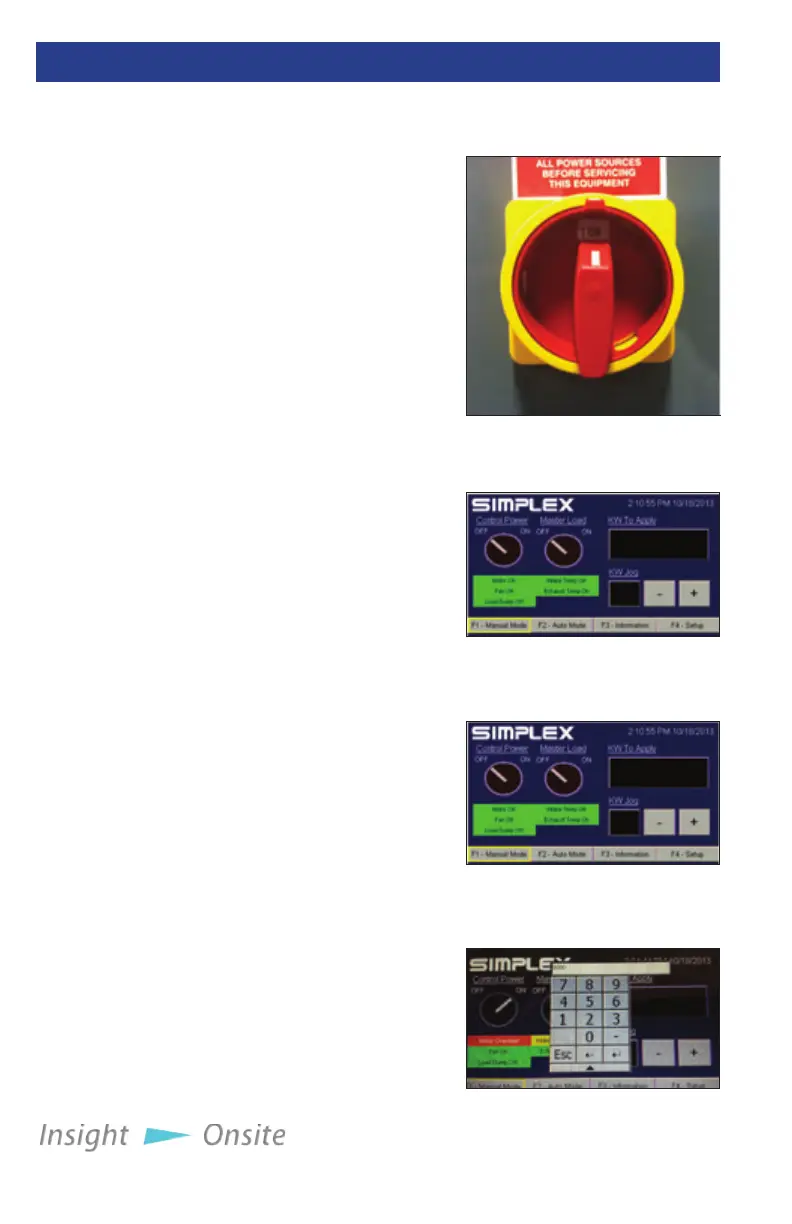
1. Start the generator or
source being tested.
2. Ensure the load bank’s
Fan/Control Power
Disconnect Switch,
located on the unit’s door,
is in the on position (see
Figure 21 Fan/Control
Power Disconnect
Switch.)
3. Check the load bank’s
intake areas, located on
the bottom of the unit, to
ensure that the vents are
not blocked by paper or
other debris that would
prevent the cooling fan
from pulling in air.
4. On the HMI, turn on the
load bank by pressing the
Control Power button in
the upper le corner of
the screen (see Figure 22
Control Power Button.)
5. Listen to the load
bank’s fan to ensure it is
operating normally.
When the fan is running
properly, you are ready to
begin testing.
Press the F1 function
key or “F1 - Manual Mode”
on the screen to bring up
Manual Mode (See Figure
23 HMI - Manual Mode). In
the upper right area of this
screen is a display indicating
the load to be applied,
measured in kilowatts. To
change this value, touch the
pre-operation
CHeCkS
Saturn load
banks feature
a power
outlet in the
control panel
for your use.
This outlet is
limited to 2
amps.
Setting up tHe
teSt
Figure 21 Control Power
Button
Figure 22 HMI - Manual
Mode
Figure 23 HMI -
Numeric keypad
Figure 20 Fan/Control
Power Disconnect Switch


 To Next Page