Automac Mode — 19
7 AUTOMATIC MODE
e Saturn load bank can
be equipped with an optional
automatic mode, which will
extend your generator’s life
by protecting it against wet-
stacking and reverse current.
Automatic Mode adds
load when the load bank
detects that your generator
isn’t operating in its optimal
range.
When your load bank
is installed, a set of current
transformers will be installed
on your generator’s power
lines to monitor the load on
your system. When the load bank detects that the power draw
has fallen below a preset range, it begins adding load until the
draw on the generator is within the designated range. Should the
load bank determine that the power draw has increased beyond
overview
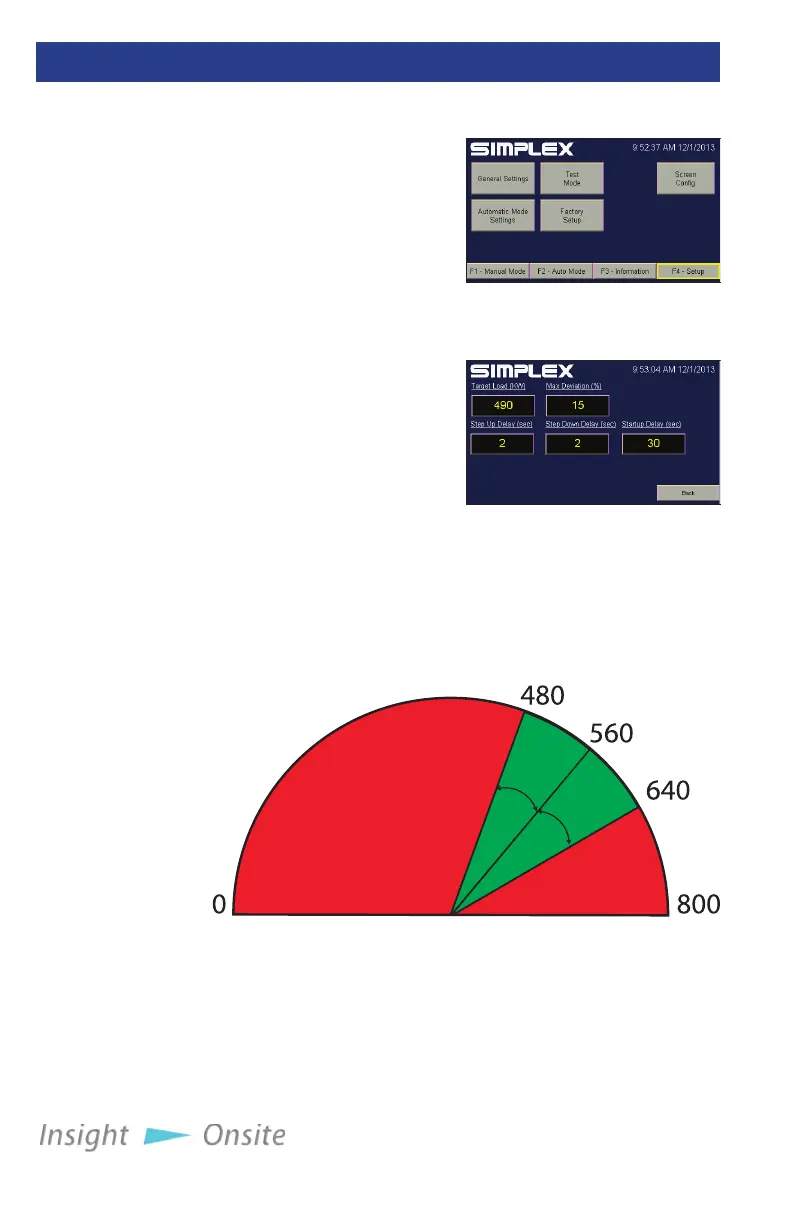
Figure 26 Setup Screen
10%
10%
Figure 28 Automatic/Regenerative Mode
In this illustration, the load bank has been set up for an
800KW generator. e Target Load is set at 560KW, with 10%
Max Deviation. So long as the load remains in the green area,
the load bank will not add or drop load. But if the load moves
into the red area, the load bank will adjust the load to move it
back into the green.
Figure 27 Automatic
Mode Setup


 To Next Page