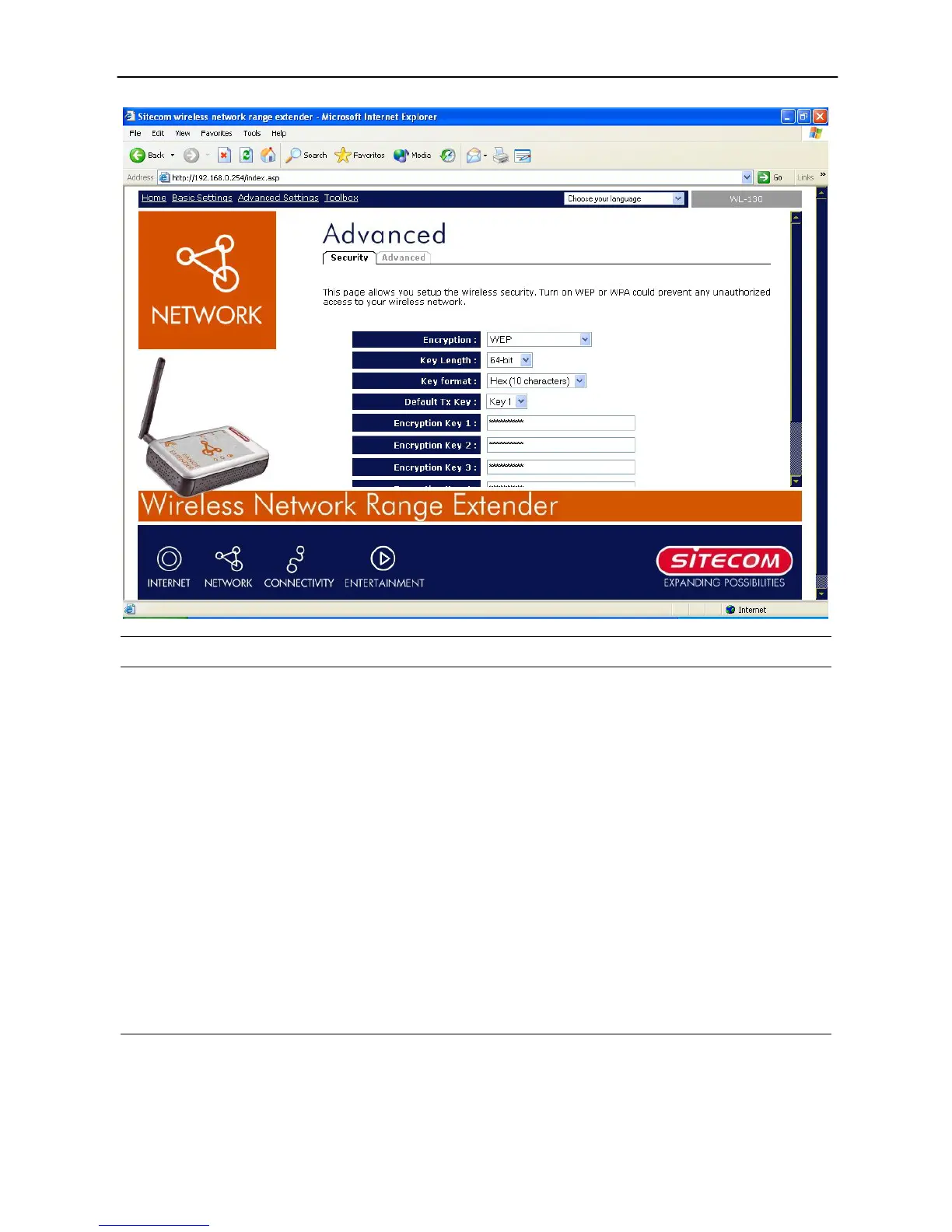
Wireless Range Extender (WL-130) Configuration
18
Parameter Description
Key Length
You can select the 64 or 128-bit key to encrypt transmitted
data. Larger WEP key length will provide higher level of
security, but the throughput will be lower.
Key Format
You may select to select ASCII Characters (alphanumeric
format) or Hexadecimal Digits (in the “A-F”, “a-f” and “0-9”
range) to be the WEP Key. For example:
ASCII Characters: guest
Hexadecimal Digits: 12345abcde
Default Tx Key
Select one of the four keys to encrypt your data. Only the key
you select it in the “Default key” will take effect.
Key 1 - Key 4
The WEP keys are used to encrypt data transmitted in the
wireless network. Fill the text box by following the rules below.
64-bit WEP: input 10-digit Hex values (in the “A-F”, “a-f” and
“0-9” range) or 5-digit ASCII character as the encryption keys.
128-bit WEP: input 26-digit Hex values (in the “A-F”, “a-f” and
“0-9” range) or 10-digit ASCII characters as the encryption
keys.
Click the Apply button at the bottom of the screen to save the above configurations. You can
now configure other advance sections or start using the Access Point.



 To Next Page