Wireless Range Extender (WL-130) Configuration
22
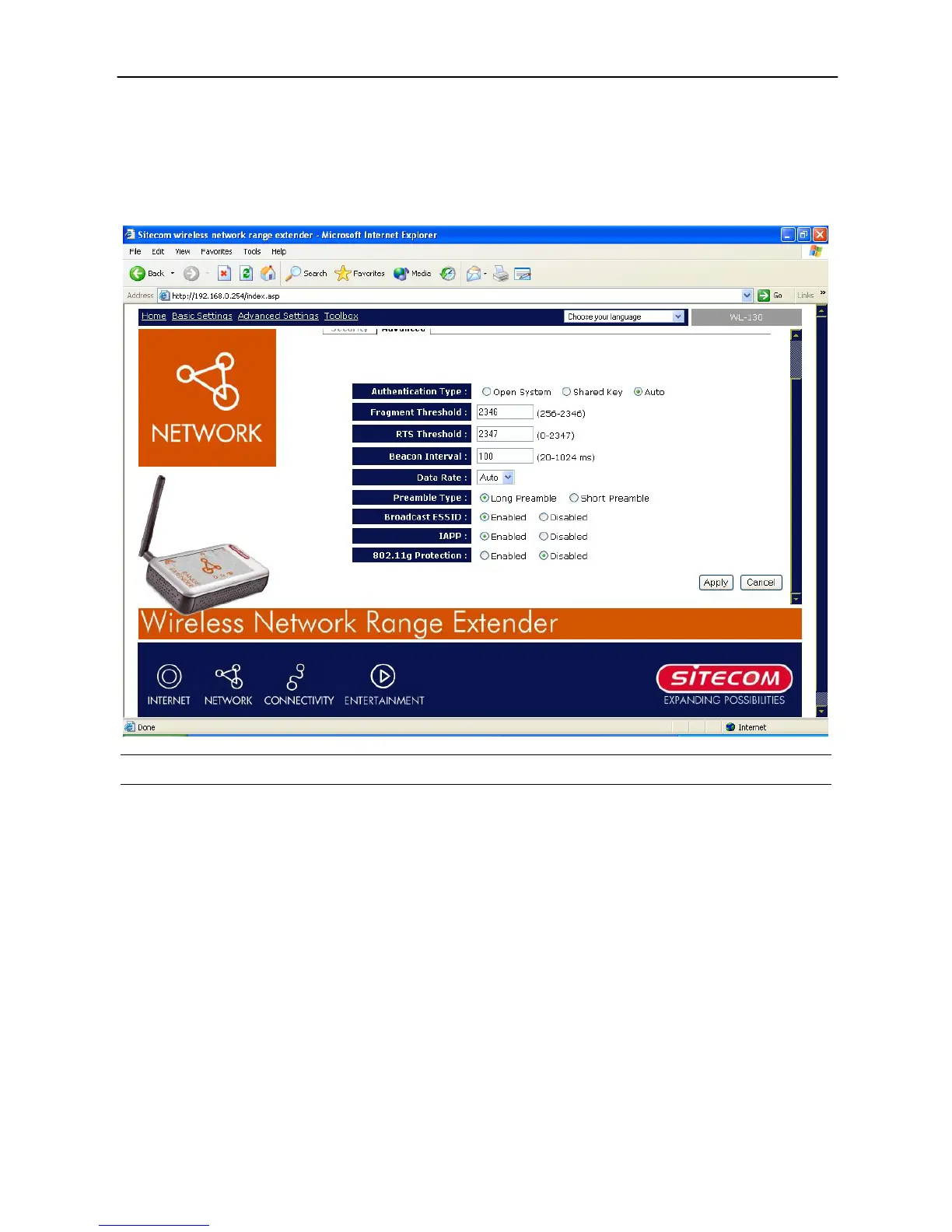
Advanced Setting
You can set advanced parameters of this access point. The parameters include Authentication
Type, Fragment Threshold, RTS Threshold, Beacon Interval, Tx Operation Rate, Tx Basic Rate,
Preamble Type, Broadcast ESSID. You should not change these parameters unless you know
what effect the changes will.
Parameter Description
Authentication Type
There are two authentication types: “Open System” and
“Shared Key”. When you select “Open System”, wireless
stations can associate with this access point without WEP
encryption. When you select “Shared Key”, you should also
setup WEP key in the “Encryption” page and wireless stations
should use WEP encryption in the authentication phase to
associate with this access point. If you select “Auto”, the
wireless client can associate with this access point by using any
one of these two authentication types.
Fragment Threshold
“Fragment Threshold” specifies the maximum size of packet
during the fragmentation of data to be transmitted. If you set
this value too low, it will result in bad performance.
RTS Threshold
When the packet size is smaller than the RTS threshold, the
access point will not use the RTS/CTS mechanism to send this
packet.



 To Next Page