Device Installation
5-2
5.2 Connection with Imaging Device
The image detector that can be used with the SR-8230s shall comply with the following
basic requirements:
Min. acceptable requirement of X-ray
range
40kV-125kV
Image Sensor a-Si (Amorphous Silicon) TFT
Min. Effective Array 2304 x 2800
Min. Effective Area (H x V) 343 x 416 mm
Software Configured with basic test imaging tools
for image acquisition and display.
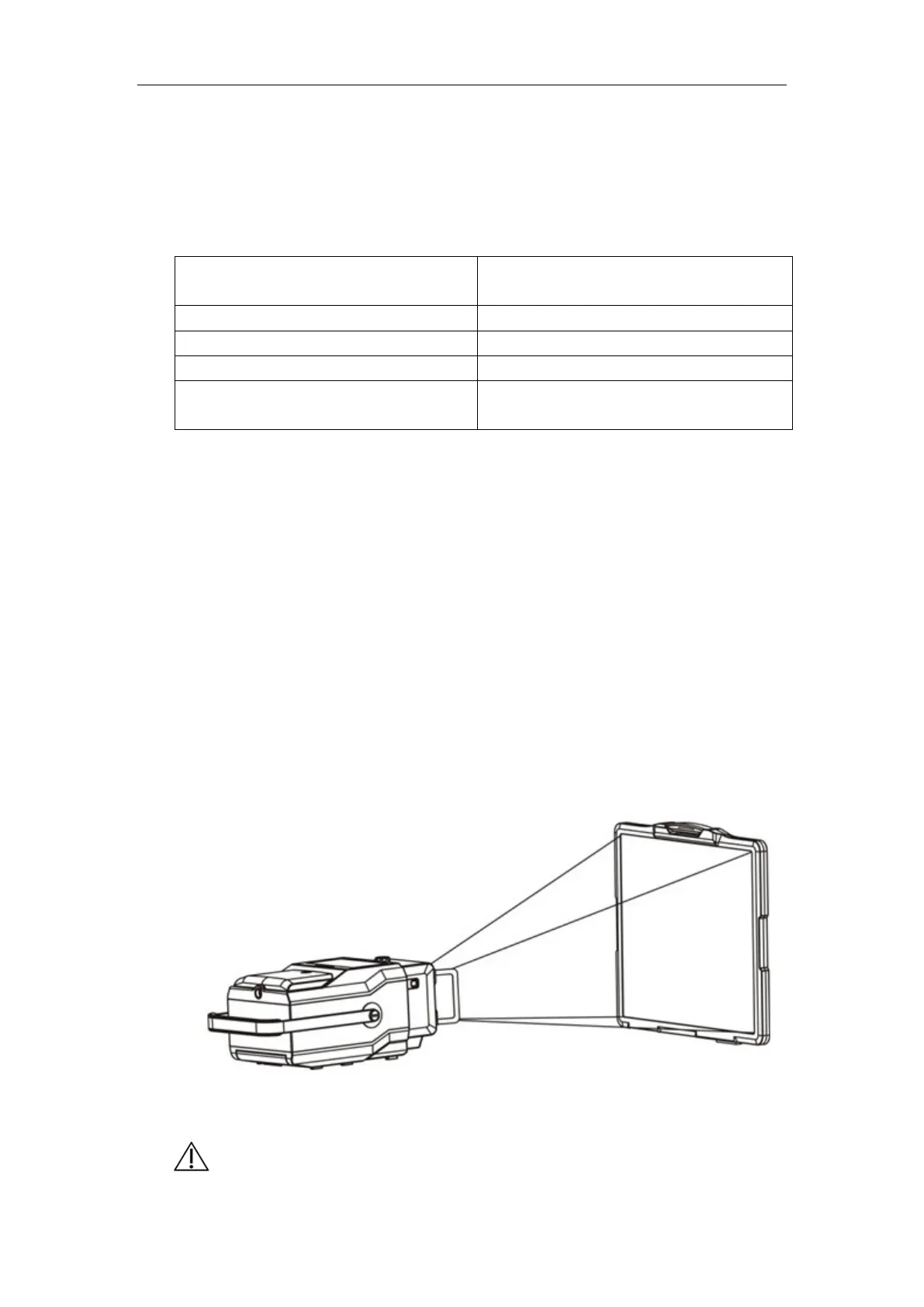
The X-ray digital detector is located at a distance of 1.2m from the front of the portable
X-ray machine, and the distance can be confirmed by the ruler below the collimator of
the portable X-ray machine. There should be no other object blocked between the X-ray
digital detector and the collimator of the portable X-ray machine. Press the button and
light up the collimator light of the portable X-ray machine, then use the two knobs of the
collimator to adjust the light field projected on the X-ray digital detector, enabling the
light field covers the valid receiving area of the X-ray digital detector (see Fig. 5-2), and
ensure that the cross at the collimator light field center coincides with the central cross of
the X-ray digital detector.
Fig. 5-2
Caution: When using this device to connect a digital flat panel detector, first


 To Next Page