19
SKF TKTI 21 & 31
4.2.3 Setup
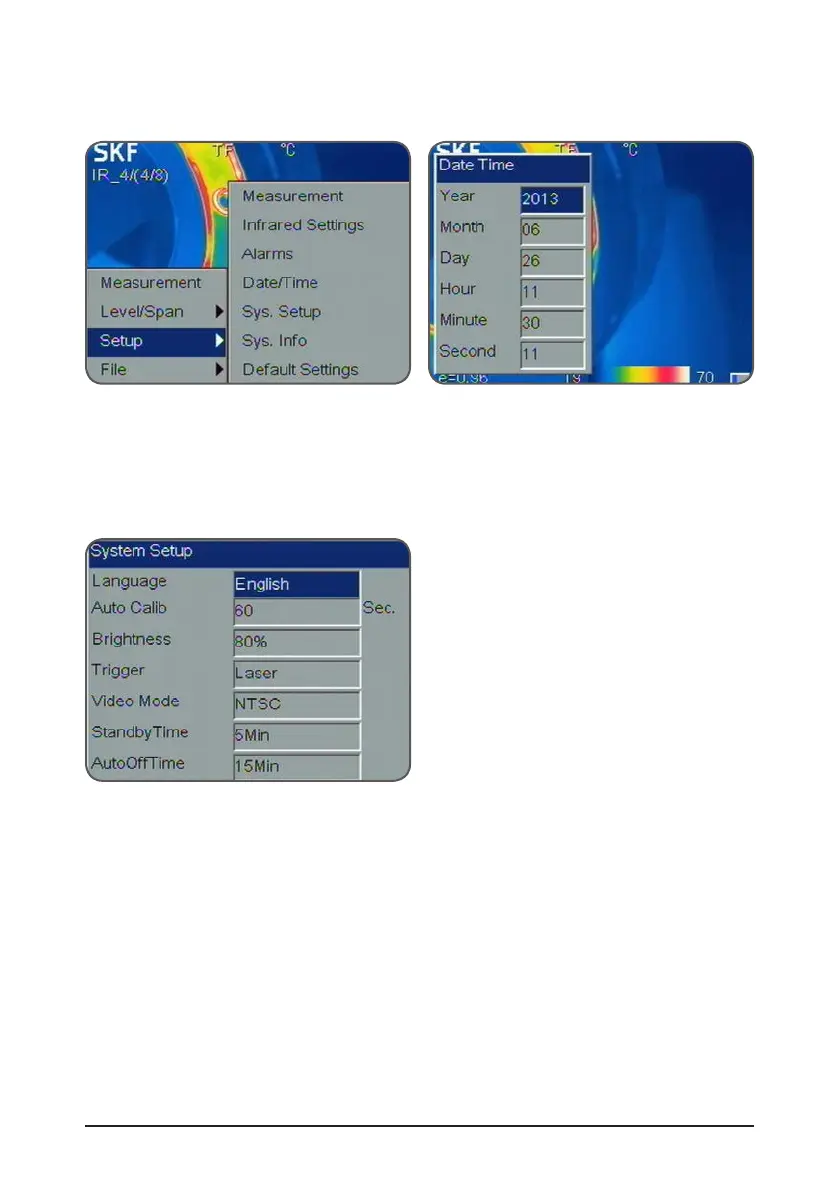
Access the setup menus by pressing the Menu button and select Setup.
Figure 18 setup menu Figure 19 Date and time setup
4.2.3.1 Date/Time setup
Select Setup->Date/Time to open the Date/Time dialog box. The user can set the Year,
Month, Day, Hour, Minute and Second. Press Okay to validate or C to cancel.
4.2.3.2 System setup
Figure 20 System Setup
Press Menu button and select Setup->Sys. Setup and press the Okay button to open the
System Setup dialog box.
Use the navigation pad to modify each setting.
Press the Okay button to validate or C to cancel.
The user can modify the following parameter:
• Language: English, Spanish, French, German, Italian, Portuguese, Korean, Japanese,
Russian, Simplified Chinese and Traditional Chinese.
• Auto Calibration: Select Auto Calibration and press the right button on the navigation
pad, the Auto Calib dialogue box will pop up.
The user can select 3 different modes: long, short or customize.



 To Next Page