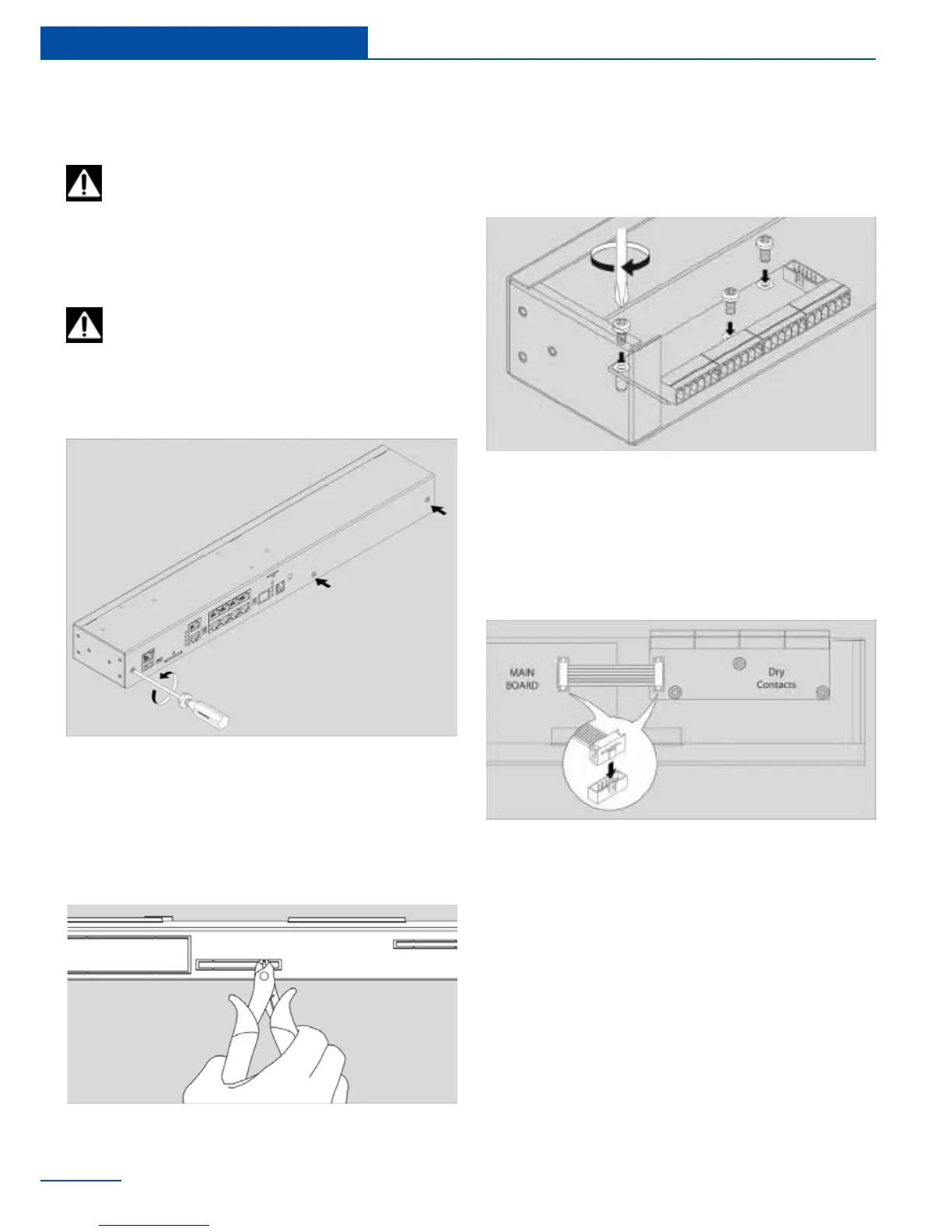
Installation of Dry Contacts
module
1 Carefully unscrew three screws holding the
cover and open it.
Disconnect device power cable.
2 Break 6 steel bridges in the dry contacts
hole of the appliance case. Using forceps
(cutter) with thin nozzles cut the thin
bridges in the hole. Make sure that no
burrs are left.
1
2
3
4
3 Set up dry contacts module on 3 steel
spacing sleeves inside the appliance case,
attach the board with three M3 screws
from supply to the sleeves.
4 Connect “16 wire BH16 at cable” sup-
plied with “dry contacts” module to the
connector on the module card and on the
appliance motherboard. Close and fasten
the cover.
5 Check if all the cables are connected.
Carefully place top cover back so that
all cover wings t in and all cutoff points
match the panel holes. Then use 3 screws
to close the enclosure. Check whether the
burrs prevent dry contact module from
being inserted into the hole, remove them
if needed.
22
Installation
Antenna, GSM or Dry Contacts module
can be already installed inside. Carefully
open the box by unplugging, if necessary, any
cables that are connected from top cover to
bottom cover.



 To Next Page