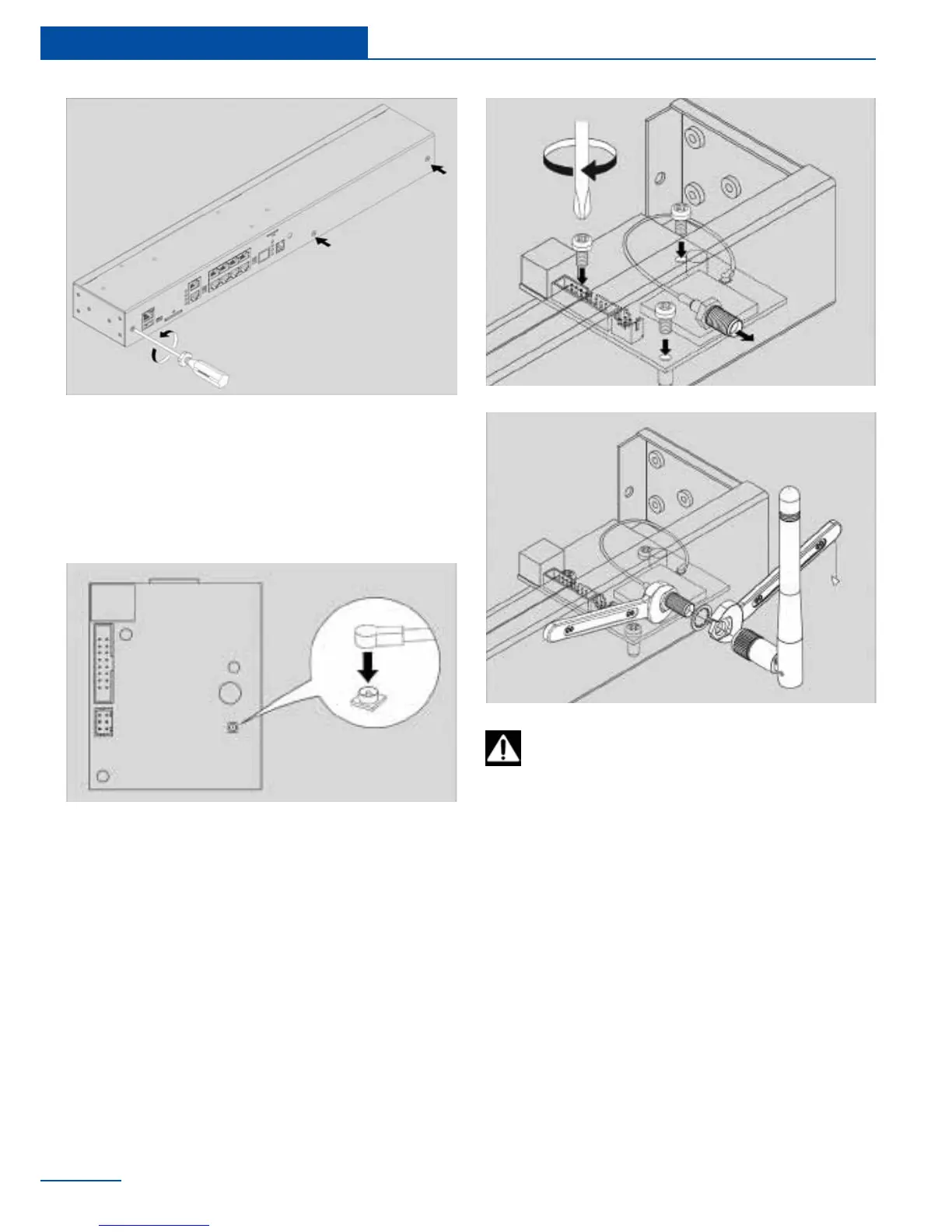
2 Connect antenna cable to the modem
board. Carefully connect the U-Fl antenna
cable to the input U-FL connector and gen-
tly press it. If possible install the connector
on the seat with a magnifying glass!
3 Set up the GSM modem card on 3 steel
spacing sleeves on the cover, attach card
to the sleeves using three M3 screws sup-
plied with the modem.
1
2
4 Set the SMA connector antenna cable to
the rear or to the front panel of the appli-
ance into the corresponding SMA hole. Put
on the SMA connector gold-plated washer
and nut from the supply, holding SMA con-
nector with one key, securely tighten the
nut with the other key.
5 Connect 16-pin at cable to the connectors
on the modem card and on the appliance
motherboard. Close and fasten the cover.
If necessary, install the SIM card into the
appropriate hole.
3
4
6 Carefully place top cover back so that all
the enclosure. When installing the green
dry contact connectors can go tight, check
the burrs and remove them with rasp!
24
Installation
Do not tighten SMA connector with one
key, you can break the cable and the con-
nection would be lost!



 To Next Page