SECTION 5, Page 8 SJ-800 Series E Battery Powered
119153
Proximity Switch Replacement And Adjustment Procedure
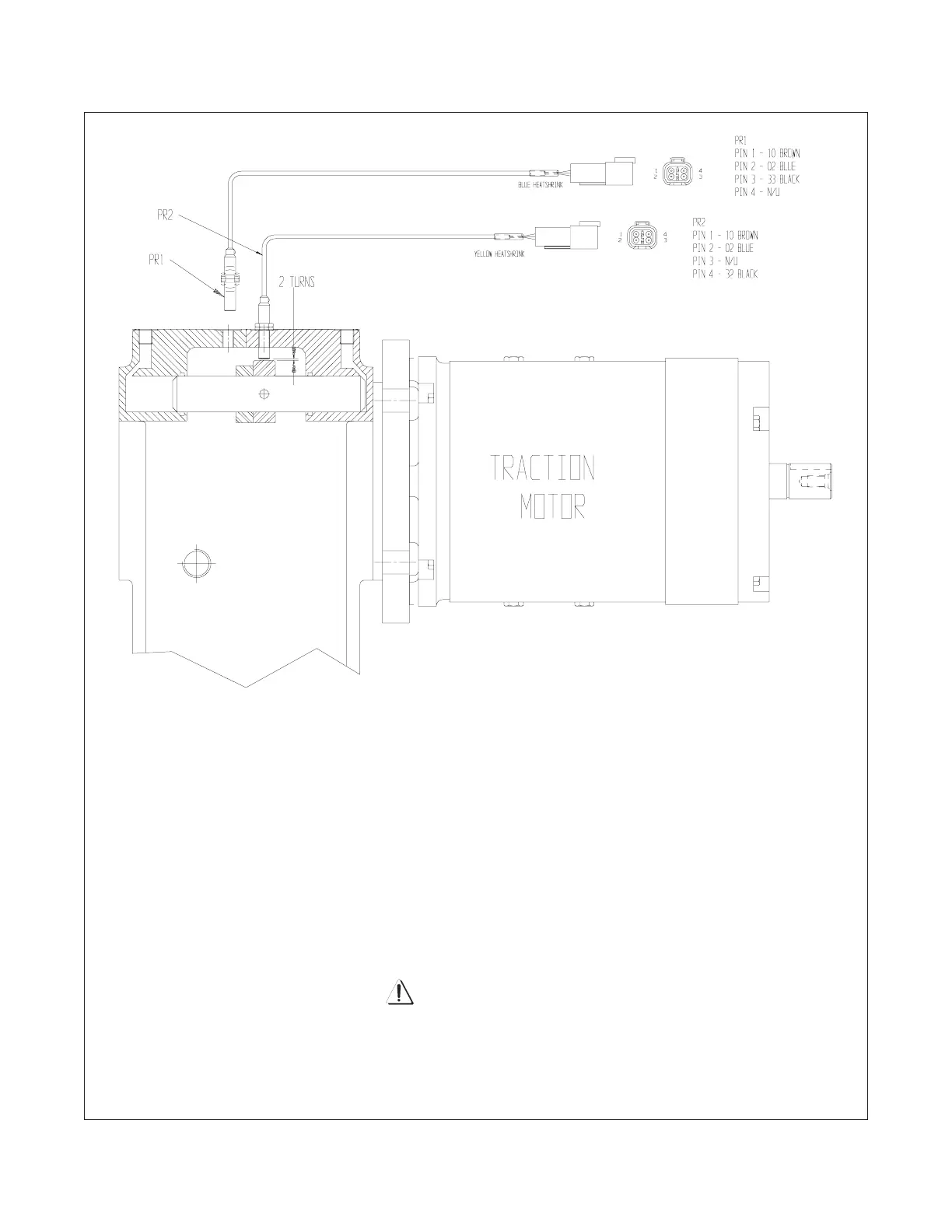
Figure 5-3. Traction Motor/Lift Pump Proximity Switch Location
1. To replace a proximity switch. First select either: lift mode to replace the PR2 proximity switch or traction
mode to replace the PR1 proximity switch.
2. Disconnect the main battery disconnect plug.
3. Unplug the connector for the electrical wiring to the proximity switch you want to replace.
4. Back off the lock nut and remove the proximity switch from the gearbox.
5. To install the new proximity switch turn the switch in until it bottoms out. NOTE: There should be threads
of the proximity switch showing when it bottoms out. Then back off the switch two full turns. This insures
the switch is set at the proper distance from it’s sensing surface of 2mm.
6. Tighten the lock nut down while holding the proximity switch in it’s adjusted position.
7. Reconnect the connector for the electrical wiring to the proximity switch.
8. Reconnect the main battery disconnect plug.
Make sure the correct proximity switch is adjusted.
If the switch you are adjusting does not match the selected mode you will damage the component.
WARNING



 To Next Page