18
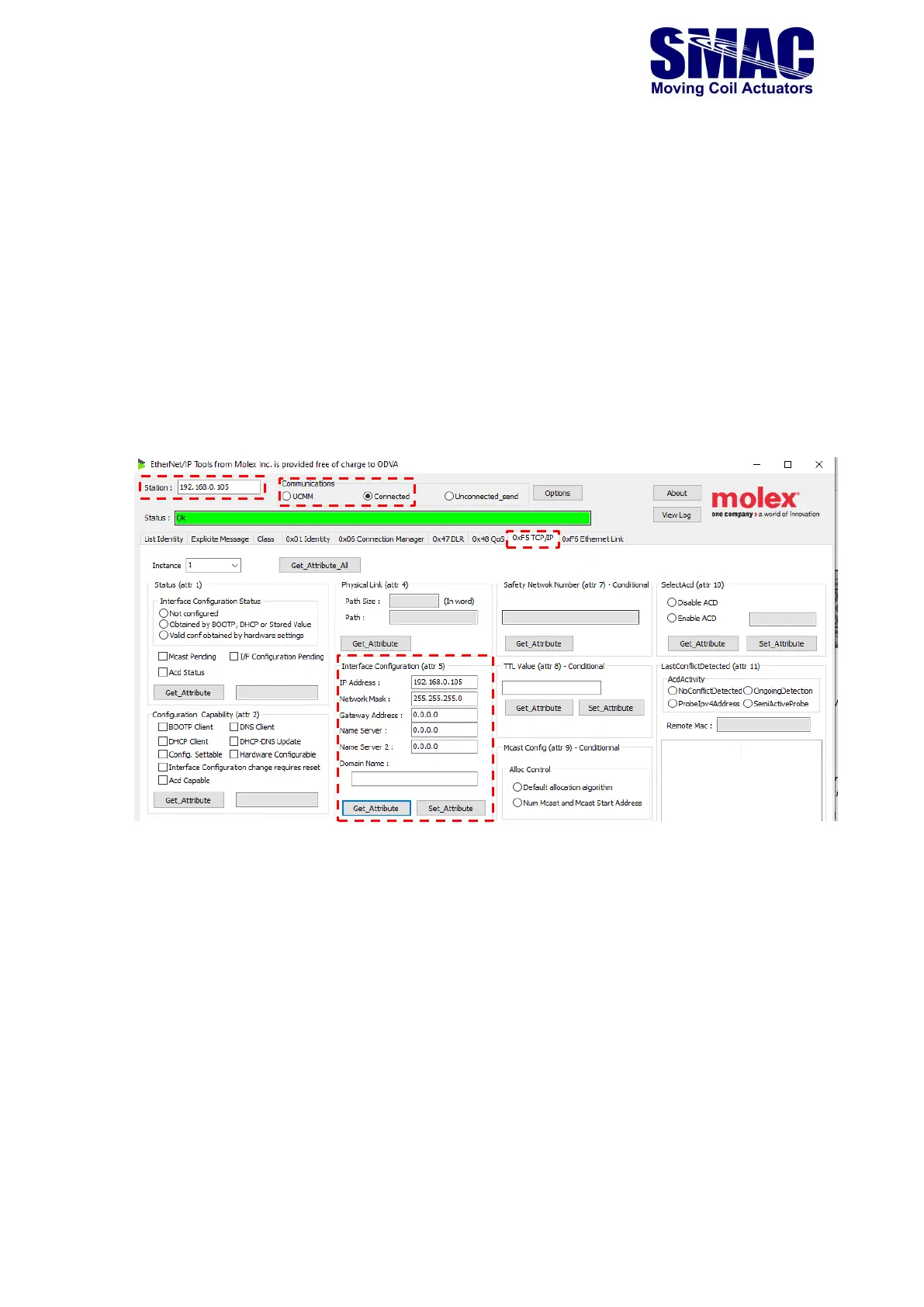
Users could use a free Ethernet/IP explicit messaging software such as Molex EIPTool to perform
the IP settings modification. The steps are as follow:
• Set the PC’s IP address to 192.168.0.1
• Open the Molex EIPTool software.
• Refer to the figure below and perform the following
o Set the station to: 192.168.0.105
o Set the Communications to either UCMM or Connected. Select the 0xF5 TCP/IP
tab.
o Click on Get_Attribute of the Interface Configuration (attr 5). This will show the
default IP settings of Table 2.1.
o Change the parameters of the Interface Configuration (attr 5) as required and
click on Set_Attribute.
o The newly set parameters (IP settings) will be applied after power cycling the
VLC-1-EIP.
2.2.3 Connecting VLC-2-EIP to an Ethernet/IP network (with a Studio 5000 example)
The VLC-2-EIP is ready to be connected to an Ethernet/IP network, provided the following
conditions are met
• System macros have been loaded and saved in the VLC
• The RS232 cable is disconnected from the RS232 port (J6) and after that, the VLC-EIP-
25 is power-cycled.



 To Next Page