SMART LightRaise Installation and User's Guide 41
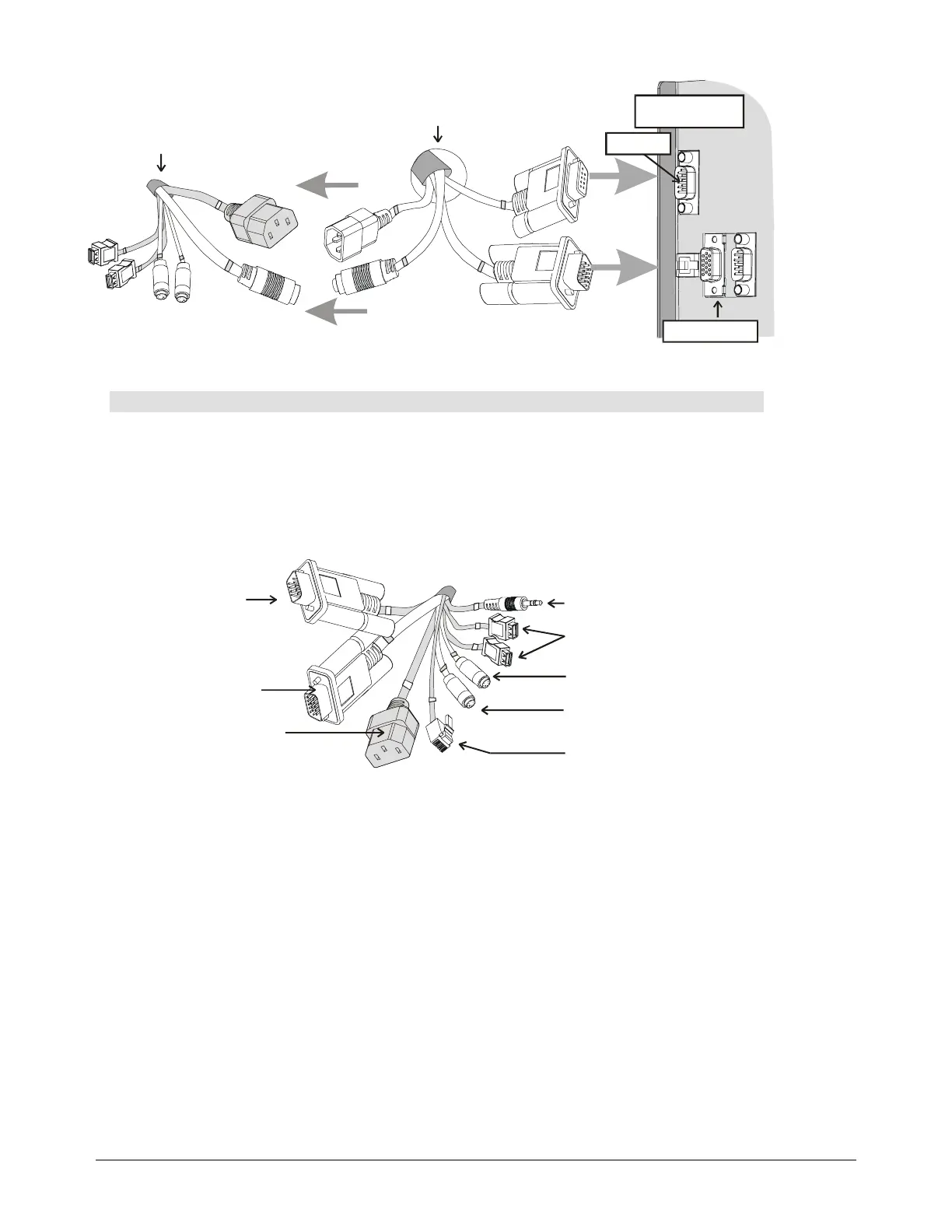
Cable Bundle on Left
Side of Console
Boom Cable Bundle
DB9 Port
Control System
inside Console
Projector Video (V01)
Projector Control (C01)
SMART Board Serial (C02)
HD15 Port
To install and connect the internal computer:
NOTE:
SMART Board software can be loaded on the computer before the computer is
installed in the LightRaise console.
1
Place your computer inside the console.
NOTE:
Don't use the cables that come with your computer. Instead, use the internal
computer cables that are bundled on the left side of the console.
USB Cables (Labeled
C06 and C07)
Power Cable
Extension
(Labeled P03)
PS/2 Mouse Cable
(Labeled C05)
Network Cable
(Labeled C11)
3.5 mm Audio Cable
(Labeled A01)
HD15
Connector
(Labeled V04)
DB9 Connector
(Labeled C03)
PS/2 Keyboard Cable
(Labeled C04)
3
6
4
2
7
6
6
8
2
Connect the DB9 (C03) connector to the computer's COM port.
3
Connect the HD15 (V04) connector to the computer's monitor port.
4
Connect the 3.5 mm (A01) audio cable to the computer's audio port.
5
Feed the supplied IR receiver's cable through a convenient cable grommet. If you choose
not to use the supplied wireless keyboard and mouse, feed your connected keyboard and
mouse cables through a convenient cable grommet.
6
Connect one PS/2 (C04) cable to the keyboard port and the other PS/2 (C05) cable to the
mouse port on the computer. Plug the other end of these cables, included in the bundle at
the top of the console, into the IR receiver cable's keyboard and mouse connectors.
NOTE:
The supplied keyboard has PS/2 connectors for both mouse and keyboard. If
you're using a connected keyboard, confirm that the keyboard cable is connected to the
keyboard port on the computer and that the mouse cable is connected to the mouse port.
Alternatively, use the USB cables (C06 and C07) to your computer's USB port.



 To Next Page