Rev 0.0 5
USER INSTRUCTIONS
EN
2
DESCRIPTION AND USE OF THE CONTROLS
2.1 Upper panel
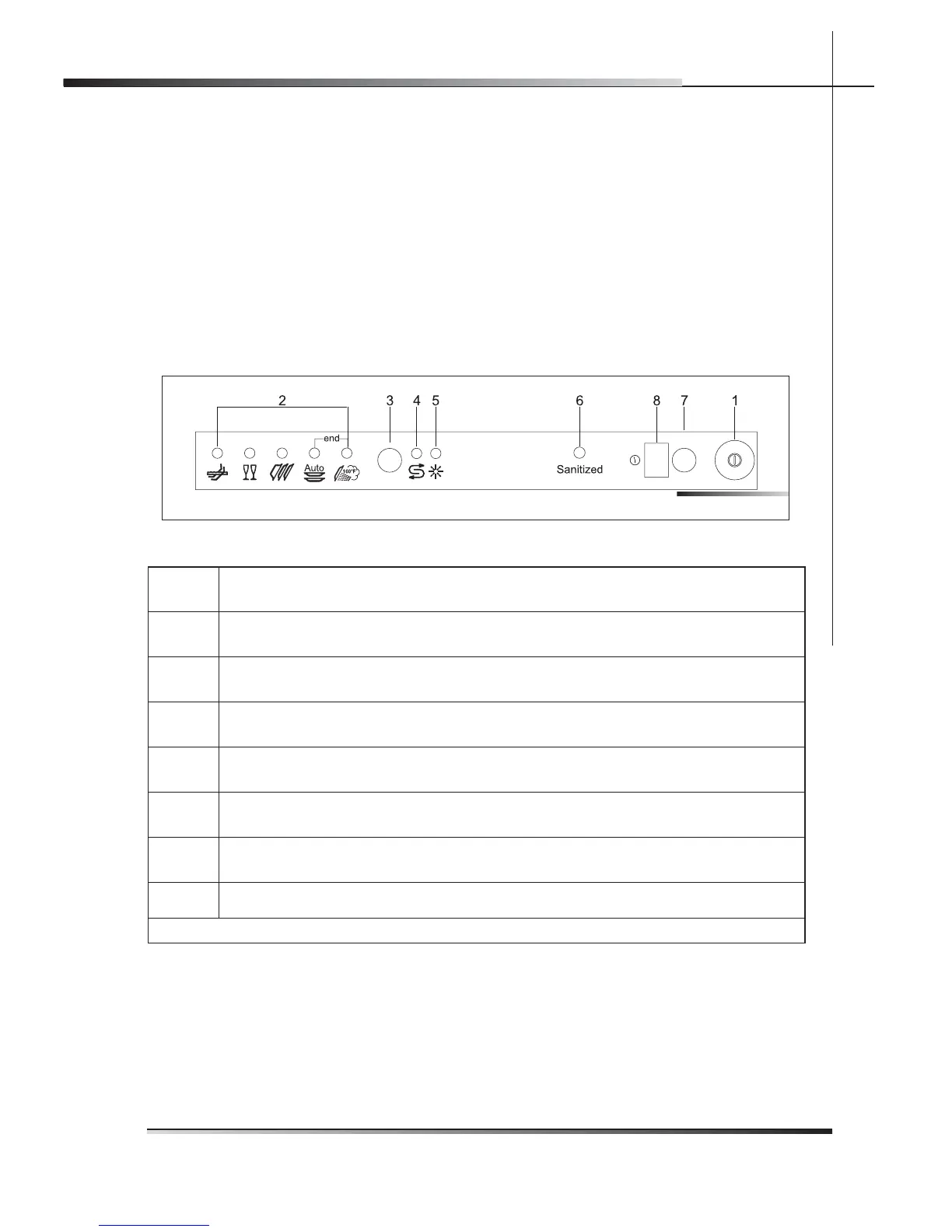
All the dishwasher controls are grouped on the upper panel (see fi g. 2-01). The
dishwasher can only be switched on, programmed, switched off, etc. with the
door open.
A brief description (see tab. 2-01) of the various controls on the upper panel is
given below.
1
On/off button
Press to power the appliance.
2
Program indicator lights
These show which program is selected and whether there are any faults (troubleshooting).
3
Program selection button
Press in sequence to select the required program.
4
Add salt indicator light (only fi tted on some models)
Shows the appliance has run out of salt.
5
Add rinse-aid indicator light (only fi tted on some models)
Shows the appliance has run out of rinse-aid.
6
Sanitation indicator light
Shows the function is active.
7
Program delay button (only fi tted on some models)
Press to delay the start of the program up to 9 hours.
8
Display (only fi tted on some models)
Tab. 2-01
Fig. 2-01


 To Next Page