12 1061526 Rev. C VULCAN™ Generator Operations/Service Manual
Operational Modes / Power Delivery Modes
Operational Modes
Power Up
When the AC power to the generator control unit is
turned on using the power switch on the rear panel,
the generator performs a series of system self-tests
to determine if it is performing properly. The self-tests
include:
ROM checksum
RAM test
Temperature measurement calibration test
RF system test
Display segments and indicators test
If any of the system self-tests fail, the FAULT indicator
on the front panel is illuminated and a continuous
tone sounds. Contact Smith & Nephew if any system
self-test fails.
WARNING: Failure of the radiofrequency
surgical equipment could result in
unintended increase of output power.
Stand-By Mode
Immediately after performing the self-test, the
generator will default to Stand-By Mode. All of the
displays on the front panel will be blanked, and the
generator control unit will not be able to deliver RF
power while it is in Stand-By Mode.
Fault Mode
If a fault is detected at any time during the generator
control unit’s operation, the FAULT indicator light will
illuminate, an alarm will sound, an error code and text
message will be displayed in the message display,
and the generator will enter the Fault Mode. RF
energy cannot be delivered and the control unit must
be powered down then powered up again to exit from
Fault Mode.
Power Delivery Modes
Temperature Control Mode
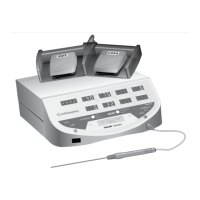
If the MODE button is pressed once while the
generator is in Stand-By Mode or if a temperature
controlled probe is connected to the generator, the
generator will enter the Temperature Control Mode.
In Temperature Control Mode, the Smith & Nephew
VULCAN™ Generator software automatically adjusts
energy delivery to maintain the tissue temperature
indicated in the SET TEMP display. Only monopolar
temperature-controlled probes may be used in
Temperature Control Mode.
All Smith & Nephew probes are equipped with a
sensor that enables the generator control unit to
detect the type of probe connected. When a probe is
connected, the Smith & Nephew VULCAN Generator
software will read the sensor and automatically adjust
power output and temperature parameters to the
preprogrammed settings for the probe type.
If a probe is not detected, the generator control
unit will default to PRESET “1”, and the SET POWER
and SET TEMP displays will show the power and
temperature values corresponding to this setting.
Power Control Mode
The generator enters Power Control Mode if the
MODE button is pressed once while the unit is
in Temperature Control Mode, or twice while in
Stand-By Mode, or if a cutting or ablation probe is
connected to the control unit.
The user may change the type and amount of
power delivered by adjusting SET CUT (inactive for
ELECTROBLADE™ Resector) or SET COAG (inactive for
GLIDER Articular Cartilage Probe).
All Smith & Nephew probes are equipped with a
sensor that enables the generator control unit to
detect the type of probe connected. When a probe is
connected, the Smith & Nephew VULCAN Generator
software will read the sensor and automatically adjust
parameters to the preprogrammed settings for the
probe type.
If a probe is not detected, the generator control unit
will default to PRESET “10”, and the SET CUT and
SET COAG displays will show the SET CUT and SET
COAG values corresponding to this setting.



 To Next Page