231061526 Rev. CVULCAN™ Generator Operations/Service Manual
Troubleshooting (continued)
Condition Possible Remedy
“OP” in the Temperature
display.
1. Ensure probe is connected properly (see “Preoperative Setup” section for
connection details).
2. With probe attached, flex the cable near the generator control unit and probe end
connections. If “OP” changes to a temperature reading, replace the cable.
3. If “OP” is still displayed after flexing the cable, replace the probe.
No indicators or
read-outs are displayed
when the control unit is
turned on.
1. Be sure the control unit is plugged into a working electrical outlet and the power
switch at the rear of the unit is turned on.
2. Unplug the control unit and inspect the integrity of the fuses in the rear panel.
Fuses should only be replaced with those of the same type and rating according
to the label on the rear of the unit or the “Technical Specifications” section.
RF power does not turn
on when footswitch is
pressed.
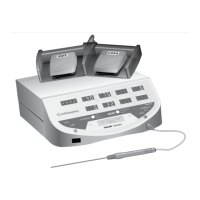
1. Verify that the footswitch is properly connected to the back of the control unit.
2. Verify that only one of the two footswitches is activated.
3. In Temperature Control Mode, only the blue COAG (right) footswitch is active.
Verify that the blue COAG footswitch is the one in use.
4. In Temperature Control Mode, verify that a temperature-controlled probe is in
use.
5. Compare SET TEMP to TEMPERATURE. If TEMPERATURE is not close to
SET TEMP, the thermocouple in the probe may be defective. RF delivery is
disabled in this condition.
FAULT indicator light
stays on and the
generator emits a
continuous tone.
Turn control unit off and back on. If light stays on, contact Smith & Nephew.*
RF interferes with other
equipment.
1. Ensure the probe or neutral electrode cables do not cross the cables from the
affected equipment. Changing the settings on the affected equipment may
alleviate interference.
2. Plug the affected equipment into a separate power outlet.
Delivered power
displayed on the
ACTUAL PWR readout
will not go above
5 watts.
1. If IMPEDANCE reading is 40 ohms or lower (20 ohms depending on probe), ensure
that the probe tip is NOT in contact with any metal conductor or instrument.
2. Turn the control unit off and back on. If issue does not resolve itself, the control unit
may need repair. Contact Smith & Nephew.*
Temperature reads “OP”
and a temperature-
controlled probe is
being used.
1. Ensure that the control unit is in Temperature Control Mode.
2. Ensure that the probe extension cable is properly plugged into the jack and that
the probe is properly plugged into the other end of the cable (the white markers
should line-up and there should be a positive click).
3. lf steps 1–2 do not solve the problem, replace the extension cable.
4. If step 3 does not solve the problem, replace the probe.
*Call Smith & Nephew Technical Support at 1-800-343-5717 in the U.S., or your local Smith & Nephew representative.
Observed Problems (continued)



 To Next Page