Mx37y_Technical_Description_ENG_v2.00.doc
27
─ Single- and three-phase electronic meters with built-in DLC
modem, GSM/GPRS modem or RS485 comm. interface
5.8. Historic reading of G-meter
Meter reading for analysis, for reference, for disputes
on invoices and to enable recovery of lost data, both
billing and scheduled readings.
5.9. Device status
During its operation, the meter performs tests of
individual functions, and in case of an error it creates
the “Self-Test Error” event.
The detected errors are represented with FF flag on
the LCD display. A corresponding error bit in the FF
register is set and an error event is recorded in event
log. The FF register is 32 bits long. It is organized in 4
groups of errors:
• Time base errors
• Access data errors
• Checksum errors
• Other errors
LIST OF ERROR STATUSES hex
TIME BATTERY DISCHARGED 0x01000000
TIME INVALID-TIME 0x02000000
ACCESS RAM 0x00010000
ACCESS FRAM 0x00020000
ACCESS MEASURE 0x00040000
CHECKSUM ROM 0x00000100
CHECKSUM BACK UP DATA 0x00000200
CHECKSUM PARAMETERS 0x00000400
CHECKSUM RAM 0x00002000
LIST OF EVENTS IN EVENT LOG hex
FATAL ERROR 0x0001
BILLING RESET
0x0010
DEVICE CLOCK CHANGED
0x0020
POWER RETURNED
0x0040
POWER FAILURE
0x0080
EVENT LOG CLEARED
0x2000
LOAD PROFILE CLEARED
0x4000
L1 POWER FAILURE
0x8001
L2 POWER FAILURE
0x8002
L3 POWER FAILURE
0x8003
L1 POWER RETURNED
0x8004
L2 POWER RETURNED
0x8005
L3 POWER RETURNED
0x8006
METER COVER OPENED 0x8010
TERMINAL COVER OPENED 0x8011
NO CONNECTION TIMEOUT (only
DLC meters)
0x8012
PREPAY TOKEN ENTER SUCCESS 0x8013
PREPAY TOKEN ENTER FAILED 0x8014
PREPAY CREDIT EXPIRED 0x8015
PREPAY EM CREDIT EXPIRED 0x8016
PREPAY EM CREDIT ACTIVATED 0x8017
5.10. Tariff structure configuration of E-
meter
Setting of tariff structures with different combinations
of tiers and timeslots including the consumption
threshold in the meter (Activity calendar, special days
table, register activation).
5.11. Remote customer
connection/disconnection
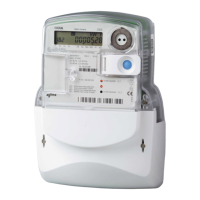
A plug-in switching device (ZO3…) is used for remote
disconnection and reconnection of electric network to
individual customers.
The meter controls the switching device via control
output or via M-Bus.
Control can be performed locally (from the meter) or
from a remote control centre using the meter AMR
communication.
5.12. Load-profile reading of E-meter
Collection of information saved in profiles of individual
customers and/or a larger number of customers.
COSEM Objects
Clock. Profile Status,
M-Bus Ch1 Result 0 – External Meter 1 Consumption,
M-Bus Ch2 Result 0 – External Meter 2 Consumption,
M-Bus Ch3 Result 0 – External Meter 3 Consumption,
M-Bus Ch4 Result 0 – External Meter 4 Consumption,
Load Profile Period 1,
Load Profile Period 2.
Load-profile period 1 is used for hourly values of
consumption and Load-profile period 2 is used for
daily values of consumption.
5.13. Load-profile reading of G-meter
Collection of information saved in profiles of individual
customers and/or a larger number of customers.
Load-profile period 1 is used for hourly values of
consumption and Load-profile period 2 is used for
daily values of consumption.
5.14. Load-profile configuration of E-
meter
Remote configuration of information saved in profiles
of individual customers and/or a larger number of
customers.
Load-profile configuration enables setting of capture
period and capture objects of Load-profile period 1
and Load-profile period 2.



 To Next Page