Mx37y_Technical_Description_ENG_v2.00.doc
19
─ Single- and three-phase electronic meters with built-in DLC
modem, GSM/GPRS modem or RS485 comm. interface
INDICATION STATUS MEANING
Lit
Indicates signal strength:
good covering with a
GSM/GPRS signal
Blinking
Bad covering with the
GSM/GPRS signal. An
external antenna is
recommended
SQ
Not Lit
Very bad or no covering
with the GSM/GPRS
signal. An external antenna
is required
REG
Lit
Indicates that the meter is
ready for telecom-
munication network
Lit
Meter data downloading or
uploading is in progress
DRO
Blinking
Data package is present in
the AMR communication
network
FF
Lit
Meter fatal error (the meter
should be dismounted and
sent to examination)
Lit
Emergency credit is
activated
EC
Blinking
When available credit
crosses the emergency
credit threshold
* If the FF code is displayed, the meter should be
dismounted from a place of measurement and sent to
an authorized repair shop or to the manufacturer for
examination.
4.5. LED
The meter is provided with two LEDs on the front
plate. One indicates active energy flow, the other
reactive energy flow. They are intended for checking
the meter accuracy. Impulse constant depends on the
meter version.
In normal meter operation mode, the LED emits pulses
with frequency that is proportional to the measured
power and is intended for the meter calibration and
testing. The LED is turned on and glows steadily if load
is lower than the meter starting current.
4.6. Push-buttons
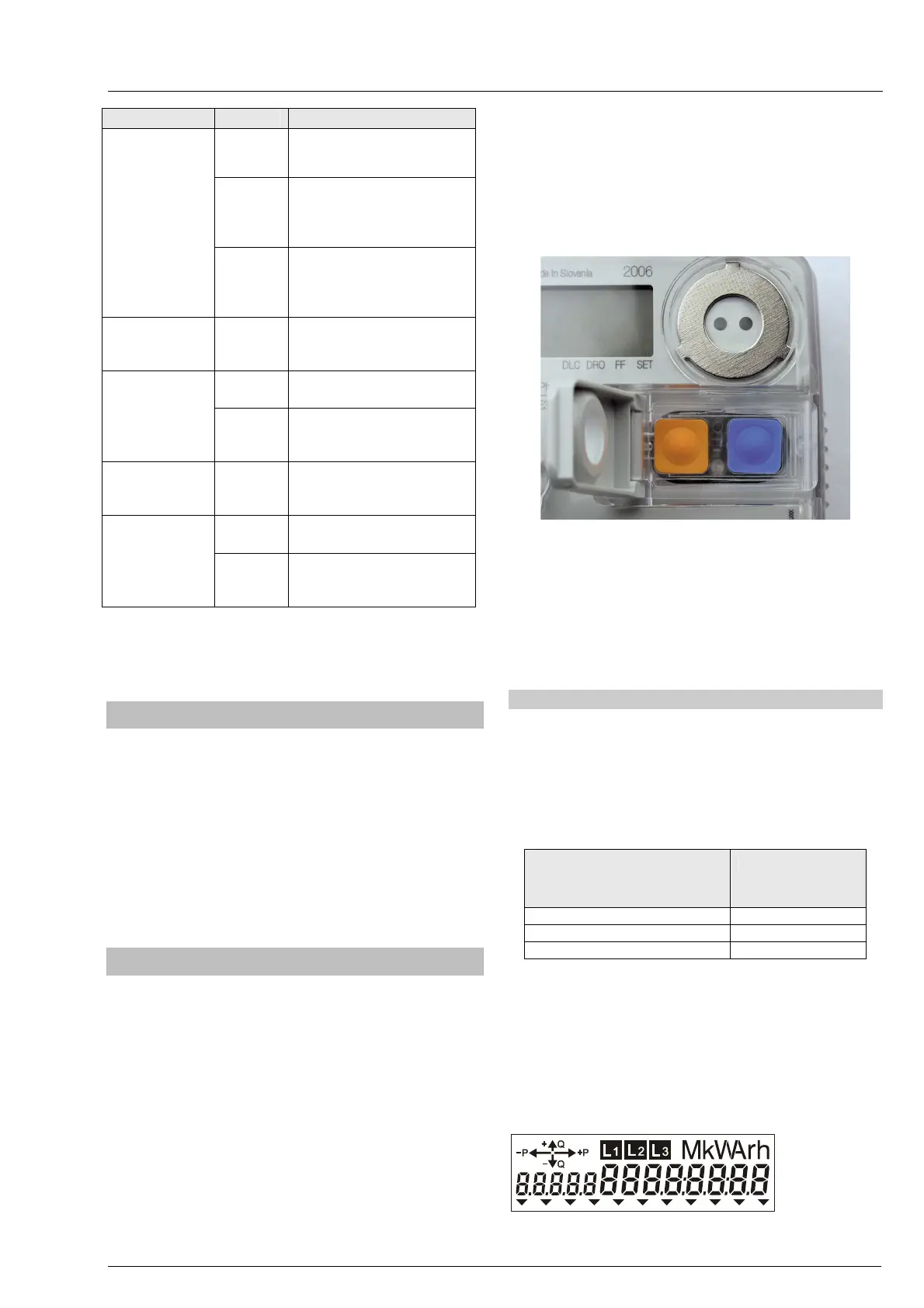
Two push-buttons are built in the cover of three-
phase meters:
• RESET – orange with a sealing option,
• SCROLL – blue.
Two push-buttons enable:
• Switching over among the meter operation
modes
• Browsing through measuring results and
adjustments
As to the duration, we distinguish three different
pressings on the push-button:
• short pressing – pressing time
shorter than 2 s,
• long pressing – pressing time
between 2 s and 5 s,
• prolonged pressing – pressing time
longer than 5 s.
Fig. 24: Push-buttons
Besides the above described push-buttons, the
meters are provided with the third one, which is built
in the PCB under the meter cover – a Param lock
switch. When unlocked, it enables to enter the meter
programming in a laboratory, and at the same time it
is used as a hardware-lock against tamper attempt.
4.6.1. RESET and SCROLL push-button
RESET push-button
Pu
sh-button functions are:
- Switching to the meter test operation mode
- Billing reset
The push-button can be locked by a seal.
DURATION OF PRESSING
ON THE PUSH-BUTTON TP
[S]
COMMAND
0.2 < Tp < 2 BILLING RESET
2 < Tp < 5 MENU
5 > Tp RESET
Billing reset by pressing the RESET push-button is
active only in AUTOSCROLL mode.
SCROLL push-button
Push-button functions are:
- LCD display test
The LCD should be tested in order to check if all its
segments are in order.



 To Next Page