Mx37y_Technical_Description_ENG_v2.00.doc
22
─ Single- and three-phase electronic meters with built-in DLC
modem, GSM/GPRS modem or RS485 comm. interface
Display Test
t = 6 s
0-0:21.0.2
N
0-0:21.0.1
Display registers
Display Test
60 s no activity
Connect
Enter
Credit
Credit
Disconnect
SD Off
SD On
Credit
first time ?
EC SEL
Release Scroll key
Credit
Disconnect
Y
N
SD==Off
SD mode
Y
N
on
off
Y
START
Scroll key hold > 8s
LEGEND:
Scroll key released and
pressed again
SKH
Scroll key hold
SKH
SKH
SKH
SKH
SKH
SKH
SKH
SKH
SKH
SCMD
Scroll command
SCMD
SCMD
SCMD
SCMD
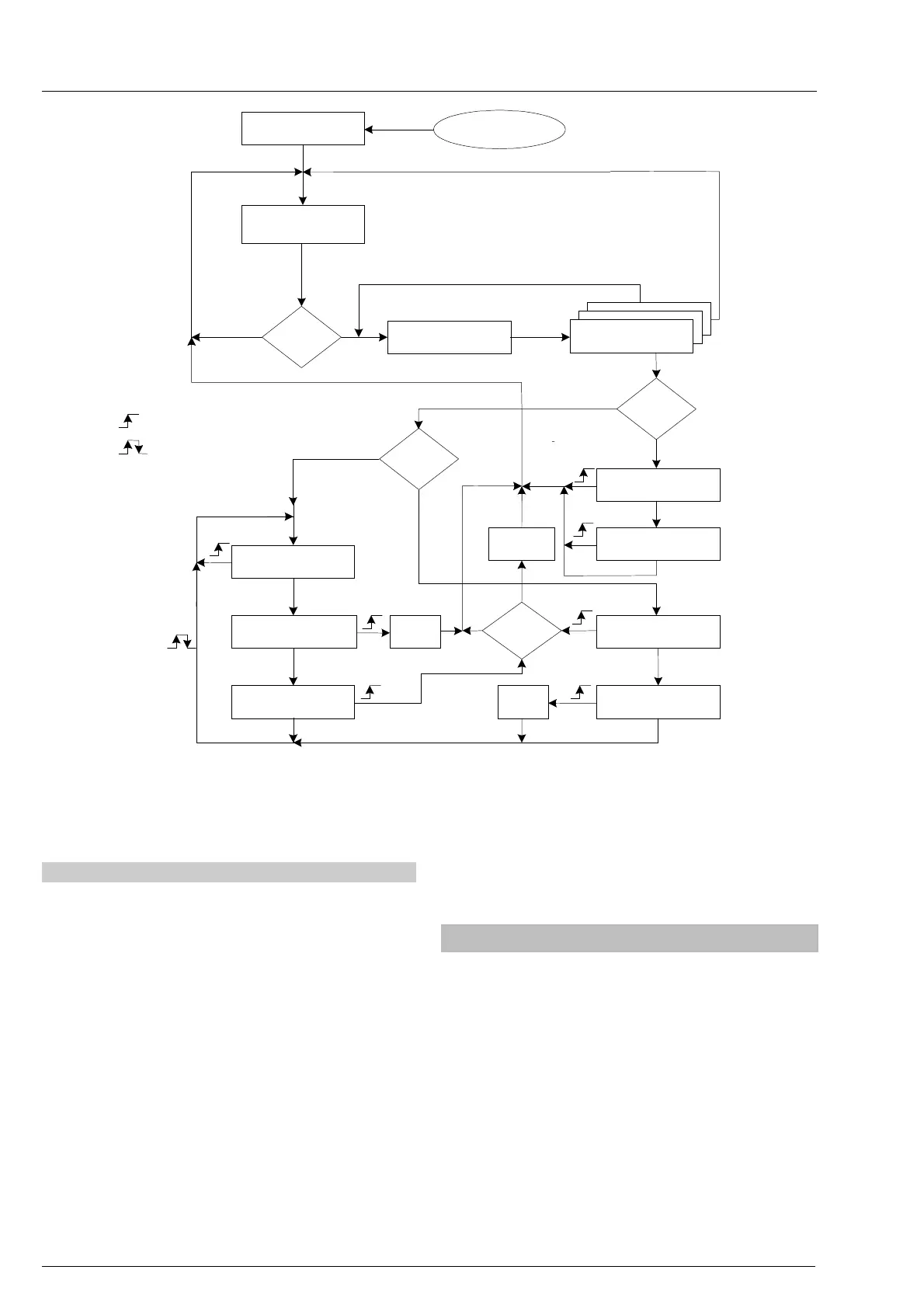
Fig. 27: Menu navigation
4.6.2. Manual meter billing reset
In order to perform manual billing reset of the meter,
so that the meter is made ready for a new billing
period, the seal of the Reset (orange) push-button lid
should be broken. The Reset push-button should be
pressed when the meter is in the Autoscroll mode.
The billing reset is not performed immediately – the
microcontroller waits until the current demand period
is completed. As long as the microcontroller waits to
execute the meter billing reset, the BR signal flag is
displayed.
In order to prevent tamper attempts of the Reset
push-button after meter billing reset, the orange
push-button is disabled for one demand period. If the
Reset push-button is pressed again in a time period
shorter than the demand period, the second meter
reset command will not be carried out.
After pressing the Reset push-button, its lid should be
closed and sealed again.
Upon request, the function of manual meter billing
reset can be disabled by software.
4.7. Communication channels
The Mx37y meters are equipped with the following
communication channels:
a. Optical port – IR communication interface
b. DLC modem (Mx371)
c. GSM/GPRS communication interface with
antenna – option (Mx372)
d. RS 485 comm. interface – option (Mx372)
e. M-Bus communication interface – option



 To Next Page