See "The Phone’s Web Interface" on page 26 on how to open the phone’s web
interface, "User Mode/Administrator Mode" on page 29 for an explanation of
administrator and user mode. See "How the Web Interface Works" on page 28
on the mechanics of navigating in the windows and changing the settings.
Any changes you make will not take effect until you press "Save". Changes
will be lost if you open another page of the web interface without first pressing
"Save".
Every phone has a limited number of hard keys. Phone users, however, have
a myriad of different priorities and preferences when asked which functions
they use most often and which functionalities they would like to access quickly.
snom has therefore designed the function keys to be programmable, even the
preprogrammed “hard keys” whose default function is printed on the casing.
And we have made it easy to customize the settings to your needs and
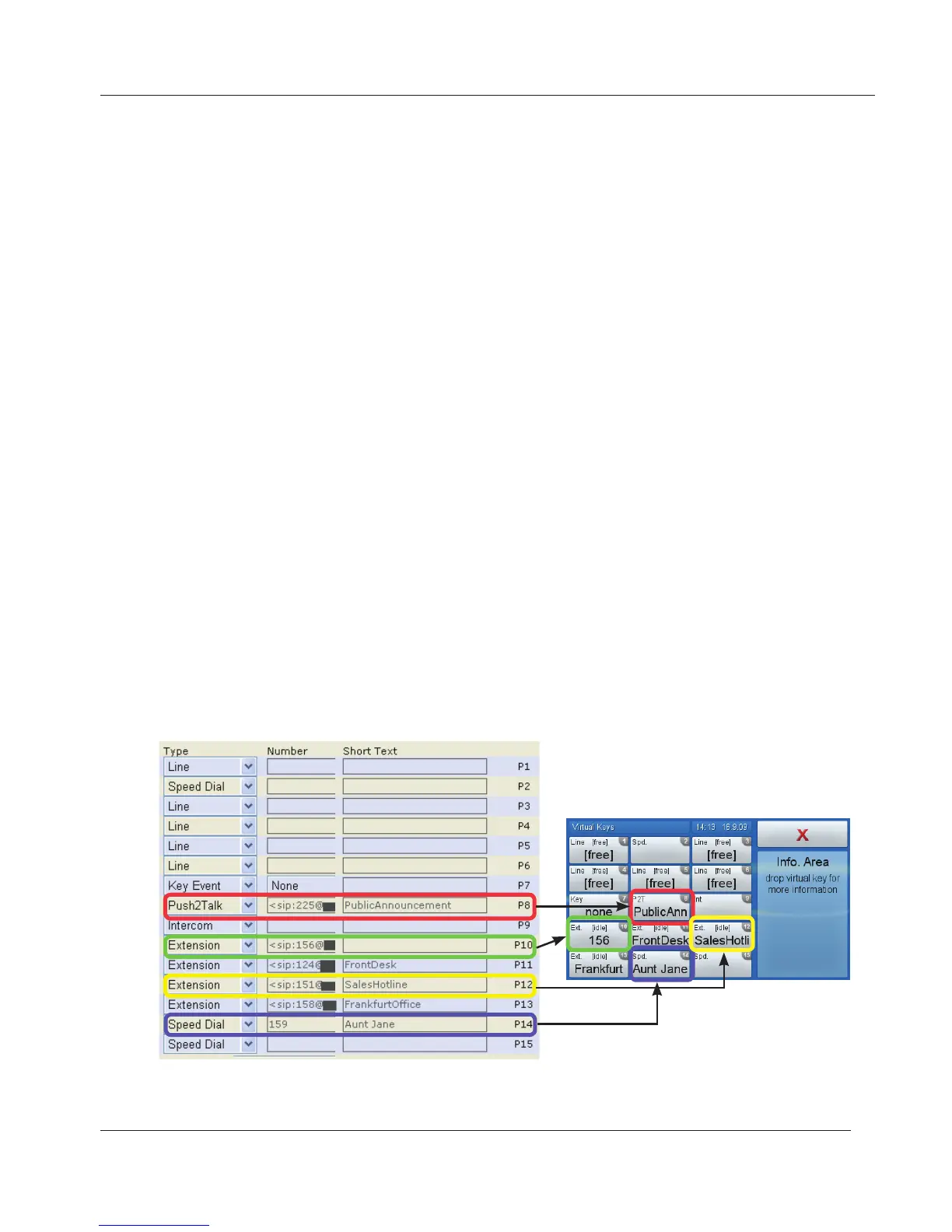
preferences as we’ll demonstrate here with programming a virtual function key
for extension monitoring/call pickup and speed dialing.
The snom 870 has 15 virtual function keys. On the phone they are called
"virtual keys" or "v.keys". The numbers in the upper right corner correspond to
the numbers on the phone's web interface > Function keys , P1 - P15 (P =
programmable).
www.InternetVoipPhone.co.uk | sales@internetvoipphone.co.uk | 0800 088 48 46



 To Next Page