9
5 Measurement Setup
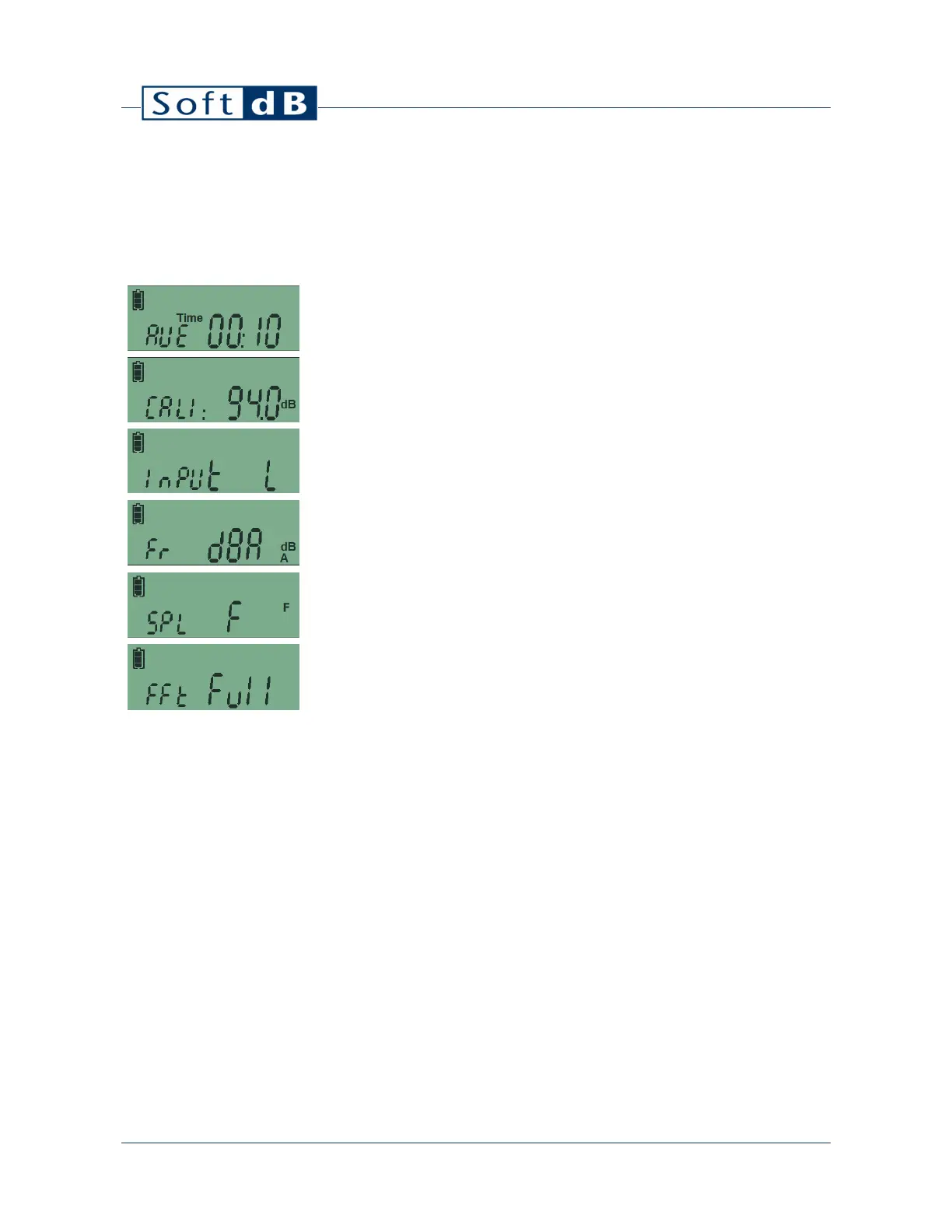
The measurement setup is accessible by performing a long-press on the left-most button. Another
long-press on the button changes the setup menu and a short-press on the button changes the
parameter value. To exit the menu, click on any of the two other buttons or wait 10s.
Record Duration : Flips through 1s, 10s, 1m, 5m, 15m and 60m. Note that these
durations can be changed using the software.
Calibration : Flips through 94 dB or 114 dB calibrator selection. A long-press on the
center button starts the calibration process. Refer to section XX for more information.
Input Range : Flips through “Low” and “High”. Refer to technical specifications for more
information on the input range.
Frequency Weighting : Flips through “A”, “C” and “Z” frequency weighting to display.
Note that “A”, “C” and “Z” global levels are always recorded regardless of this parameter.
The only exception are percentiles (LN%) which are only recorded for the selected
frequency weighting.
SPL Time Response : Flips through “Fast” and “Slow” time response for sound pressure
level exponential response.
FFT Mode : Flips through “OFF”, “Full”, “8000”, “4000”, “2000”, “1000”, and “500”. The
FFT is 400 lines and spans a full bandwidth of 17.2kHz. The bandwidth can be reduced
using the “8000” to “500” modes to achieve higher frequency resolution.


 To Next Page