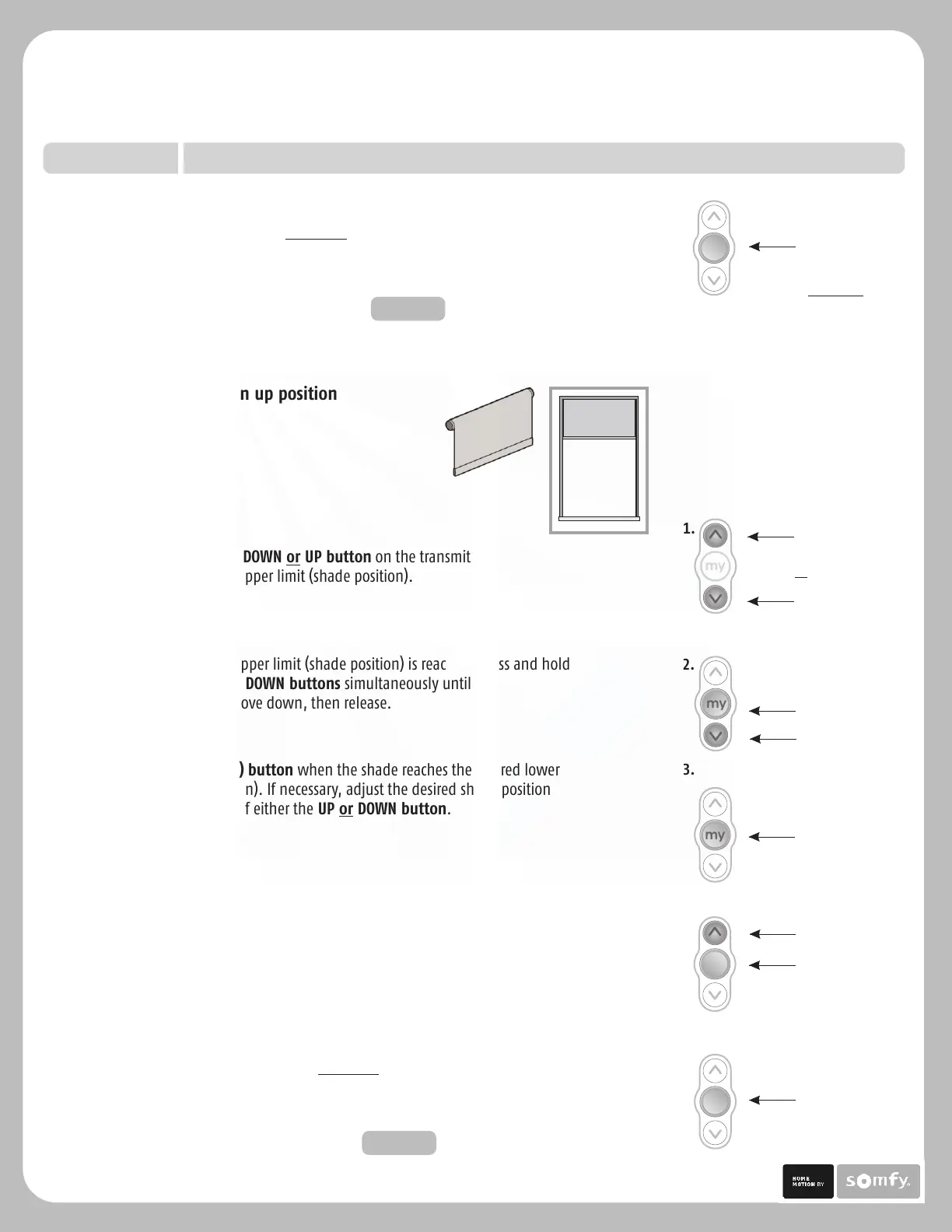
Press & hold MY (stop)
Button
my
Press & hold MY (stop)
and UP Button
4.
3.
3) Press the MY (stop) utton when the shade reaches the desired lower
limit (shade position). If necessary, adjust the desired shade position
with a brief press of either the UP or DOWN utton.
b
b
4) Once desired lower limit (shade position) is reached, press and hold
MY (stop) and UP uttons simultaneously until the shade begins to
move up, then release.
b
my
Press & hold MY (stop)
Button
5.
my
5) Once shade stops at previously set upper limit (shade position), press and
hold the MY (stop) utton for 2 seconds until the shade jogs. This confirms
both limits (shade positions).
To complete programming proceed to STEP FIVE
b
1.
2.
1) Press and hold the DOWN or UP utton on the transmitter to
reach the desired upper limit (shade position).
b
2) Once the desired upper limit (shade position) is reached, press and hold
the MY (stop) and DOWN uttons simultaneously until the
shade begins to move down, then release.
b
Press &
hold UP or
DOWN Button
my
my
Press & hold MY (stop)
and DOWN Button
my
5.
Press & hold MY (stop)
Button for 2 seconds
5) Once shade stops at previously set lower limit (shade position), press and hold
the MY (stop) utton for 2 seconds until the shade jogs. This confirms both
limits (shade positions).
To complete programming, proceed to STEP FIVE
b
Sonesse 30 Programming & Operation Instructions
TM
Starting with shade in up position
P.3
STEP FOUR
Setting Limits (Shade Positions) continued.
Solar Control, LLC | 888-550-4836





 To Next Page