4
ADVANCED CONFIGURATIONS
ADVANCED CONFIGURATIONS
System conguration
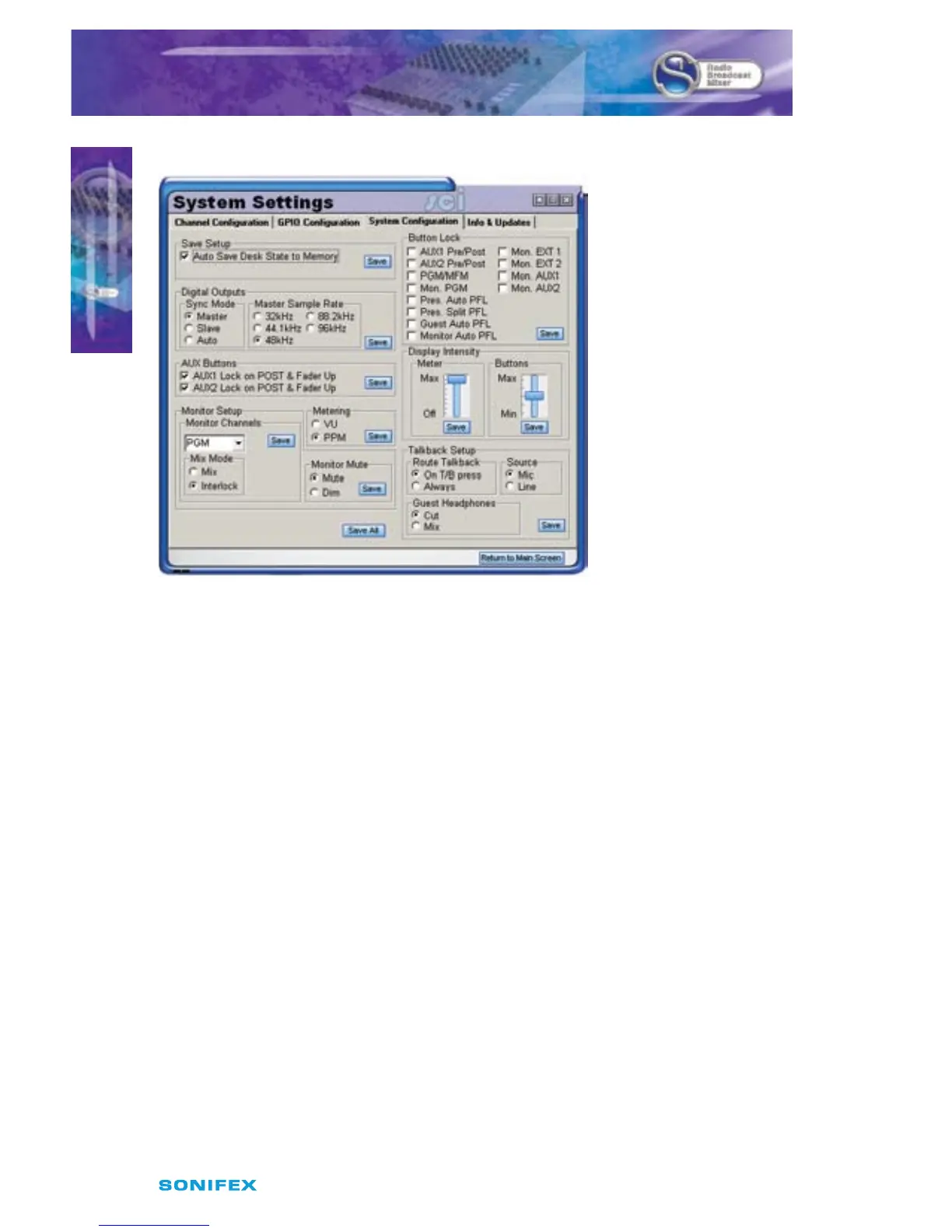
Fig 4-6: System Conguration Screen
Save Setup Box
This congures the internal memory of the S1
Auto Save Desk State to Memory:
This enables or disables the desk state tracking function within the S1. When enabled, the
state of the desk including buttons is saved every 10 seconds, unless a button is pressed
within those 10 seconds. This enables the desk to restore the state should the desk lose
power.
Digital Outputs Box
Here the Synchronisation Mode and the internal sample rate is set.
Sync Mode:
• Master: the output is always the sample rate specied by the Master Sample Rate
• Slave: the output always follows the sample rate of the Sync Input. When no Sync
signal is present, the digital output is disabled.
• Auto: The output follows the sample rate of the sync input. When no sync input is
present, the sample rate falls back to the Master sample rate.
Master Sample Rate
This is only available when in Master Mode. this allows you to set the sample rate used in
Master or when in Auto mode and the sync signal is not present.



 To Next Page