YELLOW BLUE RED GREEN
TOP MENU POP UP'MENL
0_,,0
REiN
;OUNDMODE SOUND MODI
PRESET-- REPLAY ADVANCE PRESET+
TUNING-- PLAY TUNING+
VOL TV VOL
.......
MUTING_.:I::L_ T T
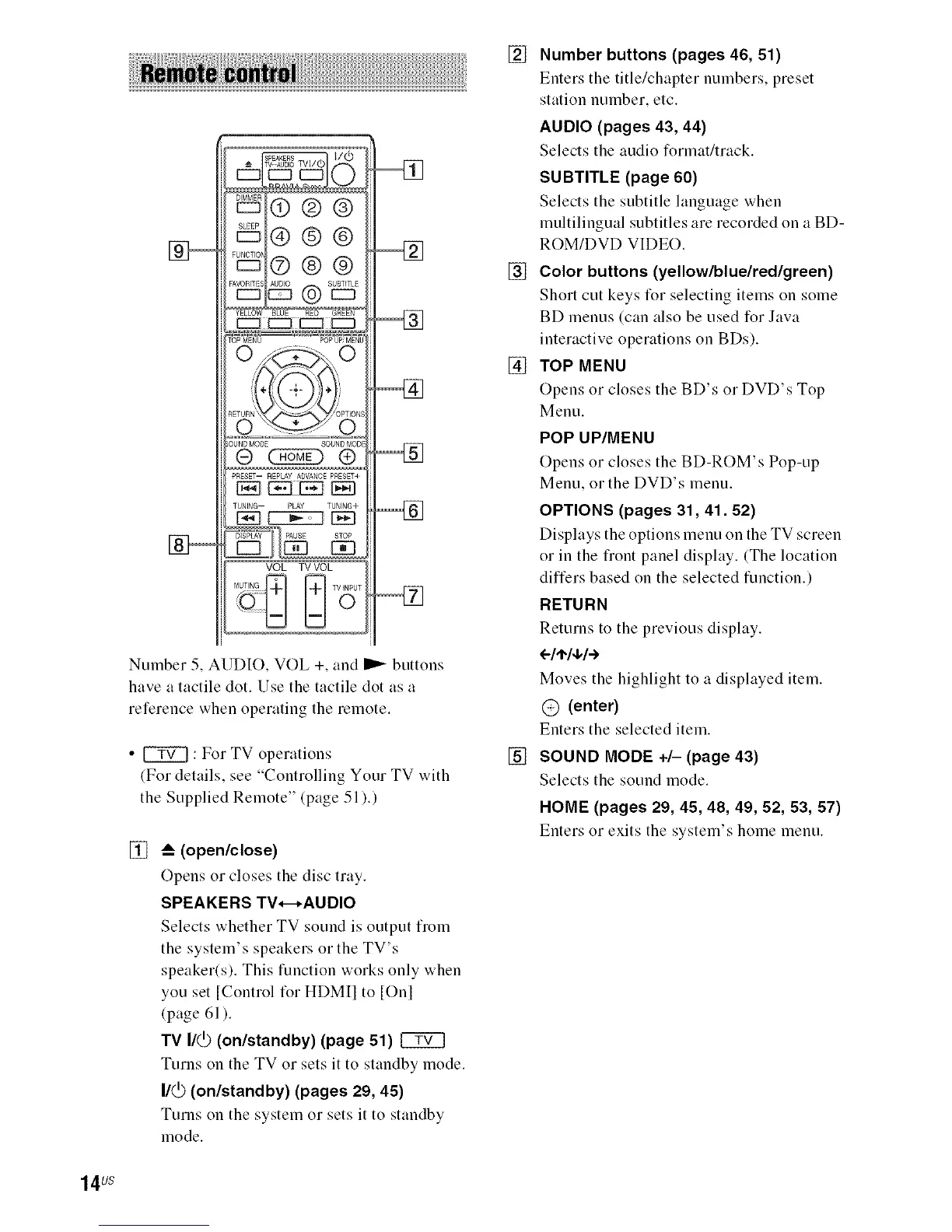
Number 5, AUDIO, VOL +, aud _ buttous
have a tactile dot. Use the tactile dot as a
reference wheu operatiug the remote.
• _ : For TV operatious
(For details, see "Coutrolliug Your TV with
the Supplied Remote" (page 51 ).)
[]
_--(open/close)
Opens or closes the disc tray.
SPEAKERS TV*-*AUDIO
Selects whether TV sound is output from
the system's speakers or the TV's
speaker(s). This function works only when
you set [Control for HDMII to [Onl
(page 61 ).
TV I/(_ (on/standby) (page 51)
Turns on the TV or sets it to standby mode.
I/_ (on/standby) (pages 29, 45)
Turns on the system or sets it to standby
mode.
[] Number buttons (pages 46, 51)
Enters the title/chapter numbers, preset
station number, etc.
AUDIO (pages 43, 44)
Selects the audio format/track.
SUBTITLE (page 60)
Selects the subtitle language when
multilingual subtitles are recorded on a BD-
ROM/DVD VIDEO.
[] Color buttons (yellow/blue/red/green)
Short cut keys for selecting items on some
BD menus (can also be used for Java
interactive operations on BDs).
[] TOP MENU
Opens or closes the BD's or DVD's Top
Menu.
POP UP/MENU
Opens or closes the BD-ROM's Pop-up
Menu, or the DVD's menu.
OPTIONS (pages 31,41.52)
Displays the options menu on the TV screen
or in the fiont panel display. (The location
differs based on the selected function.)
RETURN
Returns to the previous display.
(-/t,/+/.-)
Moves the highlight to a displayed item.
@ (enter)
Enters the selected item.
[] SOUND MODE +/- (page 43)
Selects the sound mode.
HOME (pages 29, 45, 48, 49, 52, 53, 57)
Enters or exits the system's home menu.
14 us



 To Next Page